Call CA Tally HelpDesk
+91 9205471661,
7428779101
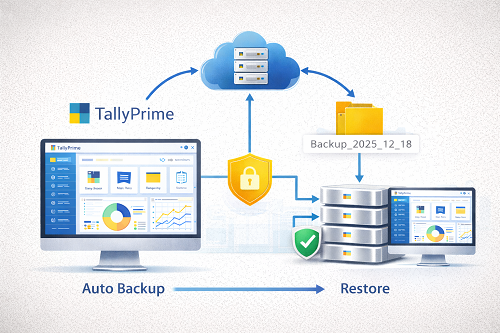
Data protection is one of the biggest headaches for businesses using accounting software. System crashes, accidental file deletion, malware attacks, and corruption risks are increasing every year. TallyPrime understands this reality very clearly, and that is why Auto-Backup is expected to be one of the strongest features inside TallyPrime 7.0.
Automatic data backup ensures that all your important accounting information is protected continuously without manual effort. It also guarantees that even if your hardware fails, your business continues running safely without data loss. In this long guide, you will learn:
- What auto-backup means in Tally
- Why TallyPrime 7.0 requires structured backup
- Expected new backup enhancements
- How to enable auto-backup
- Daily/weekly backup cycles
- Cloud and server backup concepts
- Recovery guidelines
- Security recommendations
- Pricing for Tally software
- Who needs this feature the most
Let’s begin.
Is Auto-Backup Already in Tally? And What’s New in 7.0?
TallyPrime already provides manual and scheduled backup options. However, TallyPrime 7.0 is expected to expand backups into:
- Continuous auto-backup
- Background scheduled backup
- Smart backup compression
- Encrypted auto storage
- Backup event reporting
- Remote backup management
This aligns with the stronger data performance architecture being developed for future Tally releases.
What Is Auto-Backup? (Simple Definition)
Auto-Backup means your Tally data gets saved automatically at fixed intervals without human effort.
So instead of:
- remembering backup dates,
- manually choosing folders,
- moving backup files every week,
Tally will do it automatically.
Why Backup Is Critical for Tally Users?
Because losing accounting data creates:
- GST filing delays
- Loss of transaction history
- Trial Balance mismatch
- GST returns rejection
- Invoices re-entry
- Financial penalties
- Business downtime
- Customer loss
Even a 1-day accounting loss is damaging.
Expected Auto-Backup Workflow in TallyPrime 7.0
Although 7.0 is not officially released yet, feature direction is clear:
1️⃣ Automatic Scheduled Time Backup
Choose:
System backs up without user intervention.
2️⃣ Multi-Backup Folder Support
Businesses will store backup in:
- local drive
- server folder
- USB folder
- external NAS
- cloud drive
3️⃣ Encrypted Data Copies
Backups will be secure using data encoding.
4️⃣ Roll-Based Restore Points
You may restore backup from:
- last hour
- last day
- last month
depending on availability.
5️⃣ Backup Notifications
If backup fails, user will get alert:
- pop-up notification
- email trigger
- dashboard warning
How Auto-Backup Will Work Inside Tally (Expected Steps)
Step 1: Go to Backup Settings
Gateway → Settings → Data Management → Auto-Backup
Step 2: Select Backup Location
Choose main folder:
- D:\TallyPrimeBackup7.0
- network path
- cloud bucket
Step 3: Set Backup Frequency
Recommended settings:
- Daily for accounting companies
- Hourly for POS shops
- Weekly for manufacturing firms
Step 4: Enable Automatic Restore Folder Storage
Tally will store backup batches with timestamps.
Step 5: Save & Activate
After saving, Tally works silently in the background.
Auto-Backup Storage Size Management
Businesses worry about space usage.
Tally 7.0 may include:
- auto delete old backups
- compression
- duplicate removal
- date range purge tool
This ensures storage costs remain low.
Benefits of Auto-Backup in TallyPrime 7.0
✔ Zero manual effort
No staff involvement = fewer mistakes.
✔ Peace of mind
Your critical accounting data stays safe.
✔ Fast recovery
Restore in minutes after failure.
✔ Protected against ransomware
If original data is encrypted by hackers, restore backup.
✔ Better compliance
Auditors prefer backup records.
✔ Backup history preserved
You can store 30–90–365 day backup cycles.
Who Needs Auto-Backup the Most?
Every business needs backup, but especially:
- GST heavy organisations
- Large data volume companies
- Retail POS billing
- Factories
- Jewellery traders
- E-commerce operations
- Multi-branch business
- CA firms with client data
Auto-Backup vs Manual Backup – Business Comparison
|
Feature
|
Auto-Backup
|
Manual Backup
|
|
Human involvement
|
No
|
Yes
|
|
Backup frequency
|
Continuous
|
Random
|
|
Chance of error
|
Very low
|
Very high
|
|
Speed
|
Instant background
|
Slow
|
|
Cost
|
Included
|
Labour charge
|
|
Security
|
High
|
Depends on user
|
How to Restore Backup in Tally (Basic Method)
If data is lost:
Gateway → Data → Restore → Select folder
Choose:
- Company
- Backup date
- Location
Restore will import full dataset.
Cloud Auto-Backup – Future in Tally
TallyPrime is moving towards cloud design:
Auto backup may soon link to:
- Microsoft OneDrive
- Google Drive
- Amazon S3
- Private cloud servers
This will give across-branch access as well.
Security Notes
Auto-backup works only if:
- Device storage is safe
- Folder is accessible
- User rights are controlled
So use:
- access permissions
- user security
- antivirus scanning
Backup Folder Naming Convention Example
TP7_Backup_2025_12_18_09AM
TP7_Backup_2025_12_18_03PM
TP7_Backup_2025_12_18_09PM
This avoids confusion.
What If Auto-Backup Fails? (Troubleshooting)
Check:
1️⃣ Disk full
2️⃣ Permissions blocked
3️⃣ Backup folder moved
4️⃣ Antivirus deleted file
5️⃣ Drive letter changed
Auto-Backup Use Case Examples
Retail store
Bills generated every 5 minutes → backup hourly.
CA Firm
Lot of data per day → backup 3 times daily.
Jewellery Shop
High gold rate entries → backup hourly.
Factory
Bulk entries weekly → weekly lockdown backup.
Why Auto-Backup Will Transform TallyPrime 7.0 Users
Because it reduces:
- human stress
- accidental loss
- ransomware risk
- staff dependency
- database damage
and brings:
- futureproof accounting
- automatic recovery confidence
- business continuity
Conclusion
Auto-Backup will be one of the most powerful and business-saving features inside TallyPrime 7.0. It gives businesses assured protection, zero-effort backup discipline, long-term storage strategy and fast recovery.
Data is the future asset—TallyPrime 7.0 auto-backup ensures that your accounting foundation stays safe every day.
Powered by Binarysoft Technologies
Authorized Tally Partner
Location : 1626/33, 1st Floor, Naiwalan, Karol Bagh, New Delhi – 110005, INDIA
Contact us : +91 7428779101, 9205471661, 8368262875
Email us : tally@binarysoft.com (10:00 AM – 6:00 PM, Mon–Fri)
Frequently Asked Questions
Will Auto-Backup be free inside TallyPrime 7.0?
Yes, it will be part of native build.
Will it slow down computer speed?
No, backup runs in silent mode.
Can backup be scheduled offline?
Yes, using local drives.
Will cloud integration be included?
Possibly through TSS future releases.
CA. Rishubh Talrejaa specializes in GST, business accounting, and compliance advisory for growing enterprises. With experience in handling real-time transactional data and audits, he writes practical insights on inventory control, taxation, and digital transformation for Indian businesses operating in competitive markets.









