Call CA Tally HelpDesk
+91 9205471661,
7428779101
In 2026, e-Invoicing under GST has become stricter, faster, and completely system-driven. Businesses can no longer afford even small mistakes in invoices because once an Invoice Reference Number (IRN) is generated, it is directly recorded in government systems. The biggest change in recent months is tighter validation, real-time syncing, and strict timelines—especially the 24-hour cancellation window. Missing this window means you cannot cancel the e-invoice and must issue a credit note instead, which complicates compliance and reporting. Many businesses are now facing penalties, reconciliation issues, and GST mismatches due to incorrect e-invoice handling. Understanding how to properly cancel an e-invoice in TallyPrime is now critical to avoid financial loss, maintain compliance, and ensure smooth business operations.
A Real Story: One Invoice Mistake That Led to Compliance Trouble
Amit, a distributor in Delhi, generated an e-invoice for a bulk order. Later, he realized the GST number entered was incorrect. He thought he could simply edit the invoice later.
But by the time he checked, the 24-hour cancellation window had passed.
Now, he had to issue a credit note, adjust GST returns, and explain discrepancies during reconciliation. It delayed payments and created confusion with his client.
Since then, Amit ensures every e-invoice is verified before generation—and if any mistake occurs, he cancels it immediately within the allowed time.
This situation is common, and the only way to avoid it is to understand the correct cancellation process in TallyPrime.
What is e-Invoice Cancellation in TallyPrime?
e-Invoice cancellation means invalidating an already generated IRN (Invoice Reference Number) on the GST portal through TallyPrime due to errors such as:
- Wrong GSTIN
- Incorrect invoice value
- Wrong item details
- Duplicate invoice generation
Once cancelled, the IRN becomes invalid and cannot be reused.
Important Rules for e-Invoice Cancellation
- Cancellation must be done within 24 hours of IRN generation
- Partial cancellation is not allowed
- After 24 hours, only credit note option is available
- Cancelled IRN cannot be reactivated
- Cancellation must be reported to the GST portal via Tally
Prerequisites Before Cancelling e-Invoice
- e-Invoice must be generated successfully
- TallyPrime must be connected to e-Invoice portal
- User must have proper authorization
- Internet connection must be active
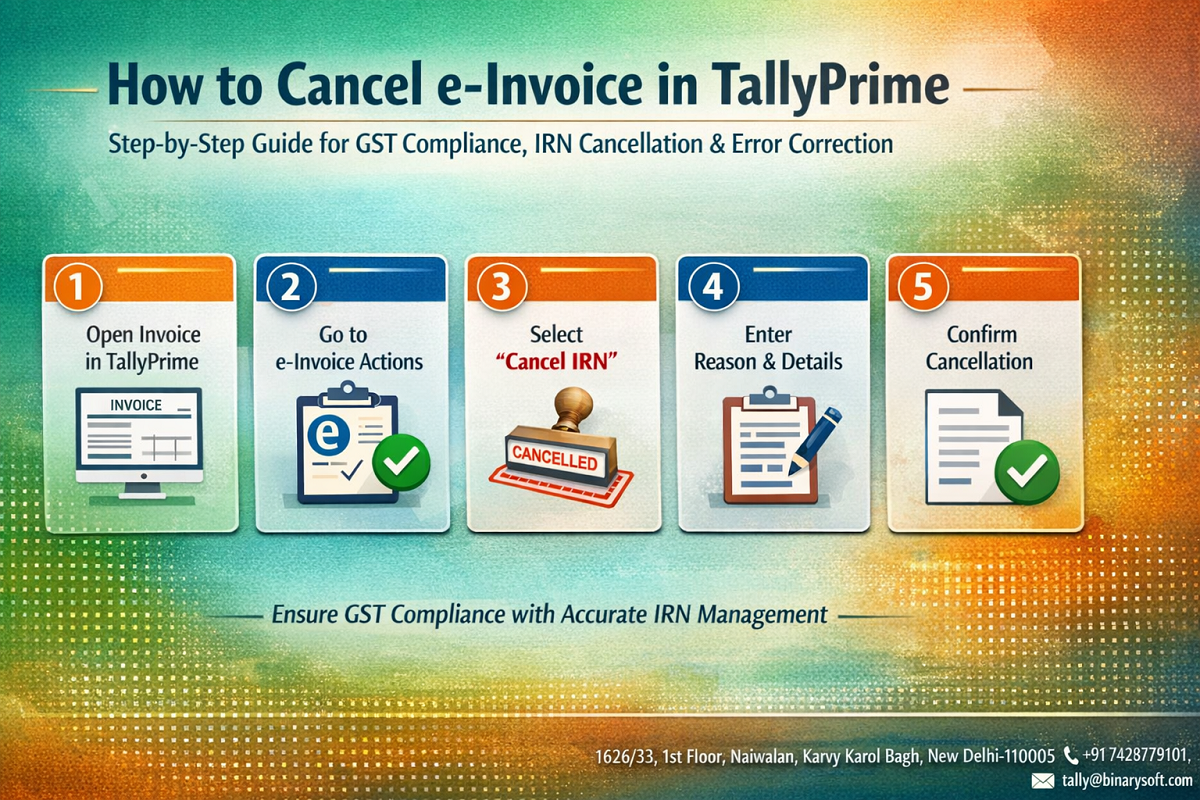
How to Cancel e-Invoice in TallyPrime – Step-by-Step
Step 1: Open TallyPrime
Launch TallyPrime and go to the Gateway of Tally.
Step 2: Go to Sales Register
- Navigate to Display > Account Books > Sales Register
- Select the invoice for which IRN was generated
Step 3: Open the Invoice
- Press Enter on the selected invoice
- Verify the invoice details
Step 4: Access e-Invoice Options
- Press Alt + Z (Exchange)
- Select Cancel e-Invoice
Step 5: Provide Cancellation Reason
- Choose reason such as:
- Data Entry Error
- Duplicate Invoice
- Order Cancelled
- Others
Step 6: Confirm Cancellation
- Press Enter to confirm
- Tally will send cancellation request to GST portal
- IRN will be cancelled successfully
How to Check e-Invoice Cancellation Status
- Open the same invoice
- Check e-Invoice details section
- Status will show as Cancelled
- IRN and QR code will no longer be valid
Common Mistakes to Avoid
- Waiting beyond 24 hours to cancel
- Editing invoice instead of cancelling
- Not checking invoice before IRN generation
- Ignoring GST validation errors
- Not syncing Tally with GST portal
What to Do After 24 Hours?
If 24 hours have passed:
- You cannot cancel the e-invoice
- You must issue a Credit Note
- Adjust GST returns accordingly
- Maintain proper documentation
Best Practices for e-Invoice Management
- Always verify invoice before IRN generation
- Train staff for GST compliance
- Maintain real-time monitoring
- Use proper item masters and GST settings
- Keep system updated with latest Tally version
Benefits of Proper e-Invoice Cancellation
- Avoid GST penalties
- Maintain accurate records
- Smooth reconciliation
- Better client trust
- Error-free compliance
Contact Details
Powered by Binarysoft Technologies – Authorized Tally Partner
1626/33, 1st Floor, Naiwalan, Karol Bagh,
New Delhi – 110005, INDIA
Contact Us:
+91 7428779101
+91 9205471661
Email:
tally@binarysoft.com
Working Hours:
10:00 AM – 6:00 PM (Mon–Fri)
Conclusion
In today’s GST-driven environment, e-invoicing is not just a compliance requirement—it is a critical part of your business operations. A single mistake can create multiple issues if not corrected within the allowed time.
TallyPrime provides a simple and efficient way to cancel e-invoices, but timing and accuracy are key. By following the correct step-by-step process and understanding the rules, you can avoid penalties, maintain clean records, and ensure smooth GST compliance.
Act quickly, verify carefully, and manage your e-invoices smartly to keep your business safe and compliant.
Frequently Asked Questions
What is the time limit to cancel an e-invoice?
You can cancel an e-invoice within 24 hours of IRN generation.
Can I edit an e-invoice after IRN generation?
No, you cannot edit it. You must cancel it and create a new invoice.
What happens if I miss the 24-hour cancellation window?
You will need to issue a credit note instead of cancellation.
Is internet required to cancel e-invoice in TallyPrime?
Yes, an active internet connection is required to communicate with GST portal.
CA. Shivesh Khandelwaal is a practicing Chartered Accountant experienced in accounting automation, compliance management, and audit support. He has worked with trading and distribution businesses to improve inventory visibility and financial reporting. His articles focus on real-world applicability.