Call CA Tally HelpDesk
+91 9205471661,
7428779101
Introduction: Mistakes Happen — Panic Shouldn’t
Even the most careful businesses make mistakes.
A wrong party selected.
Incorrect invoice value.
Duplicate entry.
Wrong GSTIN.
With e-Invoicing, these mistakes can feel scarier than before, because once an IRN is generated, businesses worry:
“Have I permanently messed this up?”
The answer is reassuring.
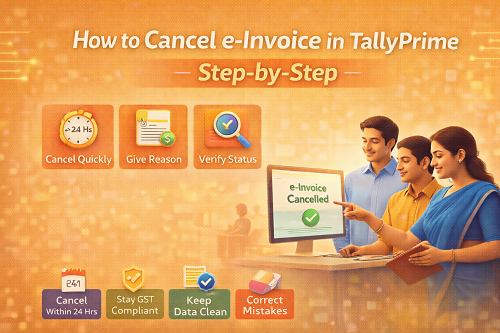
If handled correctly and on time, e-Invoices can be cancelled safely and legally using TallyPrime.
This guide walks you through the step-by-step process to cancel an e-Invoice in TallyPrime, explains why each step matters, and removes the anxiety that often surrounds e-Invoice compliance.
1. First, Understand What e-Invoice Cancellation Really Means
Before doing anything, clarity is critical.
Cancelling an e-Invoice means:
- Cancelling the IRN (Invoice Reference Number) on the GST e-Invoice portal
- Not just deleting the voucher in Tally
- Ensuring the cancellation is legally recorded with GST authorities
This understanding alone removes half the confusion.
When you know what you are cancelling, confidence replaces fear.
2. The Most Important Rule: Time Limit for Cancellation
The single most important rule in e-Invoice cancellation is time.
An e-Invoice can be cancelled within 24 hours of IRN generation.
If this window is missed:
- Cancellation is not allowed on the portal
- Alternative compliance steps are required
- Stress levels increase significantly
That’s why early detection of mistakes is your biggest advantage.
Speed equals control — and control feels empowering.
3. Step One: Identify the Invoice That Needs Cancellation
The process always begins with clarity.
You must confirm:
- Which invoice has the incorrect details
- Whether IRN is already generated
- Whether it is within the 24-hour window
This pause for verification prevents accidental cancellations.
Calm verification is always better than rushed action.
4. Step Two: Open the Correct Sales Voucher in TallyPrime
Once identified:
- Open the exact sales voucher
- Ensure you are working on the IRN-generated invoice
- Double-check invoice number, date, and party
This step creates certainty.
You’re not guessing.
You’re acting with confirmation.
That certainty reduces mental load immediately.
5. Step Three: Initiate e-Invoice Cancellation from TallyPrime
TallyPrime allows cancellation to be initiated directly from the voucher, ensuring:
- Proper communication with the e-Invoice portal
- Automatic status update
- Clean audit trail
At this stage, TallyPrime guides the process logically.
You don’t need technical knowledge.
You just need attentiveness.
Guided steps feel safe — and safety builds confidence.
6. Step Four: Provide the Reason for Cancellation
GST rules require a valid reason for cancellation.
Common reasons include:
- Data entry mistake
- Wrong party selected
- Duplicate invoice
- Incorrect taxable value
Providing a clear reason ensures:
- Transparency
- Compliance
- Future audit clarity
This step protects you later — even if no one asks today.
Preparedness always feels rewarding.
7. Step Five: Confirm and Complete Cancellation
Once confirmed:
- TallyPrime sends cancellation request
- IRN gets cancelled on the portal
- Cancellation acknowledgment is received
This is the moment of relief.
You’ll feel:
“It’s done. I’m safe. I handled it correctly.”
That emotional release — from tension to relief — is a strong dopamine moment.
8. Step Six: Verify Cancellation Status
Never assume — always verify.
After cancellation:
- Check IRN status
- Ensure invoice shows cancelled
- Confirm it won’t be reported in GST returns
Verification closes the loop.
Open loops create anxiety.
Closed loops create calm.
9. What Happens to the Sales Voucher After Cancellation?
Important clarity here:
- Cancelling e-Invoice does not automatically delete the voucher
- The voucher remains for correction or replacement
- You can now:
- Correct details
- Generate a fresh e-Invoice
- Maintain continuity
This flexibility prevents panic and supports proper accounting discipline.
10. Common Mistakes Businesses Should Avoid
Avoid these errors:
- Cancelling voucher without cancelling IRN
- Missing the 24-hour window
- Deleting invoices instead of correcting them
- Ignoring verification after cancellation
Avoiding mistakes feels even better than fixing them later.
11. What If the 24-Hour Window Is Missed?
If cancellation is not possible:
- Credit note and fresh invoice may be required
- GST return adjustments become necessary
- Extra compliance effort is involved
This reinforces one truth:
Early action saves effort.
Awareness today prevents stress tomorrow.
12. Why TallyPrime Makes e-Invoice Cancellation Less Stressful
TallyPrime’s biggest strength is clarity.
It:
- Guides the cancellation process
- Keeps records organized
- Reduces manual errors
- Maintains audit-ready data
When software supports compliance logically, users feel confident — not overwhelmed.
Conclusion: Correcting Mistakes Is Part of Compliance, Not Failure
e-Invoice cancellation is not a problem.
Ignoring it is.
When done correctly in TallyPrime:
- Compliance stays intact
- Data remains clean
- Stress stays low
- Confidence stays high
Mistakes don’t damage businesses.
Unmanaged mistakes do.
With the right process, you stay in control — calmly and confidently.
Powered by Binarysoft Technologies
Authorized Tally Partner
Location : 1626/33, 1st Floor, Naiwalan, Karol Bagh, New Delhi – 110005, INDIA
Contact us : +91 7428779101, 9205471661, 8368262875
Email us : tally@binarysoft.com (10:00 AM – 6:00 PM, Mon–Fri)
Frequently Asked Questions
Can an e-Invoice be cancelled in TallyPrime?
Yes. If done within 24 hours of IRN generation, cancellation can be completed properly.
What is the time limit for cancelling an e-Invoice?
An e-Invoice can be cancelled within 24 hours of IRN generation.
Does cancelling an e-Invoice delete the sales voucher?
No. The voucher remains and can be corrected or replaced.
What if I miss the 24-hour cancellation window?
You may need to issue a credit note and follow alternative GST compliance steps.
CA. Arvindh Khetwaani is a Chartered Accountant with experience in financial reporting, compliance management, and accounting software implementation. He has assisted businesses in adopting structured inventory and billing practices, and his articles focus on accuracy, controls, and sustainable business growth.