Call CA Tally HelpDesk
+91 9205471661,
7428779101
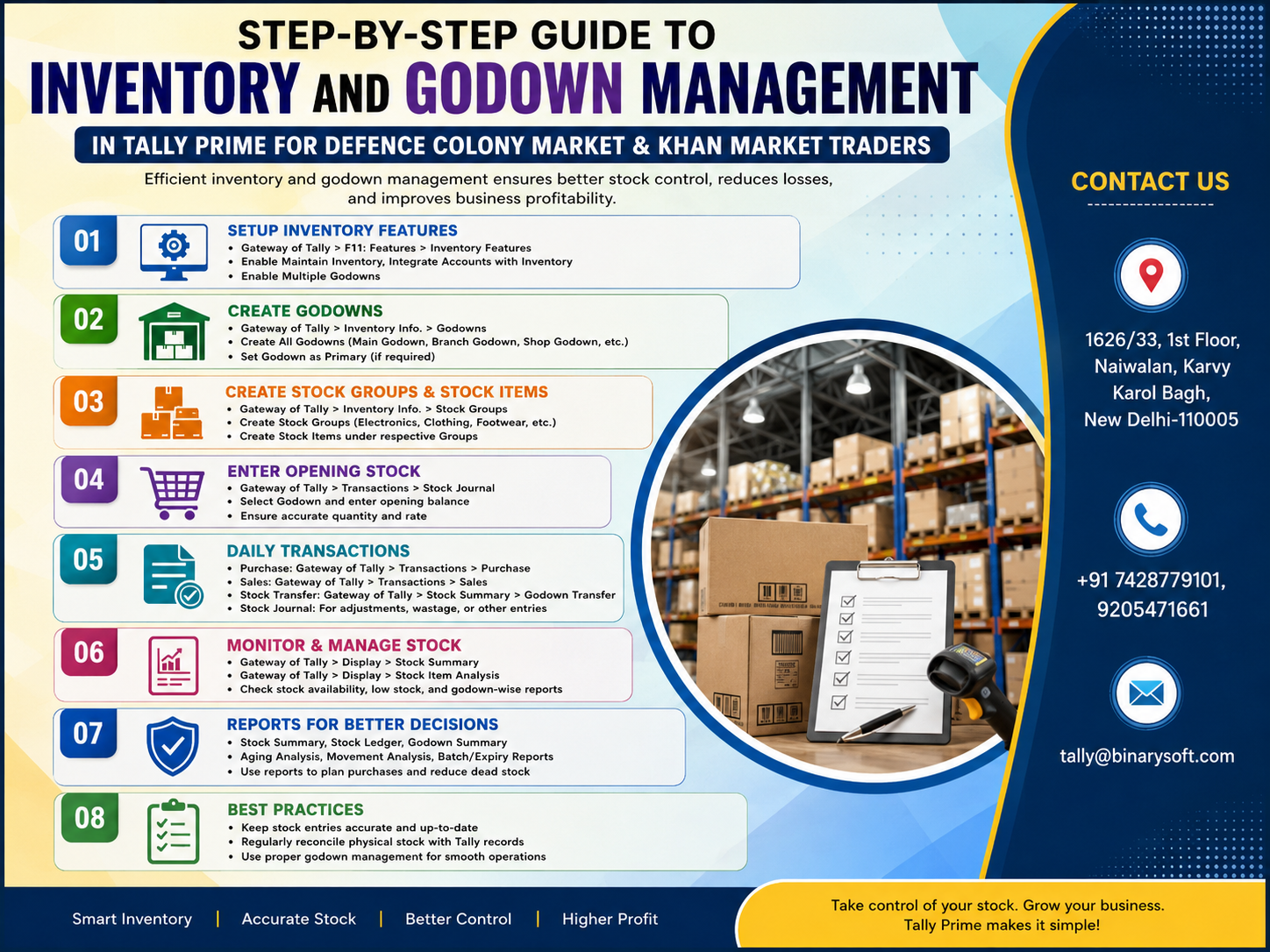
Inventory Control Has Become More Important for Delhi Traders in 2026
In 2026, traders in Defence Colony Market and Khan Market are managing a faster, more demanding retail environment where customers expect immediate product availability, accurate billing, quick service, and reliable delivery commitments. At the same time, businesses may hold stock across shops, back offices, warehouses, godowns, or multiple storage locations, making manual inventory tracking increasingly difficult. In recent months, the pressure to control working capital, avoid excess purchasing, identify slow-moving goods, and maintain accurate GST-ready business records has made inventory visibility even more valuable. A product showing as "available" in records is not enough if employees cannot identify where it is physically stored. TallyPrime's inventory and godown management capabilities can help traders organize stock by item and location, record transfers, monitor quantities, and connect inventory movements with business transactions. The result is better stock visibility, faster decisions, fewer avoidable shortages, and stronger control over money invested in inventory.
Understanding Inventory Management in TallyPrime
Inventory management is the process of recording, organizing, monitoring, and controlling the goods a business purchases, stores, transfers, and sells.
For traders in Defence Colony Market and Khan Market, inventory can represent a significant portion of business investment.
Every item sitting on a shelf or inside a godown represents money.
If that stock sells quickly at a healthy margin, it supports cash flow.
If it remains unsold for months, the same inventory can block working capital.
TallyPrime provides inventory management capabilities that can help businesses maintain structured information about stock items, quantities, units, locations, purchases, sales, and other inventory movements.
When configured according to the business's actual workflow, this gives traders greater visibility into what they own and where that inventory is located.
What Is Godown Management in TallyPrime?
A godown in TallyPrime represents a storage location used to organize inventory.
Depending on the business structure, a godown could represent:
- Main warehouse
- Shop floor
- Back-office storage
- Basement stock
- Branch
- Distribution point
- Temporary storage area
- Product-specific storage location
A trader does not necessarily need a large physical warehouse before godown management becomes useful.
For example, a Khan Market retailer may have a showroom and a separate back-storage area.
A Defence Colony trader may keep some stock at the main shop and additional inventory at another storage location.
By representing these locations separately in TallyPrime, the business can gain better visibility into location-wise inventory.
Why Location-Wise Inventory Matters
Suppose your records show that you have 25 units of a particular product.
A customer wants five units immediately.
The employee checks the shop and finds only two.
Where are the remaining 23?
Are they in the warehouse?
Were they transferred to another location?
Were some already sold but not correctly recorded?
Were they damaged?
Without location-wise stock information, the total quantity may not provide enough operational information.
Godown management addresses this problem by helping businesses understand both:
"What stock do we have?"
and
"Where is that stock?"
A Story from a Busy Market Day
It was a Saturday afternoon at a retail business near Khan Market.
The store was busy.
A regular customer walked in looking for a premium product he had purchased before. He needed six units for an event that evening.
The salesperson checked the shelf.
Only two were available.
Someone remembered seeing another carton in the back room.
Another employee thought the remaining stock had been moved to a separate storage location earlier that week.
The owner checked his records.
The system showed eight units in total.
That should have been enough.
But nobody could confidently say where the other six units were.
For the next fifteen minutes, three employees searched boxes, called another staff member, and checked old transfer notes.
The customer waited.
Finally, he looked at his watch and said he would try another store.
That sentence hurt more than the value of the immediate sale.
This was a customer who had been visiting for years.
That evening, the owner realized the problem was not that he had run out of stock.
He had the stock.
He had simply lost visibility of it.
After reorganizing inventory around clearly defined storage locations and consistently recording transfers, the situation changed. Employees could check not only whether an item was available but also where it was stored.
The owner learned an important lesson:
Inventory you cannot locate at the moment a customer wants it can be almost as costly as inventory you do not have.
Step 1: Review Your Existing Inventory Structure
Before configuring TallyPrime, understand how inventory actually moves through your business.
Do not start by creating dozens of godowns simply because the software allows it.
First identify your real locations.
For example:
Main Shop
Main Godown
Back Store
Second Floor Storage
Branch Store
A smaller business might need only:
Shop Floor
Godown
The objective is to make inventory easier to understand, not to create unnecessary complexity.
Step 2: Enable Inventory-Related Features as Required
Your company configuration should support the inventory features required for your workflow.
Businesses should review their TallyPrime configuration and ensure the appropriate inventory functionality is available for their requirements.
The exact menus and options can vary depending on the TallyPrime release and configuration being used.
Before making major changes to an existing company, businesses should also maintain an appropriate backup.
Step 3: Create Stock Groups
Stock Groups help organize similar inventory items.
Imagine a trader dealing in fashion and lifestyle products.
Instead of maintaining hundreds of unrelated item names in one long list, products can be grouped logically.
For example:
Men's Wear
Women's Wear
Accessories
Footwear
Premium Collection
A grocery or food-related trader might use:
Packaged Foods
Beverages
Personal Care
Household Products
An electronics trader might use:
Mobile Phones
Accessories
Audio Products
Computer Accessories
Networking Products
Good stock grouping makes inventory reports easier to understand.
Step 4: Create Units of Measure
Different products are purchased and sold in different units.
Examples include:
Nos
Pcs
Kg
Litre
Box
Packet
Metre
Set
The unit selected should reflect the actual way the product is purchased, stocked, and sold.
Incorrect units can create confusion in quantity reports, so businesses should define them carefully.
Step 5: Create Stock Items
A Stock Item represents an individual product maintained in inventory.
For example:
Premium Cotton Shirt – Blue – Large
Leather Wallet – Brown
LED Desk Lamp – Model A
Wireless Keyboard – Model X
Each stock item should be created with a clear and consistent naming convention.
This becomes particularly important when businesses have hundreds or thousands of products.
Avoid creating names that employees cannot distinguish easily.
For example, names such as:
"Shirt New"
"Shirt Latest"
"Shirt New 2"
may become confusing later.
A more structured naming system based on product, model, size, color, or another meaningful attribute can improve usability.
Step 6: Create Godowns or Storage Locations
Once inventory masters are organized, businesses can define their storage locations.
For example:
Main Shop – Defence Colony
Main Godown
Back Storage
Secondary Warehouse
Or:
Khan Market Showroom
Warehouse
Reserved Stock
The names should match terminology employees already understand.
If staff members call a location "Basement Store," using the same recognizable name in the software may be better than creating an unfamiliar technical label.
Step 7: Allocate Opening Stock Correctly
Businesses migrating from manual records or another system need to ensure that opening stock is properly allocated.
Suppose you have 100 units of Product A.
The physical distribution might be:
Shop: 25 units
Main Godown: 60 units
Back Store: 15 units
Simply recording 100 units without considering location can defeat the purpose of godown management.
Opening quantities should reflect actual physical inventory as accurately as possible.
A physical stock verification before implementation can be valuable.
Step 8: Record Purchases Properly
When goods are purchased, they should be recorded against the appropriate stock items and location based on the business workflow.
For example, if 200 units arrive directly at the main godown, the transaction should reflect the actual receipt of inventory.
Accurate purchase recording helps update stock quantities and creates a clearer connection between purchases, inventory, suppliers, taxes, and accounts.
Step 9: Record Sales Consistently
When goods are sold, inventory records need to reflect the movement.
If a product is sold from the showroom, the relevant stock should reduce according to the configured workflow.
Consistent transaction recording is essential.
Even the best inventory software cannot provide reliable information if employees frequently move or sell goods without recording those movements.
Step 10: Transfer Stock Between Godowns
This is one of the most important aspects of multi-location inventory management.
Suppose your main godown has 100 units.
You transfer 20 units to the shop.
The business should record this stock movement rather than simply carrying the products physically from one place to another.
After the transfer, the records should reflect the changed location-wise quantities.
This provides a digital trail of inventory movement.
Depending on the workflow and configuration, appropriate inventory vouchers such as Stock Journal can be used for stock transfers between locations.
Why Stock Transfers Must Be Recorded
Many inventory differences originate from unrecorded internal movement.
An employee takes five cartons from the godown to the shop.
Nobody records it.
Later, the shop counts five extra cartons while the godown has five fewer.
The overall company stock may appear correct, but location-wise stock becomes unreliable.
After several weeks of similar movements, employees stop trusting the software.
This is why operational discipline is just as important as software configuration.
Every meaningful inventory movement should follow an established process.
Step 11: Check Godown-Wise Stock Reports
Once transactions are being recorded correctly, businesses can use inventory reports to review stock across locations.
These reports can help management understand:
- Total stock quantity
- Location-wise stock
- Item-wise quantities
- Stock values
- Inventory movements
- Availability at different storage locations
This can make daily decision-making faster.
Step 12: Monitor Fast-Moving Products
Fast-moving products are items that sell frequently.
These products require close monitoring because running out of them can lead to lost sales.
For a trader in Khan Market, a popular premium accessory might sell consistently.
For a Defence Colony retailer, a frequently purchased household or lifestyle product may need regular replenishment.
Sales and inventory reports can help identify these patterns.
Step 13: Identify Slow-Moving Inventory
Slow-moving products create a different problem.
They occupy physical space and block working capital.
Suppose a business purchases 100 units of a product because it expects strong demand.
Six months later, 70 units remain.
That inventory represents money that could potentially have been invested elsewhere.
Regular inventory analysis helps owners identify products that may require:
- Reduced future purchasing
- Promotional activity
- Repricing
- Bundling
- Clearance strategies
Business decisions should be based on the specific commercial situation and margins involved.
Step 14: Set Reorder Planning Where Appropriate
For frequently sold products, businesses need to know when replenishment should begin.
Waiting until quantity reaches zero may be too late.
If a supplier takes several days to deliver, purchasing decisions need to happen earlier.
Appropriate inventory planning can help businesses monitor stock levels and make more timely replenishment decisions.
Step 15: Perform Physical Stock Verification
Software quantity should periodically be compared with actual physical inventory.
Differences can occur because of:
- Incorrect entries
- Unrecorded transfers
- Damaged products
- Returns
- Wrong quantities
- Human error
- Operational losses
Physical verification helps identify these discrepancies.
Businesses should investigate significant differences instead of simply adjusting them without understanding the cause.
Step 16: Manage Damaged or Unsellable Stock
Not every product in a warehouse is necessarily sellable.
Goods may become:
- Damaged
- Expired
- Broken
- Obsolete
- Returned
- Defective
These situations should be handled through an appropriate documented process so that available inventory does not misleadingly include goods that cannot actually be sold.
Step 17: Handle Sales Returns Properly
When a customer returns a product, the business needs to determine whether the item:
Can return to normal inventory,
Needs inspection,
Is damaged,
Or should be treated separately.
Simply placing every returned item back on the shelf can cause operational problems.
The inventory and accounting treatment should match the actual nature of the transaction.
Step 18: Handle Purchase Returns
Sometimes goods need to be returned to suppliers because of damage, incorrect quantity, incorrect product, quality issues, or commercial agreements.
Purchase returns should also be properly recorded because they affect both supplier accounts and inventory.
Step 19: Use Batch Tracking Where Relevant
Some businesses need to identify stock according to batch information.
This can be particularly relevant where products have batch numbers, manufacturing dates, expiry dates, or similar inventory characteristics.
Businesses dealing with applicable goods should evaluate whether batch-related inventory functionality is suitable for their operations.
Step 20: Monitor Inventory Value, Not Just Quantity
Quantity tells you how many products you have.
Value tells you how much money is tied up in those products.
Consider two items:
Product A: 500 units
Product B: 20 units
It might appear that Product A deserves more attention.
But suppose Product A costs ₹50 per unit and Product B costs ₹10,000 per unit.
Inventory value:
Product A = ₹25,000
Product B = ₹2,00,000
Now the financial importance looks completely different.
Business owners should therefore monitor both stock quantity and inventory value.
Inventory and GST Billing
Inventory management becomes even more useful when connected with regular sales and purchase processes.
A properly configured system can help businesses maintain structured transaction records involving:
- Sales
- Purchases
- Stock
- GST
- Customers
- Suppliers
- Receivables
- Payables
This reduces the need to maintain disconnected information across several systems.
Inventory and Profitability
Higher sales do not automatically mean higher profits.
Inventory purchasing has a direct relationship with cash flow and profitability.
A business can generate strong revenue but still face financial pressure if too much money remains blocked in unsold inventory.
Owners should therefore consider inventory alongside:
Sales
Gross margins
Operating expenses
Receivables
Payables
Cash flow
TallyPrime's accounting and inventory information can support a more connected view of business operations when transactions are properly maintained.
Inventory Challenges for Defence Colony Market Traders
Businesses operating in and around Defence Colony may face challenges such as limited retail storage space, frequent replenishment, multiple product categories, premium inventory, and maintaining stock outside the primary shop.
When retail space is expensive, storing unnecessary products at the selling location may not be practical.
A trader may keep fast-moving items at the shop while maintaining reserve stock at a separate godown.
Location-wise inventory records can make this model easier to manage.
Inventory Challenges for Khan Market Traders
Khan Market businesses often operate in an environment where customer experience and immediate availability can be particularly important.
For premium retail businesses, losing a sale because employees cannot locate inventory can be especially frustrating.
A well-organized inventory system helps employees check availability faster and supports more confident customer service.
How Inventory Management Improves Customer Experience
Customers rarely care about the complexity of your inventory system.
They care about answers.
"Is this available?"
"Do you have another size?"
"Can I get five pieces?"
"Can you deliver it today?"
"Is another color available?"
The faster employees can answer these questions accurately, the better the customer experience.
Inventory management therefore affects much more than warehouse administration.
It directly influences sales.
Avoiding Over-Purchasing
Some traders purchase too much inventory because they do not have reliable stock visibility.
A supplier calls with an attractive deal.
The owner cannot remember how much stock is currently available.
To avoid missing the offer, another order is placed.
Later, the owner discovers that plenty of stock was already sitting in the godown.
Accurate inventory information can support more informed purchasing decisions.
Avoiding Under-Purchasing
The opposite problem is equally costly.
A business believes sufficient stock is available.
Then a large customer order arrives.
Employees discover that the actual quantity is much lower.
Reliable inventory records help reduce these surprises.
Importance of Stock Naming Standards
As inventory grows, product naming becomes increasingly important.
A consistent structure can make searches and reports easier.
For example:
Brand – Product – Model – Size – Color
or
Category – Product – Specification
The best naming convention depends on the business.
Once selected, employees should use it consistently.
Common Inventory Management Mistakes
Even after implementing software, businesses can create problems through poor processes.
Common mistakes include:
- Creating duplicate stock items
- Using inconsistent product names
- Recording incorrect units
- Ignoring godown transfers
- Delaying transaction entry
- Maintaining negative stock without investigation
- Failing to verify physical inventory
- Mixing damaged and sellable stock
- Creating too many unnecessary locations
- Giving employees insufficient training
Software works best when supported by clear operational processes.
Daily Inventory Routine for Traders
A practical daily routine can include reviewing important transactions, confirming significant stock transfers, checking unusual stock positions, and ensuring that sales and purchases have been recorded properly.
The exact routine will depend on transaction volume and business size.
A five-minute daily review can sometimes prevent hours of reconciliation later.
Weekly Inventory Review
Once a week, management can review areas such as:
Fast-moving items
Low-stock products
Unusual negative quantities
Major stock transfers
Large purchases
Significant inventory discrepancies
This keeps potential problems visible before they become larger.
Monthly Inventory Review
A monthly review can focus more on business decisions.
Owners can examine:
- Inventory value
- Sales performance
- Slow-moving stock
- Product-wise movement
- Purchase patterns
- Location-wise stock
- Stock discrepancies
- Working capital blocked in inventory
This turns inventory information into a management tool rather than merely a record-keeping requirement.
TallyPrime for Growing Traders
As a business grows, the owner can no longer personally remember every transaction and every product.
This is where structured systems become important.
TallyPrime can help businesses bring accounting and inventory processes into an organized environment.
Depending on business requirements and configuration, traders can manage:
- Accounting
- GST
- Sales
- Purchases
- Inventory
- Godowns
- Receivables
- Payables
- Banking
- Financial reports
- Business information
Implementation should be designed around the actual business workflow rather than forcing the business into an unnecessarily complicated structure.
Before Implementing Godown Management
Before making significant changes, traders should prepare carefully.
First, list all physical inventory locations.
Second, determine which locations genuinely need separate tracking.
Third, standardize stock item names.
Fourth, review units of measure.
Fifth, verify physical stock.
Sixth, decide how internal transfers will be authorized and recorded.
Seventh, train employees responsible for stock movement.
Finally, maintain appropriate backups before making major configuration or data changes.
Training Employees Is Essential
Inventory accuracy is a team responsibility.
If one employee follows the correct process while another moves stock without recording it, reports can become unreliable.
Employees should understand:
- Why stock transfers need recording
- How products should be identified
- Which godown should be selected
- How returns should be handled
- Who can make adjustments
- When discrepancies should be reported
A simple and consistent process is usually more effective than a complicated one employees avoid using.
From Inventory Data to Business Intelligence
Inventory information becomes powerful when owners use it to answer business questions.
Which items sell fastest?
Which location holds excess inventory?
What products need replenishment?
Which products are blocking working capital?
What inventory has remained unsold?
Where is a particular product currently stored?
How much money is invested in stock?
These answers can directly influence purchasing, pricing, promotions, cash flow, and customer service.
Powered by Binarysoft Technologies
Traders in Defence Colony Market, Khan Market, and other parts of Delhi looking to improve inventory, godown management, GST billing, accounting, and overall business operations can discuss their Tally requirements with Binarysoft Technologies.
Binarysoft Technologies
Authorized Tally Partner
Location:
1626/33, 1st Floor, Naiwalan, Karol Bagh, New Delhi – 110005, INDIA
Contact Us:
+91 7428779101, 9205471661
Email:
tally@binarysoft.com
Business Hours:
10:00 AM – 6:00 PM, Monday to Friday
Conclusion
Inventory management is not simply about knowing how many products a business owns. For modern traders, it is about knowing what is available, where it is stored, how quickly it is selling, how much money is invested in it, and when additional stock may be required.
For traders in Defence Colony Market and Khan Market, where customer expectations can be high and retail space may be valuable, accurate inventory visibility can directly affect both profitability and customer experience.
TallyPrime's inventory and godown management capabilities can help businesses create a structured system for stock items, storage locations, purchases, sales, transfers, and inventory reporting.
The most important factor, however, remains consistency.
Every purchase should be recorded correctly.
Every sale should affect the appropriate inventory.
Every important godown transfer should be documented.
Physical stock should be verified periodically.
Slow-moving and high-value inventory should receive management attention.
When these practices become part of everyday operations, inventory stops being a collection of boxes sitting in a shop or warehouse.
It becomes measurable business capital.
The Khan Market trader who loses a customer because nobody can locate six units of an item does not have a stock shortage. He has an information shortage.
A properly implemented inventory and godown management system helps close that gap.
For growing businesses in 2026, that visibility can mean faster customer service, smarter purchasing, reduced excess stock, stronger working-capital control, and more confident business decisions.
CA. Vivaan Deshmukh focuses on financial reporting, audit procedures, and taxation. He shares practical insights on accounting software, business process optimization, and compliance management for SMEs and growing enterprises.