Call CA Tally HelpDesk
+91 9205471661,
7428779101
Two Essential Systems, One Important Business Decision
Running a successful business requires much more than selling products and collecting payments. Every business owner must understand what products are available, how much money is coming in, which expenses are increasing and whether the business is actually making a profit.
For many small and medium-sized businesses, this creates an important question: Should you invest in inventory management software, accounting software or both?
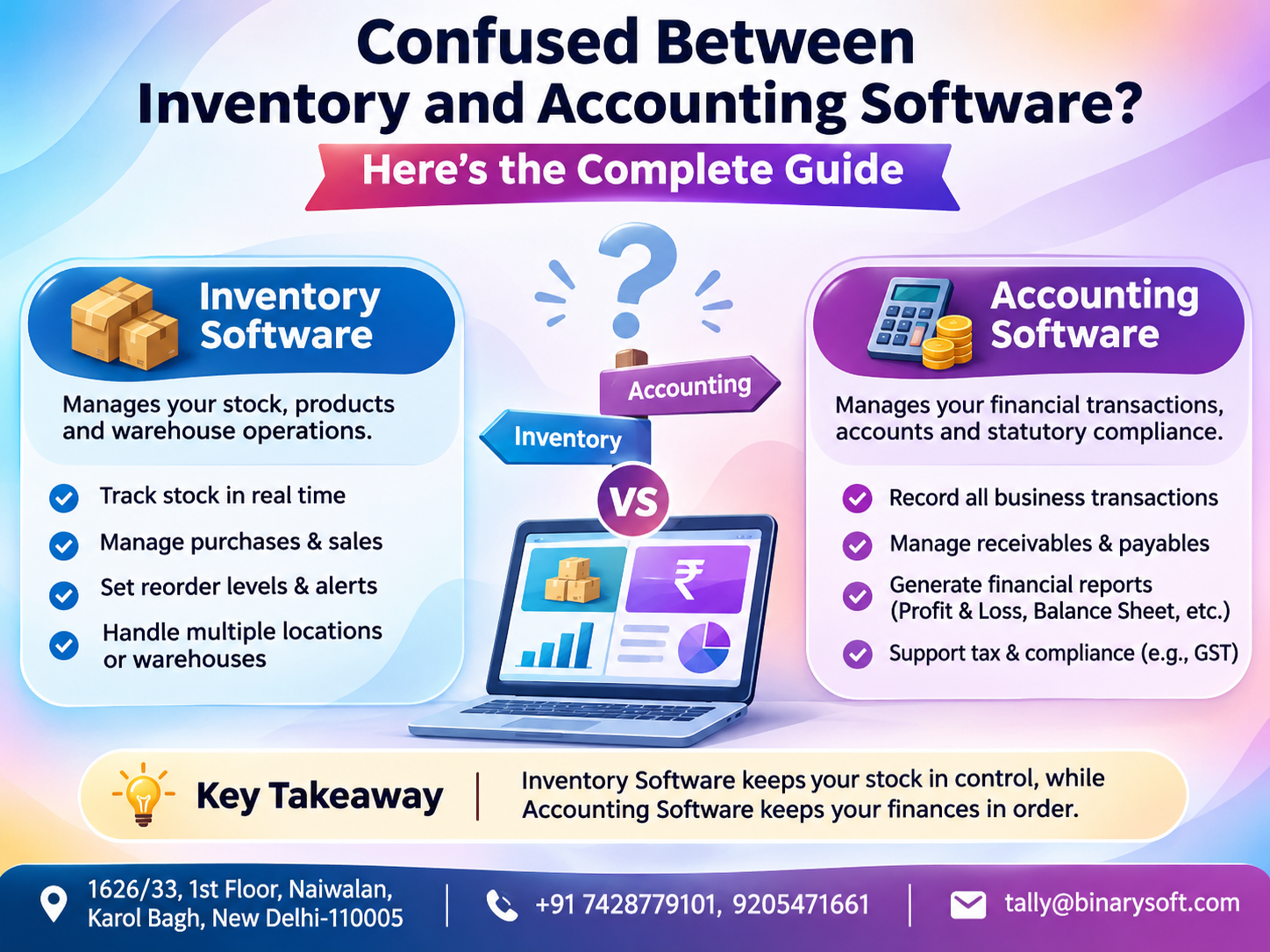
Inventory software helps businesses manage physical products, stock quantities, purchases, storage locations and product movement.
Accounting software focuses on financial transactions, income, expenses, customer payments, taxation and financial reporting.
Both serve different purposes, but their functions are closely connected.
Consider a wholesale trader who knows that 500 products are available in the warehouse but cannot calculate their profitability. Alternatively, imagine a retailer who maintains accurate financial accounts but frequently loses sales because popular products are out of stock.
In both situations, incomplete business information affects performance.
Modern integrated solutions such as Tally Prime help bridge this gap by bringing accounting, billing, inventory and financial reporting into one business management environment.
This guide explains the differences between inventory and accounting software, their benefits, practical applications and how growing Indian businesses can choose the right solution.
1. What Is Inventory Management Software?
Inventory management software is designed to monitor and control the movement of physical goods within a business.
It helps businesses understand which products are available, how many units have been purchased or sold, where stock is stored and when replenishment may be required.
Inventory management is particularly important for retailers, wholesalers, distributors, manufacturers and businesses handling multiple product categories.
Important features of inventory software
Stock tracking: Monitor available quantities and product movement.
Product categorisation: Organise products into groups and categories for easier identification.
Purchase management: Maintain information about goods received from suppliers.
Warehouse management: Track stock across multiple storage locations.
Reorder monitoring: Identify products approaching minimum stock levels.
Batch tracking: Maintain batch-related information where supported.
Inventory valuation: Calculate stock values using appropriate valuation methods.
Stock reports: Analyse available quantities, stock movement and inventory performance.
Example
A footwear retailer sells shoes in different sizes, colours and brands.
Without proper inventory records, employees may struggle to confirm whether a particular size is available.
Inventory management software helps maintain structured product information, reducing uncertainty during sales.
It also helps the owner identify which products need replenishment and which remain unsold.
2. What Is Accounting Software?
Accounting software is designed to record, organise and report the financial activities of a business.
It helps owners understand how much money the business earns, spends, owes and receives.
Accounting software is useful for trading companies, service providers, manufacturers, professional firms and organisations of different sizes.
Important features of accounting software
Sales and purchase accounting: Record revenue and purchasing transactions.
Expense management: Track rent, salaries, utilities, transportation and other expenses.
Customer and supplier ledgers: Maintain individual account balances.
Receivables and payables: Monitor money owed by customers and amounts payable to suppliers.
Bank reconciliation: Compare accounting records with bank transactions.
Tax accounting: Maintain relevant GST and other applicable tax information.
Financial statements: Generate Profit and Loss Accounts and Balance Sheets.
Cash-flow monitoring: Understand cash movement and financial requirements.
Example
A consultancy firm may not maintain significant physical inventory.
However, it must prepare client invoices, record professional expenses, monitor payments and calculate profitability.
For such a business, accounting software is essential, while advanced inventory management may not be necessary.
3. Inventory Software vs Accounting Software: Key Differences
Although both systems help manage business operations, their primary responsibilities differ.
|
Feature
|
Inventory software
|
Accounting software
|
|---|
|
Main purpose
|
Manage stock and goods
|
Manage financial transactions
|
|
Primary focus
|
Product quantities and movement
|
Income, expenses and balances
|
|
Stock tracking
|
Core functionality
|
Depends on software
|
|
GST invoicing
|
May be available
|
Commonly supported
|
|
Financial statements
|
Usually limited
|
Core functionality
|
|
Warehouse management
|
Common functionality
|
Depends on integration
|
|
Customer outstanding
|
Usually limited
|
Common functionality
|
|
Profitability analysis
|
Product-focused
|
Business-wide financial analysis
|
|
Best suited for
|
Product-based businesses
|
Most business types
|
The distinction becomes especially important when businesses grow.
A stock management application may show that 200 units were sold, but without complete financial accounting, the owner may not understand the effect of discounts, operating expenses and unpaid customer invoices.
Similarly, accounting software without inventory capabilities may accurately record sales revenue but provide limited visibility into stock availability.
For businesses handling physical products, an integrated system can provide a more complete operational picture.
4. Why Inventory and Accounting Must Work Together
Inventory and accounting are closely connected because every purchase or sale of goods affects both stock and financial records.
When a business purchases merchandise, inventory quantities increase and the related financial transaction must be recorded.
When products are sold, stock quantities decrease while sales revenue, taxes and customer balances may change.
If these records are maintained separately, employees may need to enter the same transaction multiple times.
This creates opportunities for duplication, inconsistent records and reporting delays.
Benefits of integration
-
Reduced repetitive data entry.
-
Better consistency between stock and accounting records.
-
Faster sales and purchase processing.
-
Improved visibility into inventory investment.
-
More reliable financial reporting.
-
Easier identification of outstanding customer balances.
-
Better purchasing and cash-flow planning.
For example, a distributor may have significant stock available but insufficient cash to purchase additional goods.
Integrated reports help explain whether money is tied up in inventory, unpaid invoices or other business expenses.
This information supports better decisions than reviewing inventory and accounting records separately.
5. How Tally Prime Combines Inventory and Accounting
Tally Prime provides integrated accounting and inventory capabilities that help businesses manage operational and financial information within one system.
Instead of relying on completely disconnected applications, businesses can configure relevant accounting and inventory features according to their requirements.
Integrated sales transactions
When an inventory-based sales invoice is recorded correctly, Tally Prime can update relevant stock quantities, sales ledgers, customer balances and tax information.
Integrated purchase transactions
Purchase vouchers can record goods received, supplier liabilities and relevant accounting information.
Stock management
Businesses can maintain stock groups, categories, items, units of measurement and godowns.
Financial reporting
Accounting reports provide visibility into revenue, expenses, receivables, payables and financial performance.
GST management
Relevant GST details can be configured for taxable transactions, with reporting and compliance-related capabilities available according to the installed release.
Business analysis
Owners can examine sales, purchases, stock balances and financial reports without maintaining completely separate accounting records.
This integration is especially valuable for retailers, wholesalers, distributors and growing trading businesses.
6. Practical Example: How Integrated Software Works
Imagine a wholesale electronics business purchasing 100 products at ₹2,000 each and selling 60 products at ₹2,800 each, excluding GST.
An integrated system helps record both the physical movement of products and the financial effect of these transactions.
|
Business activity
|
Amount or quantity
|
|---|
|
Products purchased
|
100 units
|
|
Purchase value
|
₹2,00,000
|
|
Products sold
|
60 units
|
|
Sales value
|
₹1,68,000
|
|
Remaining inventory
|
40 units
|
|
Remaining stock cost
|
₹80,000
|
|
Gross profit on units sold
|
₹48,000
|
The example assumes a constant purchase cost and excludes GST, freight, returns and operating expenses.
Inventory reports help the owner understand remaining stock, while accounting reports provide information about sales, purchases, customer balances and expenses.
The ₹48,000 gross profit does not represent final net profit because rent, salaries, transportation and other expenses must also be considered.
This is why combining accounting and inventory information provides a clearer picture of business performance.
7. A Father's Dream, a Daughter's Decision: The Story Behind Better Business Management
For nearly three decades, Mahesh operated a small electrical goods shop in Delhi.
He had built the business through hard work, personal relationships and the trust of loyal customers.
Every morning, he opened the shop before the market became busy. Every evening, he checked handwritten sales registers and counted available cash.
His daughter, Ananya, had recently joined the family business after completing her education.
She noticed something her father had accepted as part of daily business life.
Products were frequently misplaced, customer payments were difficult to track and stock purchases were sometimes based on guesswork.
One afternoon, a regular customer requested 50 electrical switches.
Mahesh confidently accepted the order because his register showed sufficient stock.
But when Ananya checked the warehouse, only 28 switches were available.
The remaining quantity had already been sold, but the register had not been updated.
The disappointed customer cancelled the order.
That evening, Mahesh sat quietly in the shop.
He was not upset merely about losing a sale. He feared that the business he had spent his life building was becoming difficult to manage.
Ananya suggested introducing integrated accounting and inventory software.
Initially, Mahesh resisted.
He believed computers were complicated and worried that technology would replace the personal attention that made his business successful.
Ananya explained that software would not replace his experience. It would help protect the business from avoidable mistakes.
Together, they organised stock records, entered customer balances and introduced digital invoicing.
Over time, Mahesh began checking stock availability before accepting orders.
He could identify outstanding payments and understand which products generated better returns.
Most importantly, he no longer needed to spend every evening searching through registers.
One evening, while closing the shop, Mahesh smiled and told his daughter that the business finally felt ready for the next generation.
For Ananya, that moment meant more than improved accounting.
It meant preserving her father's hard work while preparing the family business for the future.
This fictional story illustrates common challenges faced by traditional family businesses adopting digital accounting.
8. Case Study 1: Wholesale Garment Distributor
Business background
Consider a fictional wholesale garment distributor operating in Delhi and supplying clothing to retailers across North India.
The business handles multiple product categories, large purchase orders and customer credit transactions.
Challenges
The distributor maintains stock quantities in spreadsheets while financial transactions are recorded separately.
Employees frequently struggle to reconcile stock movement with sales invoices.
Customer payments are sometimes recorded late, making outstanding balances difficult to verify.
Tally Prime implementation
The business introduces an integrated accounting and inventory process.
Stock groups are created for shirts, trousers, jackets and ethnic wear.
Stock items are maintained with appropriate units, opening balances and product classifications.
Customer and supplier ledgers are configured, and bill-wise accounting is used to monitor outstanding invoices.
Sales and purchase vouchers are recorded systematically.
Illustrative results
The business gains a more consistent view of available stock and customer balances.
Employees can consult stock reports before confirming bulk orders.
The accounts team can review receivables without repeatedly comparing separate spreadsheets.
Management can also identify slow-moving inventory and make more informed purchasing decisions.
Key takeaway: Integrated accounting and inventory management helps wholesale businesses improve coordination between purchasing, sales, warehousing and finance.
This is an illustrative case study, not a verified customer implementation.
9. Case Study 2: Growing Electronics Retailer
Business background
A fictional electronics retailer operates two outlets and a small warehouse.
The company sells mobile accessories, electrical equipment and consumer electronics.
Challenges
Different employees maintain separate stock registers at each location.
The owner cannot easily determine whether a product is available at the second outlet.
Some products are overstocked while popular accessories frequently become unavailable.
Tally Prime implementation
The retailer creates separate godowns for both outlets and the central warehouse.
Stock transfers are recorded through appropriate inventory vouchers.
The business also introduces standardised sales invoicing, supplier ledgers and regular stock reviews.
Management uses Stock Summary and Godown Summary reports to monitor inventory.
Illustrative results
Employees gain better visibility into stock availability at different locations.
The owner can plan stock transfers and replenishment more systematically.
Accounting records also become easier to review because transactions follow a consistent process.
Key takeaway: Businesses operating multiple locations benefit from maintaining structured inventory records alongside financial accounting.
This scenario is hypothetical. Actual outcomes depend on data accuracy, configuration and employee practices.
10. How to Set Up Inventory and Accounting in Tally Prime
Businesses can follow a structured implementation process to begin using integrated accounting and inventory features.
Step 1: Create your company
Enter business information, financial-year details, accounting preferences and applicable GST registration information.
Step 2: Configure accounting ledgers
Create customer, supplier, sales, purchase, cash, bank and expense ledgers.
Step 3: Enable relevant inventory features
Configure stock management options according to business requirements.
Step 4: Create stock groups and categories
Organise products into meaningful classifications.
Step 5: Create stock items
Enter product names, units of measurement and opening quantities or values where applicable.
Step 6: Configure godowns
Create storage locations if the business maintains inventory across multiple warehouses or outlets.
Step 7: Record purchase and sales transactions
Use the appropriate voucher types to record goods received, goods sold and associated financial information.
Step 8: Monitor inventory reports
Review Stock Summary, Movement Analysis, Godown Summary and reorder information.
Step 9: Review accounting reports
Examine the Profit and Loss Account, Balance Sheet, receivables, payables and cash balances.
Step 10: Establish internal controls
Configure user permissions, verify opening balances, reconcile physical stock and maintain reliable backups.
Correct initial configuration is important because inaccurate opening quantities, inconsistent product names or incorrect ledger classifications can affect subsequent reports.
11. Which Businesses Need Inventory Software, Accounting Software or Both?
Different businesses have different operational requirements.
A professional consultancy may primarily require accounting, invoicing and expense tracking.
A wholesale distributor generally needs both inventory management and financial accounting.
A manufacturing business may require additional functionality for raw materials, production, job work and finished goods.
Retailers often benefit from integrated billing, stock tracking and accounting.
Service businesses that sell physical products alongside services may also need both systems.
The most appropriate solution depends on the business model, transaction volume, number of employees, product complexity and reporting requirements.
12. Common Mistakes Businesses Should Avoid
One common mistake is selecting software based only on its purchase price.
Another is maintaining separate systems without a reliable process for reconciling information.
Businesses should also avoid creating duplicate product masters, entering incorrect opening balances and allowing employees unrestricted access to sensitive accounting information.
Ignoring physical stock verification can create discrepancies even when software records appear accurate.
Regular employee training, proper transaction-entry procedures and periodic financial reviews are essential.
Technology works best when supported by disciplined business practices.
13. Why Choose Tally Prime for Integrated Business Management?
Tally Prime is suitable for many Indian businesses seeking integrated accounting and inventory capabilities.
Its important strengths include structured accounting, GST invoicing, stock management, customer outstanding tracking and financial reporting.
Businesses can also use inventory features such as stock groups, stock categories, godowns, reorder levels and movement reports.
Manufacturing and job-work-related features may support businesses with more complex material requirements.
Appropriate licensing, configuration and deployment arrangements can support different operational needs.
However, businesses requiring specialised warehouse automation, advanced barcode workflows or complex enterprise integrations should assess whether additional solutions or customisation are necessary.
Choosing software based on actual business requirements is more important than selecting the system with the longest feature list.
14. How Binarysoft Technologies Can Help
Implementing accounting and inventory software requires a clear understanding of business processes.
Binarysoft Technologies, an Authorized Tally Partner in New Delhi, assists businesses exploring Tally Prime solutions.
Businesses can enquire about software licensing, implementation, inventory configuration, accounting workflows, employee training and related support requirements.
Whether you operate a retail store, wholesale distribution business, manufacturing unit or growing trading company, appropriate software configuration can help establish more reliable financial and inventory processes.
Conclusion
Inventory management software and accounting software serve different but equally important business functions.
Inventory software helps businesses control physical stock, while accounting software provides visibility into financial transactions and performance.
For businesses handling physical products, using disconnected systems can create unnecessary complexity.
Integrated accounting and inventory software such as Tally Prime connects stock movement with relevant financial records, helping businesses improve accuracy, operational control and decision-making.
The right solution should match current business requirements while providing room for future growth.
By maintaining accurate records, reviewing reports regularly and training employees properly, business owners can reduce administrative challenges and focus more confidently on customers, profitability and expansion.
Contact Binarysoft Technologies
Powered by Binarysoft Technologies
Authorized Tally Partner
Location: 1626/33, 1st Floor, Naiwalan, Karol Bagh, New Delhi – 110005, INDIA
Contact us: +91 7428779101, 9205471661
Email us: tally@binarysoft.com
Business Hours: 10:00 AM – 6:00 PM, Monday to Friday
Frequently Asked Questions
What is the main difference between inventory and accounting software?
Inventory software manages stock quantities, product movement and warehouse records. Accounting software manages financial transactions, expenses, payments, taxes and financial statements.
Can accounting software also manage inventory?
Yes. Integrated solutions such as Tally Prime provide both accounting and inventory management capabilities.
Is inventory management software necessary for small businesses?
It depends on the business. Retailers, wholesalers and product-based businesses can benefit significantly from inventory tracking, even when transaction volumes are relatively small.
Can Tally Prime manage inventory across multiple warehouses?
Yes. Tally Prime supports godown management, stock transfers and location-wise inventory reporting.
CA. Harshit Gaurwaadi is a practicing Chartered Accountant with hands-on experience in accounting systems, GST compliance, and MSME advisory. He regularly works with small and mid-sized businesses to streamline inventory, billing, and statutory processes using modern accounting software. His articles focus on practical, ground-level challenges faced by Indian traders and professionals.