How to Generate e-Invoice in GST?

Call CA Tally HelpDesk +91 9205471661, 7428779101

How to Generate e-Invoice in GST?
By CA. Lakshy Vermaa   |   Published on: 16-03-2022 | 4 min read

The e-invoicing system, which is already being implemented for bigger businesses and to be implemented for 20 crores and above businesses from 1st April 2022, is primarily designed with 2 key aspects. First is the adoption of a standard for the invoice, which will enable standardization and swift data exchange across the different systems. The next being the registering the invoice with Government, through Invoice Registration Portal (IRP) which will ensure the authenticity of invoices

At a larger picture, it is believed that e-invoicing will play a key role to ensure the interoperability of the data with various systems alongside curbs tax evasion.

With the implementation of e-invoicing, the GST system shall be able to validate all the B2B transactions electronically and pre-populate the same in taxpayer’s GST return forms and e-way bill, as per the e-invoice details uploaded by the taxpayer.

Before getting into the process to generate an e-invoice, it is important to note that there has been a major misconception surrounding e-invoice generation. The famous misconception here is that the businesses can generate the invoices centrally through the governments portal.

That’s not true! e-invoice does not mean the generation of invoices from a central portal of the tax department. Instead, an e-invoice requires a business to generate the invoice in the prescribed format using the accounting software and upload it to the portal designed to authenticate such invoices.

Let’s now understand the steps to generate the e-invoice

How to generate e-invoice?
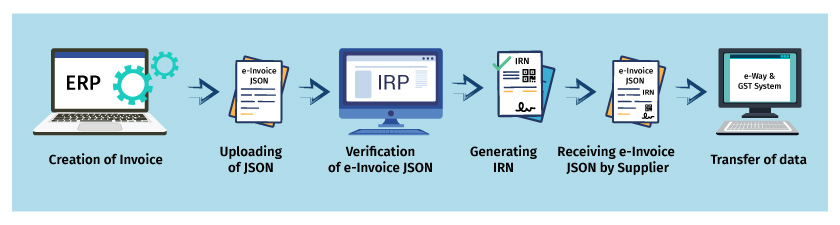
As illustrated above, the following are the detailed steps to generate an e-invoice in GST.

Step -1 Creation of e-invoice JSON: The first step is to create the invoice JSON using the accounting software as per the prescribed format. The taxpayer can generate it either using ERP software or using the offline utility provided by the government. 

Step -2 Uploading of JSON: In this step, the invoice JSON for every B2B invoice generated using accounting software or any other utilities are uploaded to the IRP system. If the ERP software is integrated with IRP via GSP, the upload of the JSON file will be automated, meaning the system sends the required details directly to the IRP portal. 

Step-3 Verification of e-invoice JSON: In this step, the IRP system validates the e-invoice JSON and checks the central registry of GST for any duplication.

Step-4 Generating invoice reference number (IRN): After successful validation of e-invoice JSON, the IRP system will generate IRN. IRN generated will be a unique number of each invoice for the entire financial year. Also, the e-invoice JSON will be updated with a digital signature along with a QR code.

Step-5: Receiving digitally singed e-invoice JSON: Here, the digitally signed e-invoice  JSON along with QR code is sent to the supplier. The IRN and QR code will be printed on the invoice before issuing it to the buyer. In case of an integrated environment of ERP and IRP via GSP, the software will automatically fetch and print such details

Step-6 Transfer of data to e-way bill system and GST system: The invoice JSON data uploaded, will be shared with the e- way bill and GST system, for preparing e - waybills and for auto-population of GST return.

  • Part-A of e-way will be auto-populated with e-invoice data
  • GSTR-1 of the supplier will be auto-populated as per the e-invoice details uploaded into IRP portal 
  • GSTR-2A will be updated, giving a real-time view to the buyer

Got questions on e-invoice? Read our article ‘What is e-invoicing’ to know and understand the fundamentals of the e-invoicing concept.


About the Author

Written by CA. Lakshy Vermaa • 16-03-2022

CA. Lakshy Vermaa advises small and mid-sized businesses on accounting discipline, tax compliance, and process improvement. With exposure to retail and trading environments, he writes practical articles aimed at helping business owners gain better financial visibility and control.


Verified Content 4 min read Support: +91 9205471661, 7428779101

Need Quick Support for Tally Prime?

For Tally Prime discount schemes and product inquiries, connect with our team.

+91 9205471661 | +91 7428779101

Subscribe For Product Updates

Opt-in Subscription

Tally Prime Auditor Renewal (One Year)

Applicable for CAs / Firms Using GOLD (Multi User ) Only
Renew your license now and upgrade from Tally ERP 9 to Tally Prime for Free!
Rs 6750 + 18% GST (Rs 1215)
Continue Here >>

Tally Prime Auditor Renewal (Two Years)

Applicable for CAs / Firms Using GOLD (Multi User ) Only
Renew your license now and upgrade from Tally ERP 9 to Tally Prime for Free!
Rs 12150 + 18% GST (Rs 2187)
Offer Continue Here >>

Tally Prime Gold Renewal (One Year)

Unlimited Multi-User Edition For Multiple PCs on LAN Environment
Renew your license now and upgrade from Tally ERP 9 to Tally Prime for Free!
Rs 13500 + 18% GST (Rs 2430)
Continue Here >>

Tally Prime Gold Renewal (Two Years)

Unlimited Multi-User Edition For Multiple PCs on LAN Environment
Renew your license now and upgrade from Tally ERP 9 to Tally Prime for Free!
Rs 24300 + 18% GST (Rs 4374)
Offer Continue Here >>

Tally Prime Silver Renewal  (One Year)

Single User Edition For Standalone PCs ( Not applicable for Rental License )
Renew your license now and upgrade from Tally ERP 9 to Tally Prime for Free!
Rs 4500 + 18% GST (Rs 810)
Continue Here >>

Tally Prime Silver Renewal  (Two Years)

Single User Edition For Standalone PCs ( Not applicable for Rental License )
Renew your license now and upgrade from Tally ERP 9 to Tally Prime for Free!
Rs 8100 + 18% GST (Rs 1458)
Offer Continue Here >>

Tally On Cloud

Tally On Cloud ( Per User Annual)
Now access Tally Prime anytime from anywhere – Just Deploy your Tally License and Tally Data on our Cloud Solution.
Rs 7000 + 18% GST (Rs 1260)
Continue Here >>

Tally Prime Gold

Unlimited Multi-User Edition
For EMI options, please Call: +91 742 877 9101 or E-mail: tally@binarysoft.com (10:00 am – 6: 00 pm , Mon-Fri)
Rs 67500 + 18% GST (Rs 12150)
Continue Here >>

Tally Prime Silver to Tally Prime Gold

Unlimited Multi-User Edition For Multiple PCs on LAN Environment
Renew your license now and upgrade from Tally ERP 9 to Tally Prime for Free!
Rs 45000 + 18% GST (Rs 8100)
Continue Here >>

Tally Prime Silver

Single User Edition For Standalone PCs
For EMI options, please Call: +91 742 877 9101 or E-mail: tally@binarysoft.com (10:00 am – 6: 00 pm , Mon-Fri)
Rs 22500 + 18% GST (Rs 4050)
Continue Here >>

Tally On AWS Cloud Personal (For 1 user)

(Per User/One Year)
TallyPrime latest release pre-installed
Rs 7200 + 18% GST (Rs 1296)
Continue Here >>

Tally On AWS Cloud Regular (Upto 2 users)

(Two Users/One Year)
TallyPrime latest release pre-installed
Rs 14400 + 18% GST (Rs 2592)
Continue Here >>

Tally On AWS Cloud Regular Plus (Upto 4 users)

(Four Users/One Year)
TallyPrime latest release pre-installed
Rs 21600 + 18% GST (Rs 3888)
Continue Here >>

Tally On AWS Cloud Regular Pro (Upto 8 users)

(Eight Users/One Year )
TallyPrime latest release pre-installed
Rs 43200 + 18% GST (Rs 7776)
Continue Here >>

Tally On AWS Cloud Performance (Upto 12 users)

(Twelve Users/One Year)
TallyPrime latest release pre-installed
Rs 64800 + 18% GST (Rs 11664)
Continue Here >>

Tally On AWS Cloud Performance Plus (Upto 16 users)

(Sixteen Users/One Year)
TallyPrime latest release pre-installed
Rs 86400 + 18% GST (Rs 15552)
Continue Here >>

Latest Articles

From Bank Statement to Tally Prime: Eliminate Manual Entries & Improve Financial Accuracy
Every business owner understands the importance of accurate financial records. Whether managing a sm...
Read More →
Top Billing Software for MSMEs: Automate Invoicing and Boost Business Efficiency with Tally Prime
Micro, Small and Medium Enterprises (MSMEs) form an important part of India's economy. From neighbou...
Read More →
Confused Between Inventory and Accounting Software? Here’s the Complete Guide for Growing Businesses
Running a successful business requires much more than selling products and collecting payments. Ever...
Read More →
All-in-One Accounting & Billing Software in Chandni Chowk & Kamla Nagar for Growing Businesses
Chandni Chowk and Kamla Nagar are two of Delhi's most active commercial destinations. From wholesale...
Read More →
Buy Tally Silver in Delhi & Across India: Single User TallyPrime License with GST Billing, Inventory & Business Insights (2026)
Businesses across India are moving towards digital accounting to manage financial transactions, main...
Read More →
Trusted Billing Software in Kirti Nagar & Dev Nagar for Inventory, GST & Business Reports
Running a successful business requires more than selling quality products or delivering excellent se...
Read More →
Get For Tally Discount Scheme and Inquiries
Call us at +91 7428779101, 8368262875.

Tally Query | Discounted Tally New License | Discounted Tally Renewal