Call CA Tally HelpDesk
+91 9205471661,
7428779101
Introduction: Why GST Reconciliation Has Become Essential for Indian Businesses
For Indian businesses managing hundreds or thousands of transactions every month, GST reconciliation is no longer a simple accounting exercise. It is an important financial control that helps protect input tax credit, identify reporting mistakes and maintain accurate tax records.
A single invoice missing from GSTR-2B, an incorrect supplier GSTIN or a small difference in taxable value can create complications during return preparation.
In 2026, businesses increasingly rely on ERP systems, accounting software and Excel-based analysis to manage these challenges. However, exporting data from an ERP system is only the beginning. The real task is comparing those records with GST portal information and identifying discrepancies.
Excel functions such as XLOOKUP, SUMIFS, COUNTIFS, IFERROR, IF, ABS and TEXT can help automate much of this comparison.
Instead of checking every invoice manually, accountants can use formulas to locate missing entries, calculate tax differences and prioritize exceptions.
Tally Prime adds another layer of efficiency through GST reports, purchase records and reconciliation capabilities.
This guide explains how businesses can combine Excel formulas, ERP exports and Tally Prime to establish a more accurate and dependable GST reconciliation process.
A Business Owner's Story: The ₹3.6 Lakh Input Tax Credit That Nearly Went Unnoticed
It was the last week of the month when Amit, the owner of a growing electronics distribution company in Delhi, received an unexpected message from his accountant.
Several supplier invoices were not matching with the company's GSTR-2B records.
The amount involved was approximately ₹3.6 lakh in potential input tax credit.
Amit had already planned important supplier payments for the following month. Any unexpected cash flow pressure could affect his ability to purchase new inventory.
His accountant had exported purchase records from the company's accounting system and downloaded GSTR-2B information from the GST portal.
But there were more than 2,000 invoice entries to compare.
Checking each invoice manually would take several days.
The accounting team introduced an Excel reconciliation process using XLOOKUP, COUNTIFS and SUMIFS.
Within a few hours, they identified missing supplier invoices, duplicate entries and differences in GST amounts.
Some mismatches resulted from invoice formatting differences, while others required suppliers to correct their reporting.
The company then strengthened its monthly accounting process using Tally Prime.
Instead of waiting until the return deadline, the team began reviewing GST records regularly and following up on exceptions earlier.
Amit realized that reliable accounting was not only about filing returns. It was about protecting working capital and maintaining confidence in business decisions.
This is an illustrative story based on common GST reconciliation challenges.
1. What Is GST Reconciliation?
GST reconciliation is the process of comparing accounting records with GST returns and portal-generated information to identify differences.
Businesses commonly reconcile their purchase registers with GSTR-2B and their sales registers with GSTR-1.
They also compare outward tax liability with GSTR-3B and verify relevant input tax credit information.
The main objective is to ensure that transactions recorded in the accounting system are accurately reflected in the appropriate GST records.
GST reconciliation helps businesses identify missing invoices, incorrect GSTINs, duplicate transactions, tax amount differences and reporting-period mismatches.
It also supports the review of eligible input tax credit before filing GSTR-3B.
Importantly, an invoice appearing in GSTR-2B does not automatically establish ITC eligibility. Businesses must also satisfy the applicable statutory conditions.
2. Why Excel Is Useful for GST Reconciliation
Excel remains widely used because it allows accountants to analyze information exported from different accounting and ERP systems.
A business may maintain purchase records in its accounting software while obtaining supplier-reported invoice information from the GST portal.
Excel provides a practical environment for comparing these datasets.
Its advantages include flexible invoice matching, customizable exception reports, supplier-wise summaries and quick identification of tax differences.
For smaller datasets, formulas can provide an economical reconciliation method without requiring extensive technical implementation.
However, Excel also has limitations. Large datasets, inconsistent formatting, duplicate keys and manual spreadsheet changes can affect reliability.
Therefore, Excel works best when supported by properly maintained accounting records and a controlled review process.
3. Essential Data Required Before GST Reconciliation
Before applying formulas, both datasets should contain comparable information.
|
Data field
|
Purpose
|
|---|
|
Supplier GSTIN
|
Identifies the registered supplier
|
|
Invoice number
|
Identifies the transaction
|
|
Invoice date
|
Helps verify the reporting period
|
|
Taxable value
|
Compares the value of supplies
|
|
IGST
|
Verifies interstate tax
|
|
CGST
|
Verifies central tax
|
|
SGST/UTGST
|
Verifies state or union territory tax
|
|
Total GST
|
Measures the overall tax difference
|
|
Invoice type
|
Distinguishes invoices from adjustments
|
|
Reconciliation status
|
Records the matching result
|
Businesses should maintain separate worksheets for ERP purchase records and GSTR-2B information.
Before matching, ensure that dates are valid Excel dates, tax values are numeric and GSTINs are consistently formatted.
Credit notes, debit notes and amended invoices should be classified separately where necessary.
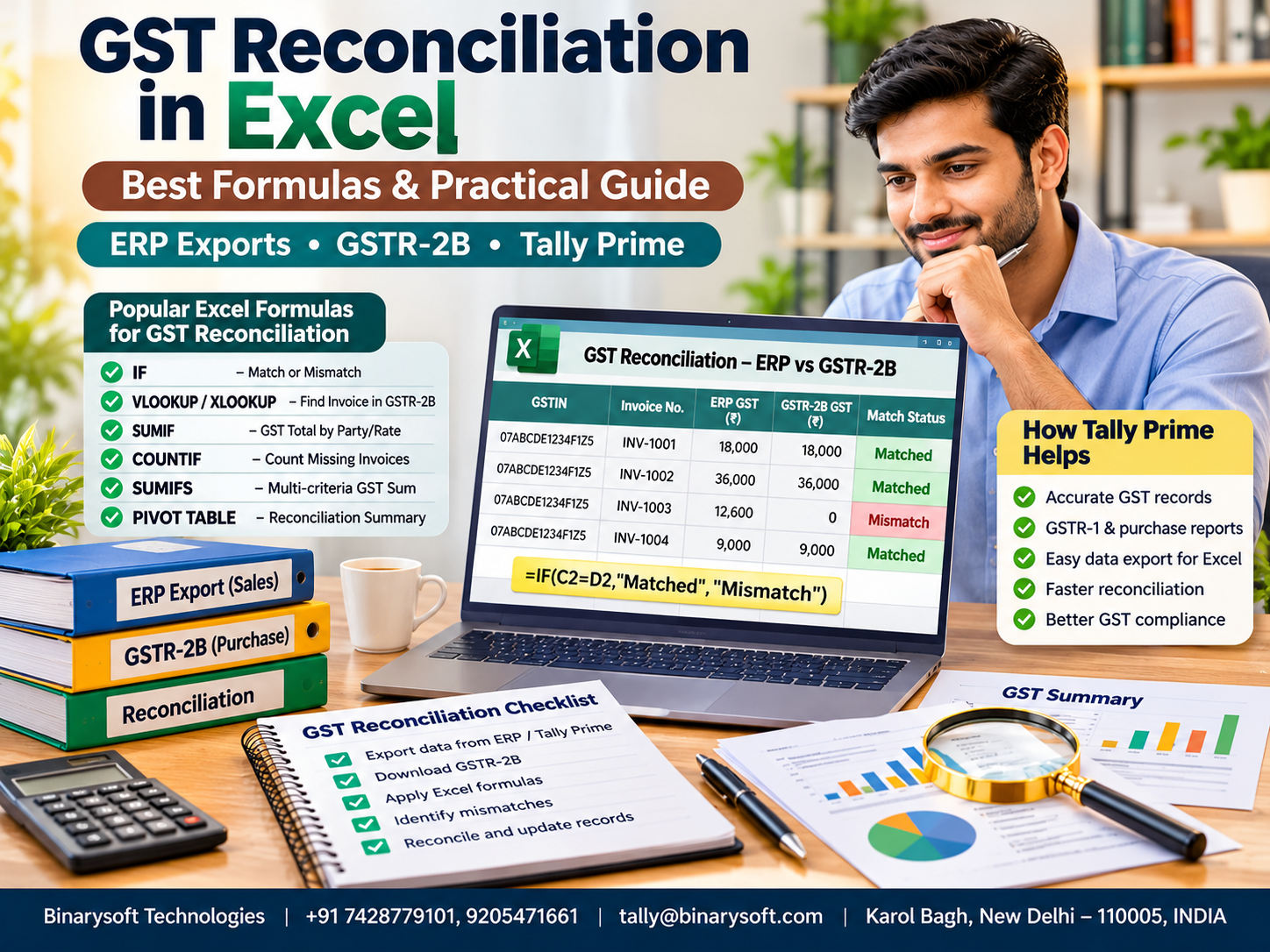
4. Best Excel Formulas for GST Reconciliation
The following formulas provide a practical foundation for reconciling ERP exports with GST portal records.
Formula 1: Create a unique reconciliation key
Matching invoices using only invoice numbers is risky because different suppliers may use identical invoice numbers.
A better approach combines the supplier GSTIN and normalized invoice number.
Assume column A contains GSTIN and column B contains invoice number.
=UPPER(TRIM(A2))&"|"&UPPER(SUBSTITUTE(TRIM(B2),"-",""))
This formula combines both values into a single reconciliation key.
For example:
GSTIN: 07ABCDE1234F1Z5
Invoice Number: INV-1001
Generated Key: 07ABCDE1234F1Z5|INV1001
Create the same key in both worksheets.
Removing hyphens can resolve certain formatting differences, but businesses should confirm that normalization does not accidentally combine genuinely different invoice numbers.
Formula 2: XLOOKUP for invoice matching
XLOOKUP is one of the most useful functions for identifying whether an invoice exists in another dataset.
Assume the ERP worksheet contains reconciliation keys in column E and GSTR-2B contains keys in column J.
=XLOOKUP(E2,$J$2:$J$5000,$J$2:$J$5000,"Missing",0)
If the invoice exists, Excel returns the matching key.
Otherwise, it displays Missing.
|
Invoice
|
Result
|
|---|
|
INV1001
|
Matched
|
|
INV1002
|
Missing
|
|
INV1003
|
Matched
|
This makes it easier to identify purchase invoices that do not appear in the selected GSTR-2B dataset.
A missing invoice should be investigated rather than automatically treated as permanently ineligible for ITC.
Formula 3: IFERROR for cleaner reconciliation reports
When lookup formulas cannot locate a record, Excel may display an error.
IFERROR can replace that error with a readable message.
=IFERROR(VLOOKUP(E2,$J$2:$K$5000,2,FALSE),"Not Found")
This is useful when working with older Excel versions that do not support XLOOKUP.
However, IFERROR should be used carefully because it can also hide errors caused by incorrectly configured formulas.
Formula 4: IF for reconciliation status
The IF function allows accountants to classify transactions automatically.
Suppose F2 contains the invoice lookup result.
=IF(F2="Missing","Vendor Follow-up","Matched")
Invoices not found in the portal dataset are marked for supplier follow-up.
More detailed status formulas can distinguish missing invoices from amount mismatches and fully matched transactions.
Formula 5: ABS for GST amount differences
Invoices may exist in both datasets but contain different GST amounts.
The ABS function calculates the absolute difference between two values.
Assume G2 contains GST as per the ERP and H2 contains GST as per GSTR-2B.
If ERP GST is ₹18,000 and portal GST is ₹17,800, the result is ₹200.
Accountants can filter invoices according to the size of their differences.
A controlled rounding tolerance may be used for minor differences, but material mismatches require investigation.
Formula 6: SUMIFS for supplier-wise GST reconciliation
SUMIFS helps calculate totals based on multiple conditions.
Assume column A contains supplier GSTIN and column G contains GST amounts.
=SUMIFS($G$2:$G$5000,$A$2:$A$5000,A2)
This calculates the total GST recorded for the supplier identified in A2.
Supplier-wise summaries are particularly helpful when businesses receive multiple invoices from the same vendor.
For multi-line invoices, SUMIFS can also aggregate amounts by a properly constructed invoice key.
Formula 7: COUNTIFS for duplicate invoice detection
Duplicate entries may cause incorrect tax reporting and reconciliation differences.
COUNTIFS helps identify repeated combinations of supplier GSTIN and invoice number.
=COUNTIFS($A$2:$A$5000,A2,$B$2:$B$5000,B2)
A result greater than one indicates that the combination appears multiple times.
This requires review, but does not necessarily establish an error because one invoice may legitimately contain several item-level rows.
The accountant should distinguish duplicate invoice bookings from legitimate multi-line transactions.
Formula 8: TEXT for date standardization
ERP exports and GST portal records may display dates in different formats.
The TEXT function can create a consistent display format for valid Excel dates.
This helps accountants compare invoice dates more consistently.
However, TEXT does not automatically correct invalid dates stored as text. Those values must first be converted into genuine dates.
Formula 9: ROUND for tax comparison
Minor rounding differences may appear when comparing tax amounts.
The ROUND function standardizes numerical precision.
Businesses can combine ROUND and ABS to identify differences beyond an approved tolerance.
=IF(ABS(ROUND(G2,2)-ROUND(H2,2))<=1,"Review as Matched","Mismatch")
Here, ₹1 is an illustrative tolerance, not a statutory permission to ignore tax differences.
Formula 10: COUNTIF for missing invoice analysis
COUNTIF provides a simple method to check whether an invoice key appears in another worksheet.
=IF(COUNTIF(GSTR2B!$J$2:$J$5000,E2)=0,"Missing in 2B","Found")
This formula is useful when only the existence of an invoice needs to be checked.
For accurate reconciliation, it should be followed by taxable value and tax amount comparisons.
5. Step-by-Step GST Reconciliation Using ERP Exports
Businesses can follow a systematic approach to reconcile purchase records with GSTR-2B.
Step 1: Export purchase data from ERP
Download the purchase register for the required tax period. Include supplier GSTIN, invoice number, invoice date, taxable value and individual GST amounts.
Step 2: Download GSTR-2B
Obtain the relevant GSTR-2B information from the GST portal. Ensure that the selected period is correct.
Step 3: Standardize the data
Remove unnecessary spaces, verify invoice formats and convert amounts into numeric values.
Step 4: Generate reconciliation keys
Create matching keys using supplier GSTIN and invoice number in both datasets.
Step 5: Apply Excel formulas
Use XLOOKUP or COUNTIF to identify invoice matches. Use SUMIFS to compare aggregated amounts and COUNTIFS to detect potential duplicates.
Step 6: Investigate exceptions
Separate missing invoices, taxable value differences, tax mismatches and reporting-period differences.
Step 7: Review ITC eligibility
Verify the relevant GSTR-2B information, IMS status where applicable, and statutory ITC conditions before finalizing the claim.
Step 8: Finalize reconciliation
Prepare a summary of matched invoices, unresolved discrepancies, supplier follow-ups and required accounting corrections.
6. Practical Example of GST Reconciliation in Excel
Consider a business comparing four purchase invoices against its GSTR-2B data.
|
Invoice
|
ERP GST
|
GSTR-2B GST
|
Result
|
|---|
|
INV-101
|
₹18,000
|
₹18,000
|
Matched
|
|
INV-102
|
₹9,000
|
₹9,000
|
Matched
|
|
INV-103
|
₹12,600
|
₹12,000
|
Difference
|
|
INV-104
|
₹7,200
|
Not found
|
Missing
|
The accountant identifies a ₹600 difference in INV-103 and an invoice worth ₹7,200 in GST that is absent from the selected portal dataset.
These entries require further investigation.
For example, INV-103 may contain an incorrect taxable value, while INV-104 may have been reported in a different return period.
Excel helps identify these exceptions quickly, allowing the accounting team to focus on the underlying causes.
7. How Tally Prime Helps with GST Reconciliation
Tally Prime offers accounting and GST reconciliation capabilities that reduce dependence on manually maintained spreadsheets.
Centralized purchase accounting
Businesses can record purchase invoices with supplier details, taxable values, GST rates and tax amounts.
Maintaining accurate records at the transaction stage improves subsequent reconciliation.
GSTR-2B reconciliation
Supported Tally Prime releases allow users to download or import GSTR-2B information and compare it with recorded purchase transactions.
The reconciliation reports can identify matching transactions, differences and invoices appearing only in one dataset.
Identification of mismatches
Businesses can investigate differences in invoice numbers, tax amounts, taxable values and return periods.
Relevant exception reports help accountants concentrate on transactions requiring attention.
Exporting information for Excel analysis
Tally Prime reports can be exported for additional spreadsheet analysis.
This is useful when businesses require customized management summaries, supplier-wise reviews or additional reconciliation formulas.
Better financial visibility
Beyond GST reconciliation, Tally Prime supports inventory, receivables, payables and financial reporting.
Combining these capabilities helps businesses maintain consistent accounting information across departments.
8. Case Study One: Electronics Distributor Improves GST Reconciliation
Illustrative case study
A Delhi-based electronics distributor handled approximately 3,000 purchase invoices every month.
The company purchased products from suppliers across multiple states.
Its accounting team faced recurring problems involving missing supplier invoices, duplicate entries and GST amount differences.
Previously, employees manually compared purchase registers with portal information.
The company introduced standardized ERP exports and Excel reconciliation formulas.
XLOOKUP helped identify missing invoices, SUMIFS calculated supplier-wise GST totals and COUNTIFS highlighted potential duplicates.
The business also adopted Tally Prime reconciliation reports for regular transaction verification.
This approach helped accountants review exceptions earlier, communicate with suppliers more efficiently and improve the reliability of their GST records.
9. Case Study Two: Manufacturing Business Strengthens ITC Controls
Illustrative case study
A manufacturing company operating in the Delhi-NCR region purchased raw materials, packaging supplies and machinery components from numerous vendors.
Its accounting team frequently encountered differences between purchase records and GSTR-2B.
The company established a monthly reconciliation process using Tally Prime and Excel.
Purchase invoices were recorded centrally, supplier GSTIN information was reviewed and tax amounts were compared using Excel formulas.
The team created separate reports for missing invoices, tax differences and transactions requiring supplier confirmation.
Management also introduced a review process before finalizing input tax credit claims.
The new workflow improved documentation, strengthened internal controls and helped reduce the risk of unsupported ITC claims.
10. Common GST Reconciliation Mistakes
Even advanced formulas cannot compensate for incorrect source information.
Common problems include matching invoices using invoice numbers alone, ignoring supplier GSTINs, failing to identify duplicate records and treating every small difference as a valid rounding adjustment.
Another significant mistake is assuming that a matched invoice automatically qualifies for input tax credit.
Businesses must consider applicable ITC eligibility conditions, including the nature of the purchase, receipt of goods or services, supplier reporting and relevant statutory restrictions.
Excel formulas should support professional judgment rather than replace it.
11. Best Practices for Accurate GST Reconciliation in 2026
Businesses should reconcile transactions regularly instead of waiting until the filing deadline.
Supplier master records must be maintained accurately, invoice numbering differences should be investigated and reconciliation reports should be reviewed by an authorized accountant.
It is also important to maintain a clear audit trail of corrections.
Where multiple employees manage accounting activities, responsibilities for invoice entry, reconciliation and approval should be defined.
Tally Prime can support this process through organized accounting records and GST reporting, while Excel provides flexibility for specialized analysis.
For larger datasets, Power Query or controlled automated reconciliation workflows may be more dependable than extensive manual formulas.
Conclusion
GST reconciliation is essential for maintaining accurate financial records, protecting eligible input tax credit and improving GST compliance.
Excel formulas such as XLOOKUP, IFERROR, IF, ABS, SUMIFS, COUNTIFS and TEXT can significantly simplify invoice matching and discrepancy identification.
However, formulas deliver the best results when businesses maintain accurate accounting records and follow a consistent reconciliation process.
Tally Prime complements Excel by supporting centralized accounting, GST reports, purchase transaction verification and reconciliation workflows.
By combining reliable accounting software with practical spreadsheet analysis, businesses can reduce manual effort, identify discrepancies earlier and strengthen financial controls.
Professional GST Reconciliation and Tally Prime Assistance
Powered by Binarysoft Technologies
Authorized Tally Partner
Location: 1626/33, 1st Floor, Naiwalan, Karol Bagh, New Delhi – 110005, INDIA
Contact Us: +91 7428779101, 9205471661
Email: tally@binarysoft.com
Business Hours: 10:00 AM – 6:00 PM, Monday to Friday
Frequently Asked Questions
Can Excel automatically reconcile GSTR-2B?
Excel can automate invoice comparisons and exception identification through formulas, Power Query and structured datasets. However, discrepancies still require review.
How can I identify missing invoices in GSTR-2B?
Create matching keys using supplier GSTIN and invoice number, then apply XLOOKUP or COUNTIF to identify records missing from the selected GSTR-2B dataset.
What is the difference between XLOOKUP and VLOOKUP?
XLOOKUP offers more flexible matching and can return values from columns on either side of the lookup column. VLOOKUP is commonly used in older Excel versions.
Can Tally Prime reconcile GSTR-2B automatically?
Supported Tally Prime releases provide GSTR-2B reconciliation features that help match accounting records with portal data and identify exceptions.
CA. Lakshy Vermaa advises small and mid-sized businesses on accounting discipline, tax compliance, and process improvement. With exposure to retail and trading environments, he writes practical articles aimed at helping business owners gain better financial visibility and control.