Call CA Tally HelpDesk
+91 9205471661,
7428779101
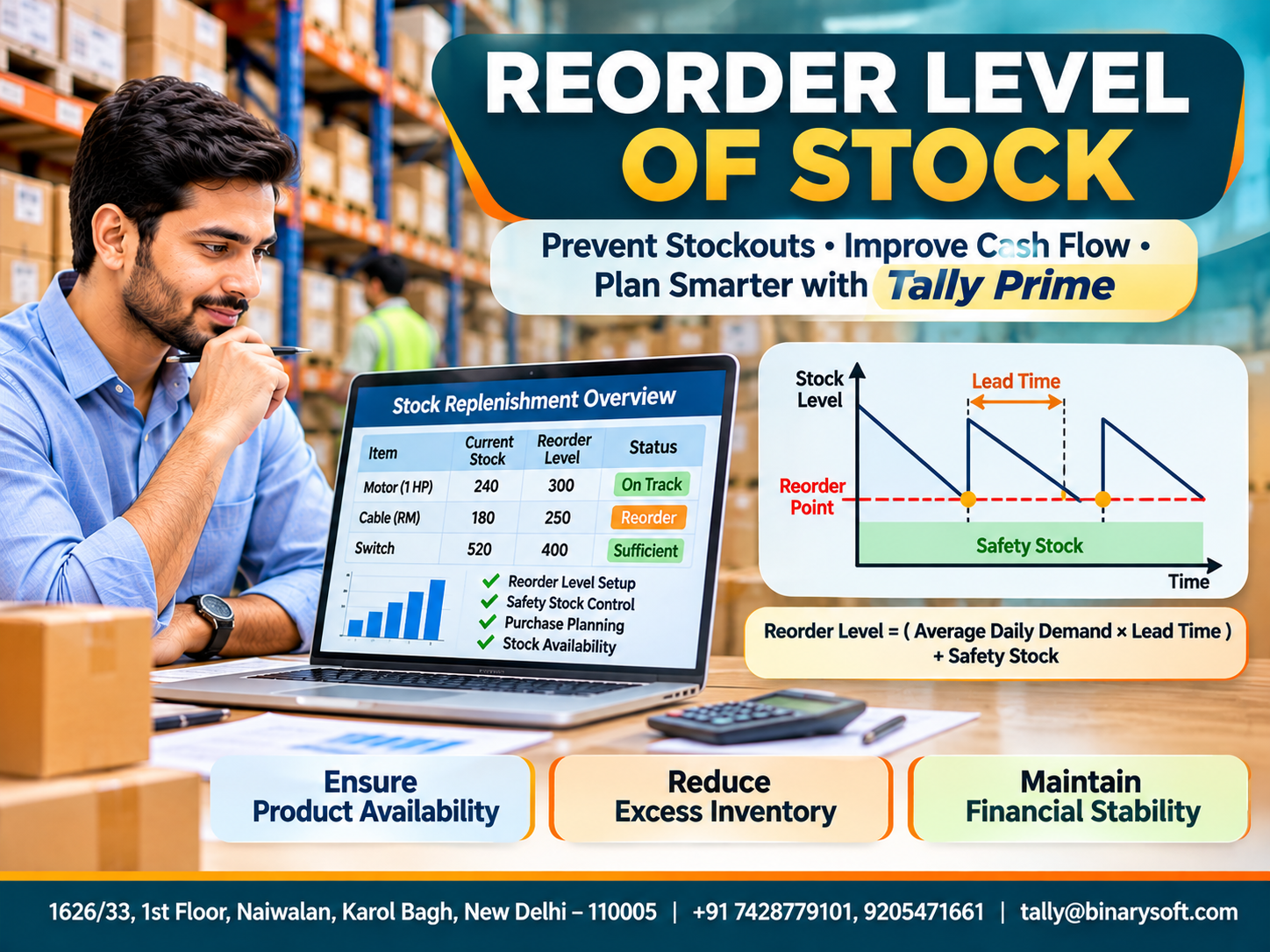
Introduction: Why the Right Reorder Level Is Essential for Business Financial Health
Every business that deals with physical products faces an important challenge: deciding when to purchase additional stock.
Ordering too early can create excess inventory, increase warehouse expenses and block working capital. Ordering too late can result in stock shortages, delayed deliveries, lost customers and emergency purchasing expenses.
For small and medium businesses, both situations can seriously affect financial stability.
Imagine a wholesale electrical goods distributor maintaining hundreds of products. One popular electrical component suddenly runs out because the purchasing team failed to order replacements on time.
The company loses an important customer order and must purchase replacement stock at a higher price.
Meanwhile, several slow-moving products remain unsold in the warehouse, consuming valuable working capital.
This situation demonstrates why maintaining an appropriate reorder level of stock is essential for inventory control and financial planning.
A reorder level identifies the inventory position at which a business should initiate replenishment.
By calculating and monitoring reorder levels, businesses can improve stock availability, reduce unnecessary inventory investment and maintain more predictable cash flow.
Accounting and inventory software such as Tally Prime supports this process through stock reports, reorder-level management, purchase order tracking and inventory movement analysis.
This guide explains reorder levels, their formulas, calculations, benefits and practical implementation for Indian businesses.
What Is Reorder Level of Stock?
A reorder level, also called a reorder point, is the predetermined inventory position at which a business should place a new purchase or production order.
Its purpose is to ensure that additional inventory arrives before available stock becomes insufficient to meet expected demand.
The reorder level is generally calculated using average demand, supplier lead time and an appropriate safety stock allowance.
For example, suppose a company sells 20 units of a product every day.
Its supplier requires 10 days to deliver new stock.
The company also maintains 100 units as safety stock.
The reorder point would be:
(20 × 10) + 100 = 300 units.
When the inventory position reaches 300 units, the company should initiate replenishment.
Inventory position generally means stock on hand plus stock already on order, minus backorders or other committed demand.
Using inventory position rather than physical stock alone helps prevent unnecessary duplicate orders.
Why Reorder Levels Matter for Financial Stability
1. Prevents Lost Sales
Stock shortages can force customers to purchase products from competitors.
Reorder levels help businesses initiate purchasing before essential inventory becomes unavailable.
2. Protects Working Capital
Unnecessary stock purchases tie up funds that could be used for salaries, supplier payments and business expansion.
Proper reorder planning helps avoid excessive inventory investment.
3. Reduces Emergency Purchasing
Urgent purchases often involve higher prices, additional transportation charges and limited supplier options.
Planned replenishment helps businesses avoid these unnecessary expenses.
4. Controls Inventory Carrying Costs
Excess stock increases warehousing, insurance, handling and financing costs.
Reorder-level planning supports more disciplined inventory purchasing.
5. Improves Supplier Relationships
Regular purchasing schedules help businesses communicate requirements and coordinate deliveries with suppliers.
6. Supports Customer Satisfaction
Reliable product availability helps businesses fulfil orders on time and maintain customer confidence.
An Emotional Story: How One Missed Stock Order Nearly Cost a Family Its Business
The Day an Important Customer Walked Away
Deepak operated a small electrical equipment distribution business in Delhi.
His father had started the company with limited savings and years of hard work.
Deepak wanted to expand the business while preserving the trust his father had built with customers.
The company supplied electrical cables, switches and industrial components to contractors and retailers.
Although sales were growing, inventory management remained largely dependent on experience and manual checking.
One afternoon, an important customer requested a large quantity of circuit breakers for an urgent project.
Deepak confidently accepted the order.
However, when warehouse employees began preparing the delivery, they discovered that the required stock was almost exhausted.
The supplier needed another ten days to deliver replacements.
The customer could not wait and cancelled the order.
That evening, Deepak sat alone in his office reviewing unpaid bills and warehouse expenses.
He realised that the company had invested heavily in products that were not selling, while essential products had become unavailable.
His father entered the office and asked what had happened.
Deepak explained that he had lost an important customer because he had failed to order stock at the right time.
Instead of criticising him, his father reminded him that successful business management required preparation, not simply hard work.
The following week, Deepak reviewed historical sales, supplier delivery times and inventory balances.
With help from his accountant, he introduced reorder levels for important products and began monitoring inventory through Tally Prime.
Over the following months, purchasing became more organised and emergency orders reduced.
The most meaningful moment came when the same customer returned with another order.
This time, Deepak delivered the products on schedule.
He realised that a simple reorder-level system could protect not only business revenue but also the trust built over generations.
This fictional story illustrates common inventory challenges faced by growing Indian businesses.
Reorder Level Formula and Calculation
A commonly used reorder point formula is:
\[ \text{Reorder Point}=(\text{Average Daily Demand}\times\text{Lead Time})+\text{Safety Stock} \]
Where:
-
Average Daily Demand: Expected number of units consumed or sold each day.
-
Lead Time: Time required for replenishment after placing an order.
-
Safety Stock: Additional inventory maintained to protect against uncertainty.
Practical Calculation Example
Consider an automobile spare parts distributor with the following information:
|
Particulars
|
Value
|
|---|
|
Average daily demand
|
25 units
|
|
Supplier lead time
|
12 days
|
|
Safety stock
|
150 units
|
|
Reorder point
|
450 units
|
Calculation:
(25 × 12) + 150 = 450 units.
When inventory position reaches 450 units, the business should review and initiate a replenishment order.
This calculation assumes average demand and lead time remain reasonably stable. Businesses experiencing significant fluctuations should use a more detailed safety stock calculation.
Reorder Level vs Minimum Stock Level vs Safety Stock
These terms are related but serve different purposes.
|
Inventory concept
|
Meaning
|
|---|
|
Reorder Level
|
Point at which replenishment should be initiated
|
|
Minimum Stock Level
|
Lowest stock balance the business aims to maintain
|
|
Safety Stock
|
Additional stock maintained against demand or supply uncertainty
|
|
Maximum Stock Level
|
Upper inventory limit used to control excessive stock
|
|
Reorder Quantity
|
Quantity to purchase when replenishment is required
|
For example, a business may have a reorder point of 450 units, safety stock of 150 units and a replenishment order quantity of 600 units.
The reorder point determines when to order, while the reorder quantity determines how much to order.
How to Calculate Safety Stock
Safety stock helps businesses handle unexpected demand increases or supplier delivery delays.
A simplified method is:
\[ \text{Safety Stock}=(\text{Maximum Daily Usage}\times\text{Maximum Lead Time})-(\text{Average Daily Usage}\times\text{Average Lead Time}) \]
Suppose maximum daily usage is 35 units, maximum lead time is 14 days, average daily usage is 25 units and average lead time is 10 days.
Safety Stock = (35 × 14) − (25 × 10)
Safety Stock = 490 − 250 = 240 units.
This method provides a basic allowance for uncertainty. Businesses requiring specific service levels should consider statistical safety stock models based on demand and lead-time variability.
Interactive Reorder Level Calculator
Enter your average daily demand, supplier lead time and safety stock to estimate when replenishment should begin.
Calculated reorder point
Inventory position
500 units
Stock above reorder point
This calculator uses a simplified reorder-point formula. It does not calculate the purchase quantity or account for all demand and supplier uncertainties.
How to Set Effective Reorder Levels for Your Business
Step 1: Analyse Historical Sales
Review historical sales and inventory consumption for the previous six to twelve months.
Identify fast-moving products, seasonal fluctuations and changes in customer demand.
Step 2: Measure Supplier Lead Time
Calculate how long suppliers normally take to deliver products after receiving purchase orders.
Review delays and differences between suppliers.
Step 3: Determine Safety Stock
Establish a suitable buffer based on demand uncertainty, supplier reliability and the consequences of stock shortages.
Step 4: Calculate Reorder Points
Use expected demand during lead time plus safety stock to determine the reorder point for each important product.
Step 5: Establish Replenishment Quantities
Consider purchasing costs, storage expenses, supplier minimum order quantities and expected demand when deciding how much stock to order.
Step 6: Monitor Inventory Regularly
Review inventory balances and outstanding purchase orders to identify products approaching their reorder points.
Step 7: Update Reorder Levels
Reorder points should be reviewed when sales volumes, supplier delivery times, product costs or market conditions change.
How Tally Prime Helps Manage Reorder Levels and Inventory Control
Tally Prime provides inventory management features that support stock replenishment, purchasing decisions and warehouse monitoring.
1. Configure Reorder Levels for Stock Items
Businesses can maintain reorder levels and minimum order quantities for stock items.
In supported Tally Prime configurations, the Reorder Status report provides access to these settings.
A typical workflow is:
-
Open Tally Prime.
-
Press Alt+G to open Go To.
-
Search for Reorder Status.
-
Select the relevant stock group or stock items.
-
Review or configure reorder levels and minimum order quantities using the available alteration options.
-
Save the changes and review replenishment requirements.
Exact screens and options may vary by product release and configuration.
2. Monitor Reorder Status
The Reorder Status report helps businesses identify items requiring replenishment based on configured stock parameters.
Purchasing teams can use the report to review available stock, outstanding orders and suggested purchasing requirements.
3. Use Stock Summary for Visibility
Stock Summary displays stock quantities and values.
Businesses can use this report to monitor inventory availability and investigate products approaching critical stock levels.
4. Track Purchase Orders
Purchase Order vouchers help businesses record supplier commitments and monitor pending deliveries.
This reduces the risk of ordering the same products repeatedly without considering outstanding purchases.
5. Analyse Inventory Movement
Movement Analysis reports help identify products with high or low stock movement.
This information supports more accurate reorder-level calculations.
6. Monitor Multiple Godowns
Businesses with multiple warehouses can track stock across different locations.
Before placing additional purchase orders, management can check whether required products are available in another godown.
7. Support Working Capital Decisions
Inventory reports can be reviewed alongside outstanding payables, receivables and financial statements.
This helps businesses assess whether proposed purchases are financially sustainable.
Important: Tally Prime supports reorder-level monitoring and purchasing workflows, but businesses should not assume that every configuration automatically places supplier orders when a reorder point is reached.
Case Study 1: Reorder-Level Planning in an Electrical Wholesale Business
Illustrative case study
A Delhi-based electrical goods distributor managed approximately 1,800 products.
The company frequently experienced shortages of fast-moving electrical components while maintaining excessive quantities of less popular products.
Management analysed historical sales, calculated reorder points and introduced safety stock policies.
Tally Prime inventory reports supported stock monitoring and purchasing decisions.
After six months, illustrative results included:
|
Performance indicator
|
Before
|
After
|
|---|
|
Monthly stockout incidents
|
20
|
6
|
|
Average inventory investment
|
₹55 lakh
|
₹46 lakh
|
|
Emergency purchase expenses
|
₹90,000
|
₹30,000
|
The example demonstrates how systematic reorder-level planning can improve product availability while reducing unnecessary stock investment.
Case Study 2: Reorder-Level Management in an Automobile Spare Parts Business
Illustrative case study
An automobile spare parts distributor supplied products to workshops and retail customers.
The business frequently purchased components urgently because stock levels were monitored manually.
Management introduced reorder levels for high-demand products, reviewed supplier lead times and established minimum purchasing quantities.
Tally Prime Stock Summary and Reorder Status reports helped the purchasing team monitor replenishment requirements.
Illustrative results after five months included a reduction in emergency purchases and improved availability of important spare parts.
The company also reduced excess inventory by avoiding unnecessary bulk purchases.
Common Mistakes When Setting Reorder Levels
Businesses should avoid using the same reorder point for every product, ignoring supplier delays and failing to consider seasonal demand.
Other common mistakes include setting excessive safety stock, neglecting outstanding purchase orders and failing to update reorder parameters.
An effective reorder-level system requires reliable inventory records, appropriate forecasting and regular management review.
Best Practices for Maintaining Financial Stability Through Stock Replenishment
Businesses should prioritise financially important and operationally critical products.
Reorder levels should reflect realistic supplier lead times and customer demand.
Purchasing teams should coordinate with sales, warehouse and accounting departments before placing significant orders.
Management should also monitor stock ageing, carrying costs, inventory turnover and working capital requirements.
Combining reorder-level planning with ABC analysis and periodic inventory audits can strengthen overall inventory control.
Conclusion
Maintaining appropriate reorder levels is an important part of inventory management and financial planning.
Businesses that order too early may face excessive stock investment, while businesses that order too late risk shortages, delayed deliveries and lost sales.
Reorder-level planning helps establish a more reliable balance between inventory availability and working capital requirements.
By considering demand, supplier lead times, safety stock and purchasing quantities, businesses can improve replenishment decisions and reduce avoidable expenses.
Tally Prime supports these activities through Reorder Status, Stock Summary, Purchase Order Management, Movement Analysis and godown-wise stock reporting.
The right reorder level helps a business maintain enough stock to serve customers without unnecessarily sacrificing its financial stability.
Professional Tally Prime Inventory Management Support
Powered by Binarysoft Technologies
Authorized Tally Partner
Binarysoft Technologies helps businesses improve inventory management, stock replenishment, purchasing workflows and accounting efficiency through Tally Prime.
Location: 1626/33, 1st Floor, Naiwalan, Karol Bagh, New Delhi – 110005, INDIA
Contact us: +91 7428779101, 9205471661
Email us: tally@binarysoft.com
Business Hours: 10:00 AM – 6:00 PM, Monday to Friday
Frequently Asked Questions
What is the difference between reorder level and safety stock?
The reorder level determines when replenishment should begin, while safety stock provides additional protection against demand fluctuations and supplier delays.
Why is reorder level important for financial stability?
Reorder levels help reduce unnecessary inventory investment, prevent lost sales, control emergency purchasing expenses and improve cash flow management.
How does reorder-level planning reduce inventory costs?
It helps businesses purchase inventory according to expected demand and delivery times, reducing unnecessary storage and financing expenses.
What happens if the reorder level is too low?
A low reorder point increases the risk of stock shortages, delayed customer orders and emergency purchases.
CA. Rishubh Talrejaa specializes in GST, business accounting, and compliance advisory for growing enterprises. With experience in handling real-time transactional data and audits, he writes practical insights on inventory control, taxation, and digital transformation for Indian businesses operating in competitive markets.