Export GSTR-1 in JSON Format & Update Rate-wise HSN/SAC Summary

Call CA Tally HelpDesk +91 9205471661, 7428779101

Export GSTR-1 in JSON Format & Update Rate-wise HSN/SAC Summary
By CA. Sagar Singh   |   Published on: 18-07-2022 | 7 min read

In the latest amendments announced for GSTR-1, a few changes have been introduced with respect to reporting of HSN/SAC Summary. The changes are given below:

  • The HSN/SAC needs to be reported rate-wise.
  • The total value of stock items/services corresponding to the HSN/SAC need not be reported.
  • The HSN/SAC needs to be reported in 4, 6 or 8 digits only.
  • The reporting of HSN/SAC needs to be, a minimum of 4 digits for companies having turnover of up to 5 Crores, and 6 digits if the turnover is above 5 Crores.

We will be supporting these changes in the upcoming releases of TallyPrime. Until then, we suggest that you follow these simple steps for reporting of HSN/SAC Summary in GSTR-1.

  1. Export the GSTR-1 report from TallyPrime in JSON format without including the HSN/SAC summary, and upload the JSON file to the portal.
  2. Export the HSN/SAC summary in MS Excel format from GST Annual Computation report. Add these details in the MS Excel template of the offline tool.
  3. Import the MS Excel template in the offline tool and generate the JSON file. Upload this JSON file to the portal.

Export GSTR-1 Report in JSON Format and Upload it to Portal

  1. View GSTR-1 report without the HSN/SAC Summary.
    1. Gateway of Tally > Display More Reports > GST Reports > GSTR-1.
      Alternatively, press Alt+G (Go To) > type or select GSTR-1 > and press Enter.
    2. Ensure the period is of May 2021.
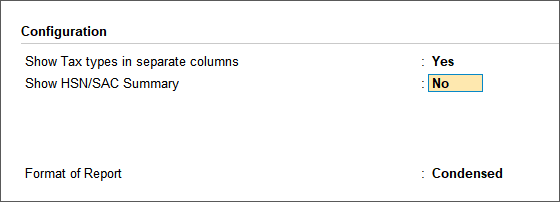
    3. Press F12 (Configure) and set the options as given below:
      • Set Show Tax types in separate columns to Yes.
      • Set Show HSN/SAC Summary to No.
    4. As always, press Ctrl+A to save.
  2. Export the GSTR-1 report with document summary as a single JSON format, and import the same in the portal.
    1. Press Alt+E (Export) > E-Return.
    2. Select the File Format as JSON (Data Interchange).
    3. Set Export separate files for each Section to No.
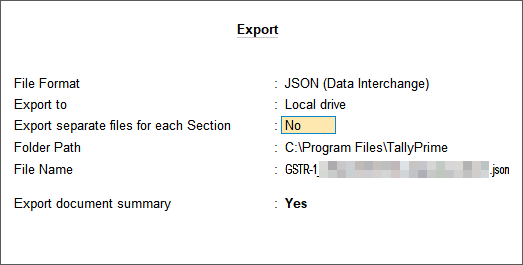
    4. Set Export document summary to Yes.
    5. Export the JSON file.
    6. Import the same JSON file in the portal.

Now, all the details of GSTR-1, other than HSN/SAC summary, are uploaded to the portal.

Add HSN/SAC Details of GST Annual Computation Report in the Offline Tool

Based on your transactions, the details of HSN/SAC with corresponding rate of tax for all outward supplies will be available in the GST Annual Computation report. Export these details in MS Excel format. Add the same details in the MS Excel template of the offline tool.

  1. View the HSN/SAC summary of outward supplies in the GST Annual Computation report.
    1. Gateway of Tally > Display More Reports > GST Reports > GST Annual Computation.
      Alternatively, press Alt+G (Go To) > type or select GST Annual Computation > and press Enter.
    2. Under HSN/SAC Summary, select Summary of Outward Supplies and press Enter.
    3. Press F2 (Period), and set it to May-2021.
  2. Export the details in MS Excel format.
    1. Press Alt+E (Export) > Current.
    2. Press C (Configure) > select the File Format as Excel (Spreadsheet).
    3. Export the file. The Excel file appears with the Rate of Tax and HSN/SAC columns as shown below:
    4. In case of services, the UQC appears as ‘OTH-OTHERS’. Change this to NA.
  3. Manually add these details in the MS Excel template, and import it in the offline tool.
    1. Open the GSTR1_Excel_Workbook_Template_V1.8.xlsx file from the offline tool.
      You will notice that the Rate column appears after the Total Value column, as shown below:

    2. Rearrange the columns and update the MS Excel file generated from TallyPrime, as shown below:
    3. Save the file. Copy these details and paste them in the GSTR1_Excel_Workbook_Template_V1.8.xlsx file.

The file can now be imported in the offline tool.

Generate JSON File in the Offline Tool and Upload it to Portal

You need to import the MS Excel template updated with HSN/SAC details in the offline tool. Then, generate the JSON file and upload it to portal.

  1. Open GST Offline Tool.exe > Import Files. Under Import Returns – one section at a time, select HSN-wise Summary of Outward Supplies – 12.
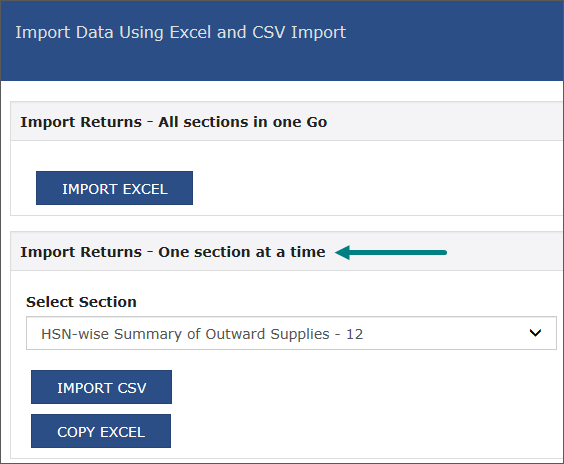
  2. Click COPY EXCEL > View Summary > and import it.
  3. Click GENERATE FILE. The JSON file will be generated.
  4. Click the link to download the JSON file.
  5. Upload this JSON file in the portal.

Once you upload the JSON file generated for HSN/SAC in the portal, the filing of GSTR-1 with HSN/SAC as per the latest amendment will be completed.


About the Author

Written by CA. Sagar Singh • 18-07-2022

CA. Sagar Singh advises MSMEs on accounting accuracy, GST compliance, and internal controls. With exposure to high-volume transaction environments, he writes practical guidance on inventory management, billing discipline, and compliance-ready accounting systems.


Verified Content 7 min read Support: +91 9205471661, 7428779101

Need Quick Support for Tally Prime?

For Tally Prime discount schemes and product inquiries, connect with our team.

+91 9205471661 | +91 7428779101

Subscribe For Product Updates

Opt-in Subscription

Tally Prime Auditor Renewal (One Year)

Applicable for CAs / Firms Using GOLD (Multi User ) Only
Renew your license now and upgrade from Tally ERP 9 to Tally Prime for Free!
Rs 6750 + 18% GST (Rs 1215)
Continue Here >>

Tally Prime Auditor Renewal (Two Years)

Applicable for CAs / Firms Using GOLD (Multi User ) Only
Renew your license now and upgrade from Tally ERP 9 to Tally Prime for Free!
Rs 12150 + 18% GST (Rs 2187)
Offer Continue Here >>

Tally Prime Gold Renewal (One Year)

Unlimited Multi-User Edition For Multiple PCs on LAN Environment
Renew your license now and upgrade from Tally ERP 9 to Tally Prime for Free!
Rs 13500 + 18% GST (Rs 2430)
Continue Here >>

Tally Prime Gold Renewal (Two Years)

Unlimited Multi-User Edition For Multiple PCs on LAN Environment
Renew your license now and upgrade from Tally ERP 9 to Tally Prime for Free!
Rs 24300 + 18% GST (Rs 4374)
Offer Continue Here >>

Tally Prime Silver Renewal  (One Year)

Single User Edition For Standalone PCs ( Not applicable for Rental License )
Renew your license now and upgrade from Tally ERP 9 to Tally Prime for Free!
Rs 4500 + 18% GST (Rs 810)
Continue Here >>

Tally Prime Silver Renewal  (Two Years)

Single User Edition For Standalone PCs ( Not applicable for Rental License )
Renew your license now and upgrade from Tally ERP 9 to Tally Prime for Free!
Rs 8100 + 18% GST (Rs 1458)
Offer Continue Here >>

Tally On Cloud

Tally On Cloud ( Per User Annual)
Now access Tally Prime anytime from anywhere – Just Deploy your Tally License and Tally Data on our Cloud Solution.
Rs 7000 + 18% GST (Rs 1260)
Continue Here >>

Tally Prime Gold

Unlimited Multi-User Edition
For EMI options, please Call: +91 742 877 9101 or E-mail: tally@binarysoft.com (10:00 am – 6: 00 pm , Mon-Fri)
Rs 67500 + 18% GST (Rs 12150)
Continue Here >>

Tally Prime Silver to Tally Prime Gold

Unlimited Multi-User Edition For Multiple PCs on LAN Environment
Renew your license now and upgrade from Tally ERP 9 to Tally Prime for Free!
Rs 45000 + 18% GST (Rs 8100)
Continue Here >>

Tally Prime Silver

Single User Edition For Standalone PCs
For EMI options, please Call: +91 742 877 9101 or E-mail: tally@binarysoft.com (10:00 am – 6: 00 pm , Mon-Fri)
Rs 22500 + 18% GST (Rs 4050)
Continue Here >>

Tally On AWS Cloud Personal (For 1 user)

(Per User/One Year)
TallyPrime latest release pre-installed
Rs 7200 + 18% GST (Rs 1296)
Continue Here >>

Tally On AWS Cloud Regular (Upto 2 users)

(Two Users/One Year)
TallyPrime latest release pre-installed
Rs 14400 + 18% GST (Rs 2592)
Continue Here >>

Tally On AWS Cloud Regular Plus (Upto 4 users)

(Four Users/One Year)
TallyPrime latest release pre-installed
Rs 21600 + 18% GST (Rs 3888)
Continue Here >>

Tally On AWS Cloud Regular Pro (Upto 8 users)

(Eight Users/One Year )
TallyPrime latest release pre-installed
Rs 43200 + 18% GST (Rs 7776)
Continue Here >>

Tally On AWS Cloud Performance (Upto 12 users)

(Twelve Users/One Year)
TallyPrime latest release pre-installed
Rs 64800 + 18% GST (Rs 11664)
Continue Here >>

Tally On AWS Cloud Performance Plus (Upto 16 users)

(Sixteen Users/One Year)
TallyPrime latest release pre-installed
Rs 86400 + 18% GST (Rs 15552)
Continue Here >>

Latest Articles

Modernize Business Invoicing with Tally Prime’s Smart Accounting and GST Features
In today's competitive business environment, generating an invoice is no longer just about recording...
Read More →
Complete Guide to Credit Control and Cash Flow Management in Tally Prime for Growing Businesses
A wholesale trader may generate lakhs of rupees in monthly revenue but struggle to pay suppliers bec...
Read More →
Tally Prime for Businesses: Smarter Invoicing, Automated Accounting and Financial Reporting
Every successful business depends on accurate financial information. Whether it is a small retail sh...
Read More →
Explore Tally Prime’s Powerful Inventory Features for Efficient Stock Monitoring and Business Accounting
In 2026, businesses across India are facing increasing pressure to manage inventory accurately while...
Read More →
Switch Your Restaurant Business to Tally on Cloud – Pricing, Inventory, GST Accounting, Multi-Location Access, Backup & Business Reports
Running a restaurant in 2026 requires much more than preparing delicious food and delivering excelle...
Read More →
Modern Banking Management in Tally Prime for Automated Reconciliation, Secure Payments and Financial Control
In 2026, Indian businesses are handling more digital banking transactions than ever as customers inc...
Read More →
Get For Tally Discount Scheme and Inquiries
Call us at +91 7428779101, 8368262875.

Tally Query | Discounted Tally New License | Discounted Tally Renewal