Call CA Tally HelpDesk
+91 9205471661,
7428779101
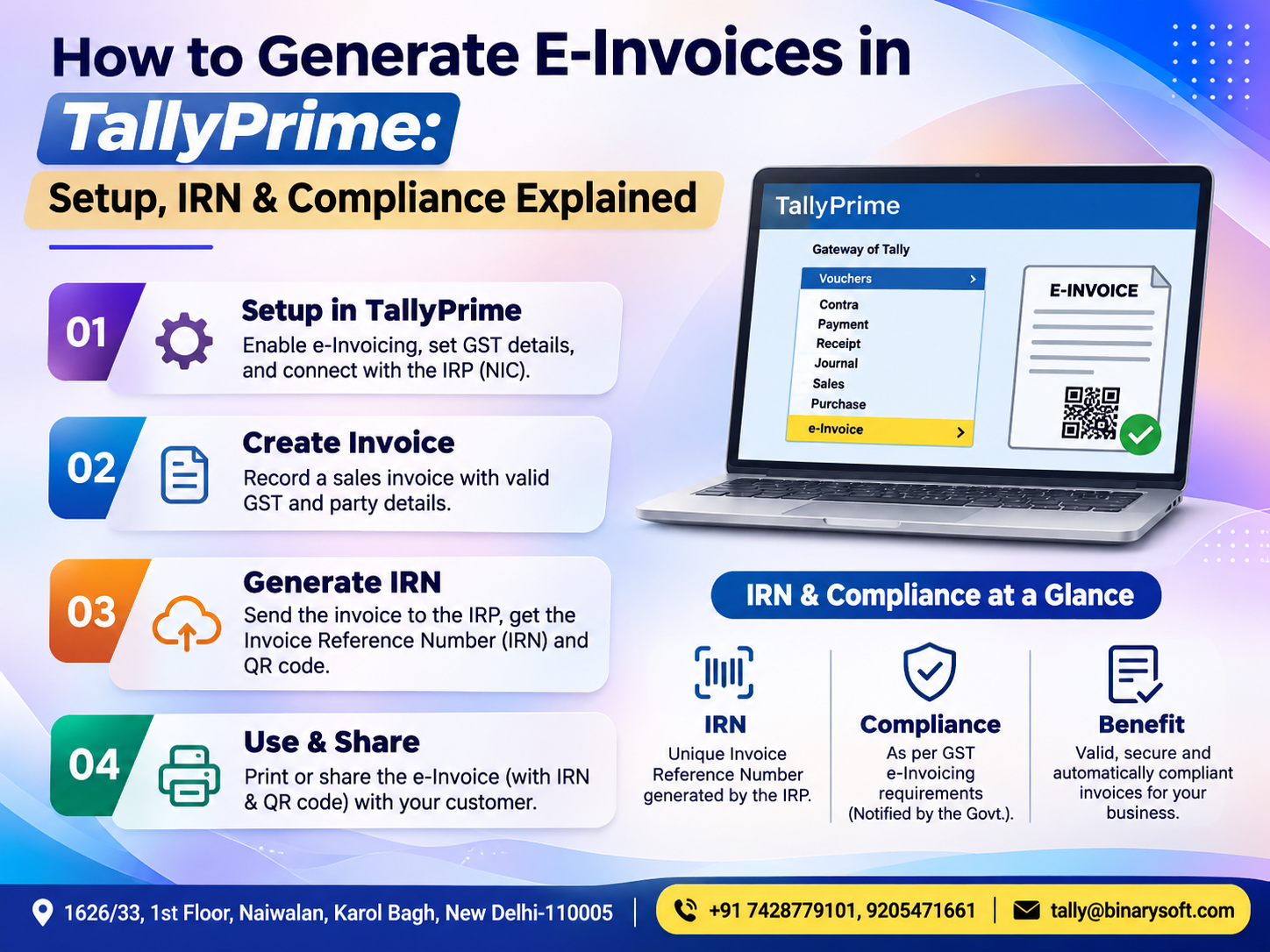
Introduction: Why E-Invoicing Matters for Modern Indian Businesses
India's business environment is becoming increasingly digital, and GST e-invoicing has become an important compliance requirement for eligible businesses.
For manufacturers, wholesalers, distributors, service providers and growing enterprises, generating accurate invoices is no longer only about maintaining sales records. It also involves meeting applicable GST requirements, maintaining consistent transaction information and ensuring that invoices can be verified electronically.
Traditional invoicing methods often involve manual data entry, repeated checking and separate accounting processes. These activities can consume valuable time and increase the possibility of errors.
TallyPrime simplifies GST e-invoicing by connecting invoice preparation, accounting records and Invoice Reference Number (IRN) generation within a structured workflow.
Businesses can prepare invoices in TallyPrime and, when the required services and configurations are available, submit eligible invoice information to the Invoice Registration Portal (IRP) for registration.
Once successfully registered, the invoice receives an IRN and a digitally signed QR code.
This guide explains how e-invoicing works, how to configure TallyPrime, how to generate an IRN, how to handle common errors and how businesses can improve compliance efficiency.
It also includes two practical case studies and a relatable business story demonstrating why accurate invoicing matters beyond statutory compliance.
What Is GST E-Invoicing?
GST e-invoicing is a system under which specified businesses report eligible invoice details electronically to a government-authorized Invoice Registration Portal.
The IRP validates the submitted information and, upon successful registration, generates an Invoice Reference Number.
The registered invoice information is accompanied by a digitally signed QR code containing prescribed invoice particulars.
An important distinction is that e-invoicing does not mean creating every invoice directly on a government website.
Businesses can continue preparing invoices using compatible accounting software such as TallyPrime.
The relevant invoice information is then reported to the IRP through the supported process.
GST e-invoicing helps standardize invoice information, reduce duplication and improve consistency between business records and GST systems.
What Is an Invoice Reference Number (IRN)?
An Invoice Reference Number, commonly called an IRN, is a unique identifier associated with an invoice registered through the GST e-invoicing system.
It is generated using prescribed invoice-identification information and is used to identify the registered document.
After successful registration, the IRP returns the IRN, acknowledgement information and digitally signed QR code.
For businesses covered by mandatory e-invoicing requirements, obtaining valid registration for applicable documents is an important part of issuing compliant GST invoices.
Why Is the IRN Important?
The IRN helps establish that the invoice information has been registered through the authorized e-invoicing system.
It supports standardized reporting and reduces the possibility of duplicate registration of the same document.
Businesses can also use the registered invoice information for reconciliation and record verification.
However, IRN registration does not independently confirm that every commercial or tax detail is correct. Businesses remain responsible for the accuracy of their invoices.
Which Businesses Must Generate E-Invoices?
GST e-invoicing applicability depends on the notified aggregate turnover thresholds, the relevant financial years, the type of supply and any applicable exemptions.
Under the threshold effective from 1 August 2023, e-invoicing generally applies to eligible taxpayers whose aggregate turnover exceeded ₹5 crore in any financial year from 2017–18 onward, subject to notified exclusions.
Aggregate turnover is evaluated on an all-India PAN basis rather than separately for each GST registration.
The applicable threshold should not be confused with a requirement to generate an e-invoice for every transaction.
Typically, covered taxpayers report eligible B2B invoices, specified export invoices and applicable credit or debit notes.
Ordinary B2C invoices are not covered by the standard GST e-invoicing mandate, although other GST requirements may apply.
Businesses should verify their applicability before enabling e-invoicing and obtain professional guidance where exemptions or unusual transaction types are involved.
Step-by-Step Guide to Set Up E-Invoicing in TallyPrime
Before generating your first e-invoice, complete the necessary registration and configuration.
Step 1: Verify Your TallyPrime Version
Open TallyPrime and check that you are using a supported version with the required e-invoicing capabilities.
Keeping the software updated helps maintain compatibility with changes in GST e-invoicing systems.
Step 2: Enable GST and E-Invoicing
Open your company in TallyPrime and follow these steps:
-
Press F11 (Features).
-
Enable Goods and Services Tax (GST).
-
Open the relevant GST registration details.
-
Set e-Invoicing applicable to Yes.
-
Enter the applicable starting date.
-
Specify the appropriate invoice billing location.
-
Press Ctrl+A to save.
If your company maintains multiple GST registrations, select the relevant registration before enabling e-invoicing.
Step 3: Register on the Invoice Registration Portal
Eligible businesses must complete the required IRP registration.
The process generally involves providing the GSTIN, verifying business information, completing the prescribed authentication and creating login credentials.
After registration, create the required API user profile for the supported integration.
For TallyPrime's connected e-invoicing workflow, the appropriate GST Suvidha Provider must be selected during API configuration.
Keep the credentials secure and provide access only to authorized employees.
Step 4: Update Company and Customer Details
Verify that the following information is accurate:
-
Company GSTIN and registered address.
-
State and PIN code.
-
Customer GSTIN where applicable.
-
Billing and shipping details.
-
HSN or SAC classification.
-
Applicable GST rates.
-
Item descriptions and units of measurement.
-
Invoice numbering and transaction dates.
Incorrect master information is a common reason for invoice rejection.
How to Generate an E-Invoice in TallyPrime
After completing the setup, businesses can generate an IRN through the normal invoicing process.
Step 1: Create a Sales Invoice
Open the Sales voucher using F8 (Sales).
Select the customer ledger and enter the relevant sales information, including products or services, quantities, rates, discounts and tax details.
Step 2: Provide E-Invoice Information
Set Provide e-Invoice details to Yes, where prompted.
Enter the appropriate Bill To and Ship To details.
Verify the transaction type and other mandatory information.
Step 3: Save the Invoice
Press Ctrl+A to save the voucher.
TallyPrime can prompt you to generate the e-invoice after saving the transaction.
Step 4: Submit the Invoice for IRN Generation
Confirm the generation request and authenticate using the required e-invoicing credentials.
TallyPrime submits the relevant invoice information through its supported connected workflow.
The IRP validates the information and returns a response.
Step 5: Receive the IRN and QR Code
When registration succeeds, the IRN and related acknowledgement information are updated in the voucher.
The digitally signed QR code becomes available for the registered invoice.
Step 6: Print or Share the Invoice
Print the invoice with the required IRN and QR code details.
Check the invoice information before sharing it with the customer.
The exact screens and options may differ depending on your installed TallyPrime version.
How to Generate Bulk E-Invoices in TallyPrime
Businesses issuing large numbers of invoices may prefer bulk processing.
TallyPrime supports selecting multiple eligible transactions for e-invoice generation.
Open Alt+Z (Exchange) and select Send for e-Invoicing.
Review pending transactions, select the required invoices and submit them for registration.
After processing, verify successful registrations and examine rejected transactions separately.
Bulk processing can reduce repetitive work for wholesalers, distributors and manufacturers with high invoice volumes.
However, businesses must still follow applicable IRP reporting deadlines and should not delay submission merely to accumulate invoices.
How to Check E-Invoice Status and IRN Details
Regular monitoring is important because saving an invoice in accounting software does not automatically establish successful IRP registration.
In TallyPrime, press Alt+G (Go To) and open the e-Invoice report.
The report helps users review relevant invoice statuses, pending transactions, errors and registration information.
Businesses should verify that invoices requiring e-invoicing have received successful IRN acknowledgements.
Any rejected or unresolved transactions should be corrected promptly.
Common E-Invoice Errors and How to Resolve Them
Invalid GSTIN
An incorrect, inactive or mismatched GSTIN may prevent registration.
Verify customer and supplier information against the applicable GST records.
Incorrect HSN or SAC
Missing or invalid classification details can cause validation failures.
Review the relevant item or service master and update the correct classification.
Duplicate IRN
An invoice that has already been registered may be rejected if submitted again as a new registration.
Check the existing IRN status before attempting another submission.
Incorrect Invoice Details
Problems involving document type, invoice number, tax values or mandatory fields may lead to rejection.
Review the voucher and correct the underlying information.
Connectivity or Authentication Problems
An unstable internet connection, incorrect credentials or temporary service interruption can prevent successful submission.
Check connectivity and authentication, then verify the invoice status before retrying to avoid unnecessary duplicate requests.
How to Cancel an E-Invoice in TallyPrime
Sometimes businesses discover an error after generating an IRN.
Where cancellation is permitted, the taxpayer can initiate cancellation through the supported e-invoicing workflow.
IRP cancellation is generally allowed within 24 hours of IRN generation, subject to portal rules and restrictions.
After the permitted cancellation period, the original IRN cannot simply be cancelled through the normal IRP process. Appropriate GST correction procedures may be required.
Businesses should not assume that deleting or modifying an accounting voucher automatically cancels its registered IRN.
Always confirm the cancellation status returned by the IRP.
E-Invoice vs E-Way Bill: Understanding the Difference
|
E-Invoice
|
E-Way Bill
|
|---|
|
Registers prescribed invoice information
|
Supports compliance for applicable movement of goods
|
|
Generates an IRN
|
Generates an e-way bill number
|
|
Includes a digitally signed QR code
|
Contains relevant goods movement and transport information
|
|
Applies to specified documents and taxpayers
|
Applies according to goods movement rules
|
|
Focuses on invoice reporting
|
Focuses on transportation compliance
|
TallyPrime can support connected e-invoice and e-way bill workflows where the relevant conditions are met.
Generating an e-invoice does not automatically remove the obligation to generate an e-way bill when one is required.
Case Study 1: A Delhi Electronics Distributor Improves Invoice Processing
Illustrative case study based on common distribution business operations.
A growing electronics distributor in Delhi supplied products to retailers across North India.
The business generated numerous B2B invoices every day.
Previously, employees prepared invoices in accounting software and separately entered information into another system for e-invoicing.
This resulted in repetitive work and occasional data-entry differences.
The Challenge
The accounts team struggled with invoice duplication, delayed IRN generation, inconsistent customer information and time-consuming verification.
The TallyPrime Approach
The distributor configured GST e-invoicing in TallyPrime, verified customer masters and established a structured invoice approval process.
Employees began generating IRNs through the connected workflow and reviewing pending transactions through the e-Invoice report.
The Business Benefits
The process reduced the need to re-enter the same invoice information into separate systems.
Employees could identify rejected transactions more quickly and maintain clearer records of successfully registered invoices.
The distributor also gained a more consistent process for checking invoices before dispatch.
The case demonstrates how integrated e-invoicing can support efficiency and accuracy in distribution businesses.
Case Study 2: A Manufacturing Company Strengthens GST Compliance
Illustrative case study.
A manufacturing company in Faridabad supplied industrial components to several corporate customers.
Its accounts department managed sales invoices, purchase records, inventory and statutory reporting.
As the business expanded, maintaining consistent invoicing information became more challenging.
The Challenge
The company faced difficulties coordinating dispatch schedules, checking customer GST details and confirming that required invoices had received valid IRNs.
The TallyPrime Approach
The company organized customer and inventory masters, configured GST e-invoicing and introduced an internal verification process.
Invoices were reviewed before submission, and IRN status was checked before relevant dispatch documentation was finalized.
The Business Benefits
The accounts team gained better visibility into pending registrations and invoice errors.
The improved workflow supported coordination between accounting, sales and dispatch employees.
The company could maintain more organized records for internal review and GST reconciliation.
This example highlights the value of combining accounting software with consistent compliance procedures.
GST E-Invoicing Compliance: Important Rules Businesses Should Know
Businesses should understand the difference between the turnover threshold for mandatory e-invoicing and the deadline for reporting invoices.
As of November 2026, an important requirement is the 30-day IRP reporting restriction for taxpayers with annual aggregate turnover of ₹10 crore or more, effective from 1 April 2025.
For affected taxpayers, invoices older than the permitted reporting window may be rejected by the IRP.
Businesses covered by e-invoicing should therefore generate IRNs promptly rather than waiting until the end of the month.
Additional compliance practices include maintaining correct GST classifications, monitoring invoice registration status, reconciling GSTR-1 information and retaining appropriate accounting records.
A Business Owner's Story: When One Missing IRN Threatened an Important Delivery
This fictional story reflects challenges commonly experienced by growing Indian businesses.
Amit had spent twelve years building a small manufacturing business in Delhi.
He began with two employees and a rented workshop. Over time, his business grew into a dependable supplier for several industrial customers.
One morning, Amit received an important order from a long-standing corporate client.
The order represented weeks of production work and a significant payment opportunity.
His team completed the products on schedule, and the delivery vehicle was ready to leave.
But during the final document review, the accounts department discovered that the invoice had not been successfully registered for e-invoicing.
The required IRN was missing.
The customer needed compliant documentation, and the dispatch process was delayed.
Amit felt frustrated. His employees had worked overtime to complete the order, yet an administrative problem threatened to affect the customer relationship.
That evening, he discussed the situation with his accountant.
They decided to improve their invoicing workflow rather than continue relying on separate manual processes.
After configuring TallyPrime and training the accounts team, the company introduced a simple rule: every invoice requiring an IRN would be checked for successful registration before the relevant dispatch documents were finalized.
Over time, the team became more confident in handling e-invoicing requirements.
A few weeks later, another important order was ready.
This time, the invoice information was verified, the IRN was generated and the required documentation was prepared before dispatch.
Amit watched the delivery vehicle leave on schedule.
For him, the change represented more than an improvement in accounting.
It meant protecting the trust his customers had placed in his business.
The lesson: Reliable e-invoicing is not merely a statutory requirement. It can also support customer confidence, operational discipline and business continuity.
Why Choose TallyPrime for GST E-Invoicing?
TallyPrime offers several practical advantages for businesses managing GST-compliant invoices.
Its integrated accounting environment helps reduce repetitive data entry and connects invoice records with sales, customer ledgers, inventory and financial reports.
The ability to generate IRNs during invoicing, process multiple invoices and review e-invoice status can help businesses maintain a more organized workflow.
TallyPrime also supports user-level security controls, allowing businesses to manage access to sensitive accounting and e-invoicing functions.
For growing businesses, these features can reduce administrative complexity while improving visibility into invoice processing.
Successful implementation still depends on accurate master data, correct configuration, employee training and regular compliance checks.
Get TallyPrime E-Invoicing Setup and Support from Binarysoft Technologies
Businesses adopting GST e-invoicing may need assistance with initial setup, software configuration and employee training.
Binarysoft Technologies, an Authorized Tally Partner, can help businesses understand their TallyPrime requirements and establish suitable accounting workflows.
Services may include TallyPrime installation, GST configuration, e-invoicing setup, IRN generation guidance, invoice error troubleshooting and accounting support.
Businesses in Delhi and other locations can contact Binarysoft Technologies to discuss their requirements.
Conclusion: Simplify E-Invoicing and Strengthen GST Compliance with TallyPrime
GST e-invoicing has become an important part of financial operations for eligible Indian businesses.
Accurate invoice preparation, timely IRN generation, correct GST information and reliable record management help organizations maintain compliance and avoid unnecessary administrative delays.
TallyPrime provides an integrated environment for managing invoices, accounting transactions, inventory and relevant GST workflows.
By following the correct setup procedures and regularly checking invoice registration status, businesses can improve operational efficiency and maintain more dependable financial records.
Whether you operate a manufacturing company, distribution business, wholesale enterprise or service organization, TallyPrime can support a structured approach to GST e-invoicing.
For professional TallyPrime e-invoicing setup, GST configuration and technical assistance, contact Binarysoft Technologies.
Powered by Binarysoft Technologies
Authorized Tally Partner
Location: 1626/33, 1st Floor, Naiwalan, Karol Bagh, New Delhi – 110005, INDIA
Contact Us: +91 7428779101, 9205471661
Email Us: tally@binarysoft.com
Business Hours: 10:00 AM – 6:00 PM, Monday to Friday
Frequently Asked Questions
How do I generate an e-invoice in TallyPrime?
Enable GST e-invoicing, complete IRP registration and API configuration, create an eligible sales invoice and submit it for IRN generation. After successful registration, TallyPrime records the IRN and QR code information.
What is an IRN in TallyPrime?
IRN stands for Invoice Reference Number. It is the unique identifier associated with an invoice registered through an authorized Invoice Registration Portal.
CA. Kairav Dalmia focuses on GST reporting, bookkeeping controls, and accounting automation for trading and service businesses. He translates technical accounting requirements into practical processes that businesses can follow in their daily operations.