Call CA Tally HelpDesk
+91 9205471661,
7428779101
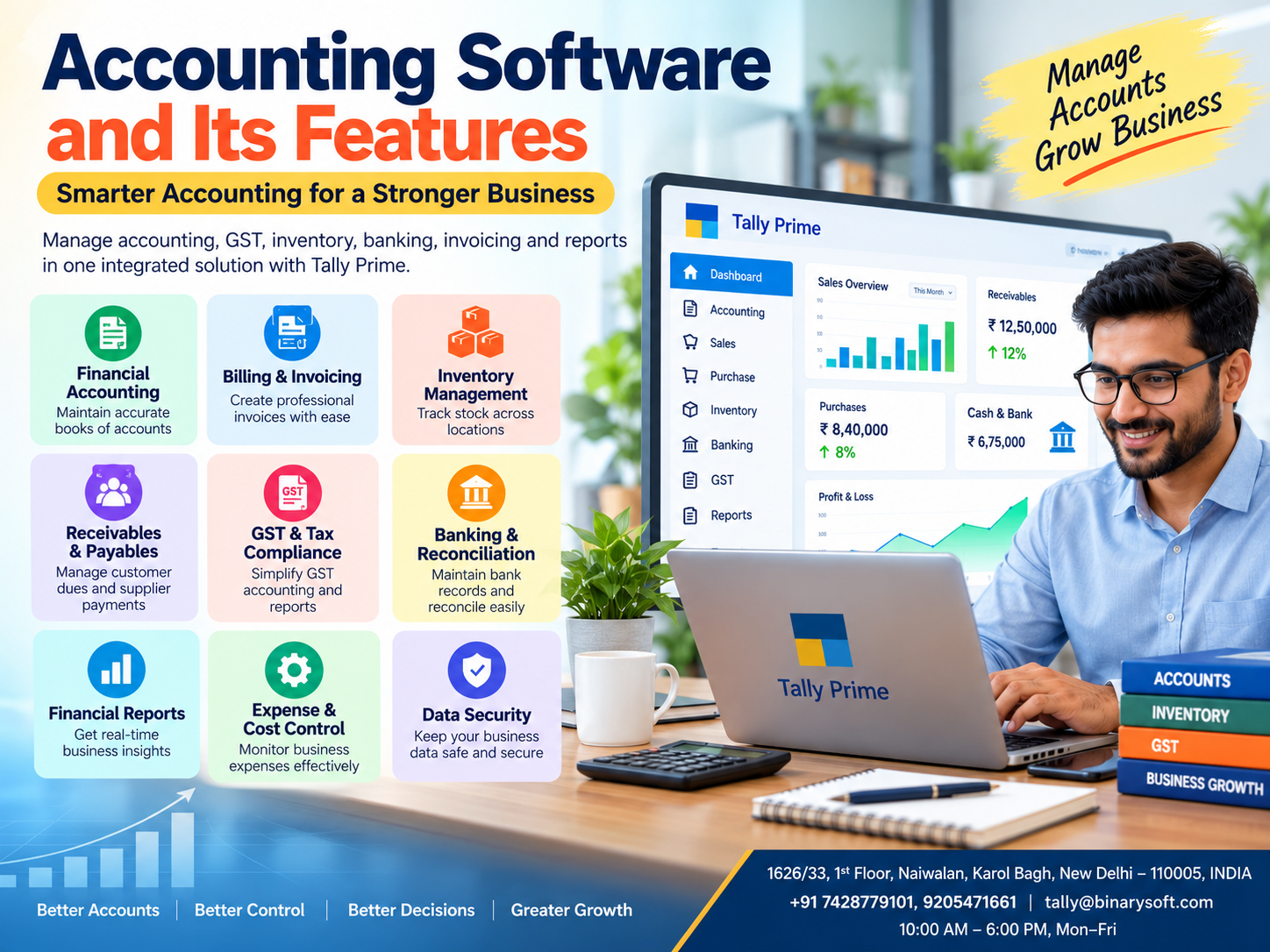
Introduction: Why Modern Businesses Cannot Depend on Manual Accounting Alone
Every successful business depends on accurate financial information. Whether a company operates a small retail shop, wholesale distribution business, manufacturing unit or professional service firm, understanding income, expenses, customer payments and profitability is essential.
In 2026, accounting responsibilities have become increasingly demanding. Business owners must manage customer expectations, supplier commitments, GST requirements, inventory movements and cash flow while maintaining reliable financial records.
Traditional accounting methods often involve handwritten registers, spreadsheets and disconnected applications. Although these methods may work for smaller operations, they become difficult to maintain as transaction volumes increase.
Imagine a business owner who generates strong monthly sales but cannot determine how much money customers still owe. The business appears profitable, yet supplier payments are delayed because available cash is insufficient.
Modern accounting software addresses these challenges by organizing financial information, automating routine calculations and generating useful reports.
Tally Prime provides integrated accounting, invoicing, inventory, taxation, banking and financial reporting capabilities that help Indian businesses manage their daily operations more effectively.
Understanding accounting software and its features is the first step toward building a financially organized and growth-ready business.
A Business Owner's Story: The Night Accounting Errors Nearly Stopped His Business
Amit owned a wholesale stationery business in Delhi. Over fifteen years, he had built strong relationships with schools, offices and local retailers.
His business was growing, and orders were increasing every month.
However, behind the growing sales was a financial problem that Amit had not fully recognized.
His employees maintained purchase records in spreadsheets, customer payments in separate registers and stock quantities in handwritten notebooks.
Every evening, Amit spent hours comparing records and searching for missing entries.
One Friday, an important supplier demanded payment for several overdue invoices.
Amit believed sufficient funds were available because the business had recorded strong sales.
But when he checked his bank account, the balance was far lower than expected.
Several customers had delayed payments, and some purchase expenses had not been recorded correctly.
Amit felt overwhelmed. He worried about losing supplier relationships and disappointing the employees who depended on his business.
He realized that working harder was not enough. He needed better financial visibility.
After introducing structured accounting processes through Tally Prime, his team began recording purchases, sales, receipts and payments consistently.
Customer outstanding reports helped identify overdue invoices, while financial statements provided clearer information about expenses and profitability.
The change did not happen overnight, but gradually Amit regained confidence in his financial decisions.
He no longer needed to depend entirely on assumptions.
He could review his business records and make decisions based on more reliable information.
This is an illustrative story created to explain the practical value of integrated accounting software.
1. What Is Accounting Software?
Accounting software is a computer-based application designed to record, organize, process and report financial transactions.
It replaces or supplements traditional manual bookkeeping methods with structured digital records.
Businesses use accounting software to maintain financial information relating to sales, purchases, expenses, customer balances, supplier payments, assets and liabilities.
A modern accounting system can support several functions, including:
-
Financial bookkeeping and ledger management
-
Sales invoicing and purchase accounting
-
Accounts receivable and payable
-
Bank reconciliation
-
Tax calculations and reporting
-
Inventory accounting
-
Financial statement preparation
-
Cost and expense tracking
-
Business performance analysis
The specific capabilities depend on the software selected and its configuration.
For example, when a business records a sales invoice, an integrated accounting application can update revenue records, customer balances, applicable taxes and inventory information.
This reduces repeated data entry and improves consistency.
2. Why Is Accounting Software Important for Businesses?
Accounting is not simply a process of recording income and expenses.
It provides the financial foundation for business planning, compliance, credit management and operational decisions.
Without accurate accounting information, business owners may struggle to answer important questions.
How much profit did the business generate?
Which customers have overdue payments?
How much money is owed to suppliers?
What is the value of available inventory?
Are operating expenses increasing?
Does the business have sufficient working capital?
Accounting software makes this information easier to organize and examine.
For small and medium-sized businesses, reliable accounting records can improve financial discipline and reduce uncertainty.
3. Essential Features of Modern Accounting Software
Feature 1: Financial Accounting and Ledger Management
Financial accounting is the foundation of every business accounting system.
It involves recording transactions under appropriate accounts and preparing financial statements.
Modern accounting software allows businesses to create ledgers for customers, suppliers, expenses, income, assets and liabilities.
Transactions are recorded through accounting entries and reflected in relevant reports.
How Tally Prime helps
Tally Prime supports ledger creation, accounting groups and multiple voucher types.
Businesses can record payments, receipts, purchases, sales, journal entries and contra transactions.
The software generates reports such as the Balance Sheet, Profit and Loss Account and Trial Balance from recorded transactions.
This helps businesses maintain organized financial information.
Feature 2: Automated Bookkeeping
Manual bookkeeping often requires repeated calculations and data entry.
Employees may spend considerable time updating registers, calculating balances and preparing summaries.
Accounting software reduces repetitive work by processing transactions through predefined accounting structures.
How Tally Prime helps
Tally Prime automatically reflects correctly recorded vouchers in relevant ledgers and financial reports.
For example, a sales transaction can affect sales income, customer balances and applicable tax accounts.
This reduces duplicate recordkeeping and supports more consistent financial reporting.
However, accurate results still depend on correct voucher entries and configurations.
Feature 3: Sales Invoicing and Billing
Sales invoicing is one of the most frequently used accounting functions.
Businesses need to generate invoices that contain appropriate customer information, product details, quantities, prices and applicable taxes.
Incorrect invoices can create payment disputes and compliance difficulties.
How Tally Prime helps
Tally Prime supports sales invoice preparation, invoice configurations, discounts, taxation and relevant business details.
Businesses can customize invoice formats within supported capabilities and maintain transaction records.
Sales invoices also contribute to accounting and inventory reports when properly configured.
This improves billing efficiency and record consistency.
Feature 4: Purchase Accounting
Purchase accounting helps businesses maintain information about goods and services acquired from suppliers.
Accurate purchase records are important for inventory valuation, expense monitoring, supplier reconciliation and taxation.
How Tally Prime helps
Tally Prime supports purchase vouchers, supplier ledgers, purchase orders and related inventory transactions.
Businesses can maintain purchase records and review supplier balances through accounting reports.
This helps purchasing and accounting teams coordinate their activities.
Feature 5: Accounts Receivable Management
Accounts receivable represents amounts customers owe for goods or services sold on credit.
Delayed collections can create cash flow difficulties even when a business reports strong sales.
Accounting software helps monitor customer invoices, due dates and outstanding balances.
How Tally Prime helps
Tally Prime provides bill-wise accounting, receivables reports and customer ledger information.
Businesses can configure credit periods and applicable credit limits.
These features help identify overdue invoices and support more disciplined payment follow-up.
Feature 6: Accounts Payable Management
Accounts payable represents amounts a business owes suppliers and other creditors.
Poor payment tracking can damage supplier relationships and create unnecessary financial pressure.
Accounting software helps businesses maintain supplier invoices and payment information.
How Tally Prime helps
Tally Prime supports supplier ledgers, bill-wise payable tracking and payment vouchers.
Businesses can review outstanding obligations and plan payments according to available funds.
This improves visibility into upcoming financial commitments.
Feature 7: GST Accounting and Compliance Support
GST accounting is particularly important for businesses operating in India.
Businesses must maintain accurate taxable transaction information and apply appropriate tax treatment.
Errors in tax classification or invoice preparation can create reconciliation problems.
How Tally Prime helps
Tally Prime supports GST-related configurations, invoice calculations, transaction records and relevant reports.
Businesses can maintain GST information for parties and items and review transaction details.
Available return-related and connected compliance capabilities depend on the software release, subscription and configuration.
Accounting software supports compliance preparation, but businesses must still verify applicable rules, classifications and return information.
Feature 8: Inventory Management and Stock Accounting
Inventory accounting connects financial records with physical stock movements.
Businesses need to monitor quantities, purchase costs, stock valuation and product availability.
Inaccurate inventory records can cause unnecessary purchases, missed sales and incorrect financial reporting.
How Tally Prime helps
Tally Prime supports stock items, stock groups, categories, units of measurement and godown or location management.
Businesses can record inventory movements and examine stock reports.
Batch-wise details and other inventory features can be configured where applicable.
These capabilities are particularly useful for retailers, wholesalers, distributors and manufacturers.
Feature 9: Banking and Bank Reconciliation
Bank reconciliation compares accounting records with bank transactions.
Differences may arise because of unpresented payments, deposits in transit, bank charges or missing entries.
Regular reconciliation helps identify discrepancies.
How Tally Prime helps
Tally Prime provides banking-related accounting and reconciliation capabilities.
Depending on the version and available services, businesses may also use supported bank statement and connected banking features.
These tools help reduce reconciliation effort while allowing accountants to review differences.
Feature 10: Financial Reporting and Analysis
Financial statements provide essential information about business performance.
Important reports include:
How Tally Prime helps
Tally Prime generates financial and inventory reports using recorded transactions.
Business owners can examine performance for selected periods and review detailed entries where supported.
This makes financial information more accessible for management decisions.
Feature 11: Expense Management and Cost Control
Every business incurs operating expenses such as rent, salaries, electricity, transportation, administration and marketing.
Without proper expense tracking, unnecessary costs can reduce profitability.
Accounting software helps classify expenses and examine spending patterns.
How Tally Prime helps
Tally Prime supports expense ledgers, cost centres and financial reporting.
Businesses can record expenses under appropriate categories and review their impact on profitability.
Cost centre reporting, where configured, can help analyze expenses associated with departments, projects or other business activities.
Feature 12: Data Security and User Access
Financial information is sensitive and must be protected from unauthorized access.
Accounting software should provide appropriate controls for accessing and maintaining business records.
How Tally Prime helps
Tally Prime offers user-level security controls and TallyVault encryption features.
Businesses can define access permissions according to employee responsibilities.
Regular backups and secure infrastructure remain important for protecting business information.
4. Different Types of Accounting Software
Businesses can choose from several accounting software categories.
|
Type
|
Description
|
Suitable for
|
|---|
|
Basic accounting software
|
Bookkeeping and financial records
|
Small businesses
|
|
Integrated accounting software
|
Accounting, billing, inventory and taxation
|
Traders, retailers and MSMEs
|
|
Cloud accounting software
|
Accounting accessed through hosted infrastructure
|
Distributed teams
|
|
ERP accounting systems
|
Financial accounting connected with wider business operations
|
Growing and large organizations
|
|
Industry-specific software
|
Specialized accounting and operational workflows
|
Businesses with unique requirements
|
Tally Prime fits many integrated accounting requirements and can be deployed in suitable hosted environments, subject to licensing and infrastructure arrangements.
5. Major Benefits of Accounting Software
Accounting software offers several advantages beyond replacing manual registers.
Improved accuracy: Automated calculations and connected reports can reduce arithmetic errors and duplicated work.
Time savings: Employees can spend less time preparing repetitive accounting summaries.
Better cash flow management: Outstanding reports help identify overdue customer payments and supplier obligations.
Improved financial visibility: Business owners can review income, expenses, liabilities and assets more regularly.
Better inventory control: Integrated inventory accounting helps monitor stock quantities and values.
Simplified compliance preparation: Organized records make it easier to prepare and review relevant taxation information.
Greater operational efficiency: Departments can work with more consistent financial information.
Scalability: Structured accounting processes can support increasing transaction volumes, subject to software and infrastructure capacity.
These benefits depend on correct configuration, reliable data entry and consistent employee usage.
6. How to Use Tally Prime for Daily Business Accounting
A practical accounting workflow can be implemented in the following sequence.
Step 1: Create a company
Set up the business in Tally Prime using the appropriate company information, financial year and accounting configuration.
Step 2: Create accounting ledgers
Create ledgers for customers, suppliers, bank accounts, expenses, sales, purchases and other relevant accounts.
Step 3: Configure inventory
For businesses dealing in goods, create stock items, groups, units and relevant inventory locations.
Step 4: Configure taxation
Enable and configure applicable GST features using verified registration and tax details.
Step 5: Record transactions
Enter sales, purchases, receipts, payments, journal adjustments and relevant inventory transactions.
Step 6: Review outstanding balances
Use receivables and payables reports to identify pending customer and supplier payments.
Step 7: Reconcile bank records
Compare accounting entries with bank transactions and investigate differences.
Step 8: Generate financial reports
Review the Balance Sheet, Profit and Loss Account, Trial Balance and other relevant reports.
Step 9: Back up accounting data
Establish regular backups and periodically verify that restoration procedures work.
Step 10: Review business performance
Use financial reports to identify operational problems, unnecessary expenses and opportunities for improvement.
7. Case Study 1: Wholesale Trader Improves Accounting Accuracy
Illustrative case study with hypothetical results.
Business: Electrical goods distributor, Delhi
Challenge: Manual accounting, inaccurate stock records and delayed customer collections.
A wholesale distributor maintained separate spreadsheets for sales, inventory and customer payments.
The accounting team spent several days every month reconciling transactions.
Management also struggled to identify overdue customer invoices.
Solution
The business introduced Tally Prime for integrated accounting and inventory management.
Employees began recording sales, purchases and receipts through standardized workflows.
Bill-wise accounting was introduced for customer balances, and inventory records were maintained more consistently.
Illustrative improvements
|
Indicator
|
Before
|
After
|
|---|
|
Monthly reporting time
|
4 days
|
1 day
|
|
Average invoice preparation
|
10 minutes
|
4 minutes
|
|
Overdue customer balances
|
₹16 lakh
|
₹10 lakh
|
|
Monthly accounting discrepancies
|
20
|
6
|
These figures are examples of possible improvement targets, not verified software performance claims.
Key learning: Integrated accounting and regular receivables monitoring can improve financial visibility and help businesses manage working capital.
8. Case Study 2: Retail Business Gains Better Inventory and Financial Control
Illustrative case study with hypothetical outcomes.
Business: Consumer electronics retailer, Noida
Challenge: Difficulty monitoring stock, expenses and daily profitability.
A growing electronics retailer sold televisions, laptops, accessories and household appliances.
The business maintained billing records separately from inventory information.
Employees sometimes confirmed product availability without checking updated stock quantities.
Management also struggled to monitor expenses and profitability.
Solution
The retailer adopted Tally Prime for billing, inventory accounting and financial reporting.
Products were organized into stock groups, purchase and sales transactions were recorded systematically, and expense ledgers were standardized.
Illustrative results
Within six months, the business aimed to reduce stock discrepancies by 60%, shorten monthly financial reporting from three days to one day, and improve visibility into product sales and expenses.
These are hypothetical outcomes illustrating what better accounting processes may achieve.
Key learning: Accurate inventory records and regular financial reporting can help retailers reduce operational uncertainty and make better purchasing decisions.
9. Accounting Software vs Manual Accounting
|
Factor
|
Manual accounting
|
Accounting software
|
|---|
|
Transaction recording
|
Handwritten or spreadsheet-based
|
Structured digital entries
|
|
Calculations
|
Often performed manually
|
Automated calculations
|
|
Financial reports
|
Prepared separately
|
Generated from recorded data
|
|
Invoice management
|
Manual preparation
|
Configurable billing
|
|
Inventory tracking
|
Separate registers
|
Integrated stock records
|
|
Customer outstanding
|
Manual reconciliation
|
Receivables reports
|
|
Error identification
|
Often time-consuming
|
Easier transaction review
|
|
Data security
|
Depends on physical and file controls
|
Software access controls
|
|
Business growth
|
Increasing administrative effort
|
More standardized processes
|
Accounting software does not remove the need for qualified review, internal controls or correct accounting judgments.
10. How to Choose the Right Accounting Software
Selecting accounting software requires careful evaluation.
Businesses should consider the volume of transactions, accounting requirements, GST applicability, inventory complexity, reporting needs and number of users.
The total cost should include licensing, infrastructure, migration, training, support and possible customization.
Security is equally important. Businesses should assess user permissions, backup procedures, recovery options and data access arrangements.
Integration capabilities should also be reviewed, particularly when a company uses e-commerce platforms, customer management applications or specialized operational software.
Tally Prime can be a suitable option for many Indian businesses requiring integrated accounting, inventory, taxation and reporting.
However, companies with highly specialized workflows should verify that their requirements can be supported before implementation.
11. The Future of Accounting Software in India
Accounting technology continues to evolve as businesses seek faster processing, better accessibility and stronger financial insights.
Cloud-enabled deployment is helping organizations support employees working from multiple locations.
Automation is reducing repetitive data processing and reconciliation activities.
Business analytics is becoming more important as owners seek clearer information about profitability, customer collections and expenses.
Digital compliance processes are also encouraging businesses to maintain more organized transaction records.
For Indian MSMEs, the most useful accounting technology will be software that combines reliable financial records with practical business workflows.
The goal is not simply to adopt more technology.
It is to create an accounting environment that helps businesses operate with greater confidence.
Conclusion: Build a Stronger Business with Modern Accounting Software
Accounting software plays an essential role in modern business management.
It helps organizations maintain accurate financial records, prepare invoices, monitor customer payments, track expenses, manage inventory and generate important financial reports.
For growing Indian businesses, these capabilities can improve productivity, strengthen financial control and support better decisions.
Tally Prime provides integrated accounting, invoicing, inventory, taxation, banking and reporting features that can simplify many daily business activities.
However, successful implementation requires more than installing software.
Businesses must maintain accurate records, train employees, configure appropriate controls and review financial information regularly.
With the right processes and accounting tools, business owners can spend less time searching for information and more time planning sustainable growth.
Powered by Binarysoft Technologies
Authorized Tally Partner
Location: 1626/33, 1st Floor, Naiwalan, Karol Bagh, New Delhi – 110005, INDIA
Contact us: +91 7428779101, 9205471661
Email us: tally@binarysoft.com
Business Hours: 10:00 AM – 6:00 PM, Monday–Friday
Frequently Asked Questions
How can Binarysoft Technologies help with Tally Prime?
Binarysoft Technologies, an Authorized Tally Partner, can assist businesses with Tally Prime software selection, configuration, training and related support services according to their requirements.
What financial reports can Tally Prime generate?
Tally Prime provides reports including the Balance Sheet, Profit and Loss Account, Trial Balance, Cash Flow Statement, receivables, payables and inventory summaries.
Can accounting software eliminate accounting errors?
Accounting software can reduce calculation errors and duplicated work, but incorrect entries, configurations and accounting judgments can still produce inaccurate results.
Is cloud accounting better than desktop accounting?
Neither approach is universally better. Cloud deployment can improve accessibility, while local deployment may suit businesses with different connectivity, control or infrastructure requirements. The choice depends on business needs.
CA. Reyansh Kulkarni has expertise in GST advisory, accounting compliance, and financial planning. He frequently contributes articles on digital accounting, inventory management, and modern financial practices for businesses.








