Call CA Tally HelpDesk
+91 9205471661,
7428779101
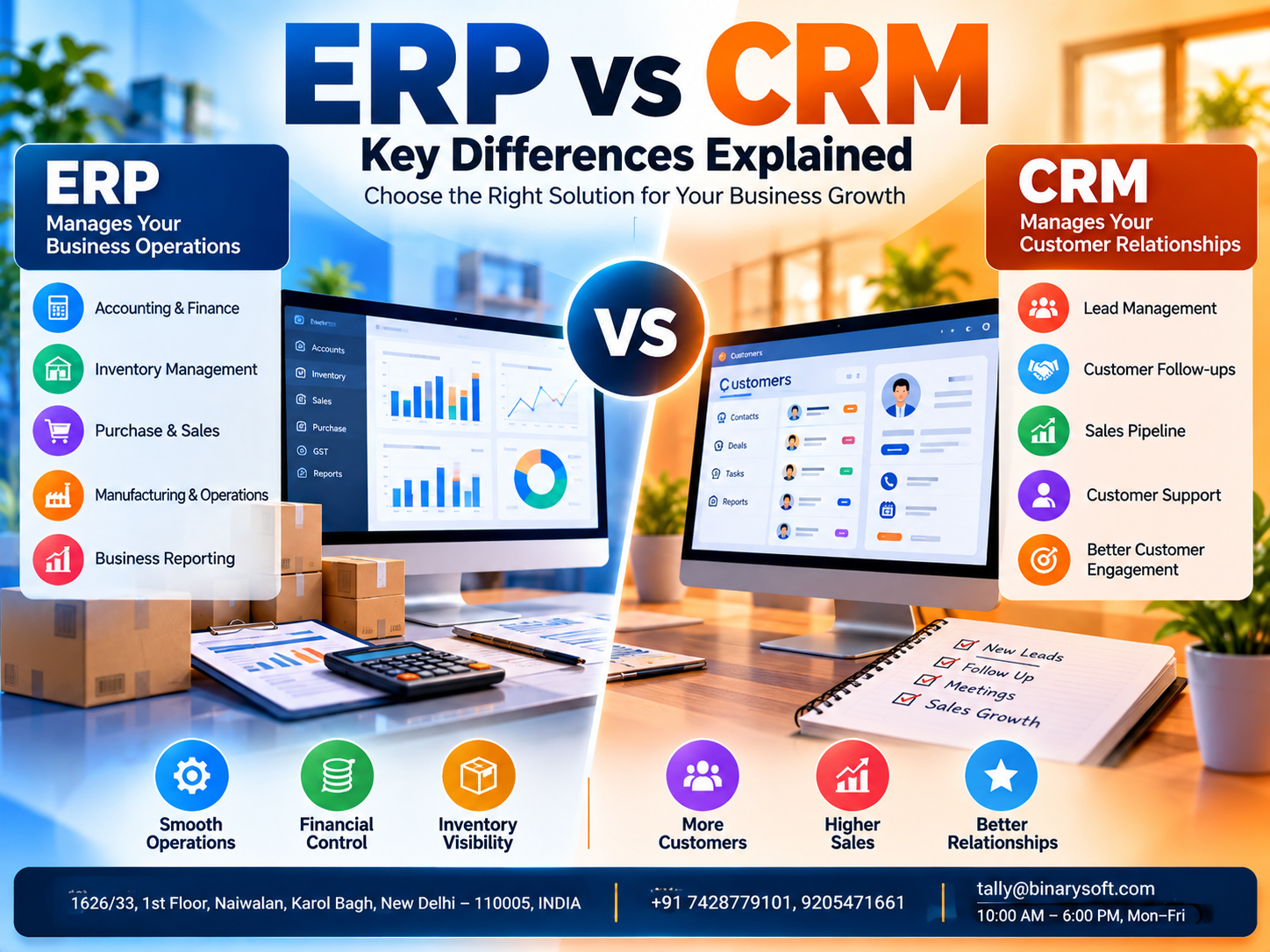
Introduction: Why Understanding ERP and CRM Matters for Businesses in 2026
As businesses grow, managing daily operations and maintaining strong customer relationships become increasingly challenging. Sales teams need accurate customer information, accounting departments require reliable financial records, and inventory managers must ensure products are available when customers need them. When these activities operate through disconnected systems, businesses often experience delays, duplicate work and communication problems.
In 2026, many small and medium-sized businesses are exploring digital solutions to improve efficiency, customer satisfaction and financial control. Two commonly discussed solutions are Enterprise Resource Planning (ERP) and Customer Relationship Management (CRM) software.
Although ERP and CRM are sometimes confused, they solve different business problems.
ERP software primarily helps organizations manage internal operations such as accounting, purchasing, inventory and financial reporting. CRM software focuses on customer interactions, sales opportunities, follow-ups and relationship management.
Understanding the differences between ERP and CRM helps businesses select the right technology, avoid unnecessary expenditure and build a foundation for sustainable growth.
A Business Owner's Story: When Growing Sales Created Unexpected Problems
Amit operated an electronics distribution business in Delhi. His company had developed a strong customer base and was receiving more inquiries every month.
However, increasing sales did not automatically translate into smoother operations.
His sales representatives maintained customer details in spreadsheets and personal notebooks. The accounting team recorded invoices separately, while warehouse employees tracked stock through another system.
One afternoon, an important customer called to ask about a delayed order.
The sales executive had promised delivery within two days, but the warehouse had insufficient stock. Meanwhile, the accounts department discovered that the customer had several overdue invoices.
Amit felt frustrated. His business was growing, yet employees were spending more time resolving internal confusion than serving customers.
He realized that the company needed two things: a better system for managing customer relationships and a reliable way to coordinate internal business operations.
After reviewing CRM and ERP solutions, Amit introduced a structured customer follow-up process and improved accounting and inventory management using Tally Prime.
The business gradually developed clearer communication between sales, accounts and warehouse teams.
Amit discovered that successful growth depended not only on attracting customers but also on fulfilling promises efficiently.
This is an illustrative story showing how ERP and CRM address different challenges faced by growing businesses.
1. What Is ERP Software?
Enterprise Resource Planning (ERP) software is a business management system designed to coordinate important organizational processes.
ERP solutions generally connect operational information across departments, helping businesses maintain consistent records and improve coordination.
Depending on the product, ERP software may include modules for accounting, finance, procurement, inventory, manufacturing, human resources, sales orders and business reporting.
The primary purpose of ERP is to improve the efficiency and visibility of internal operations.
Important functions of ERP software
Financial management: ERP systems help businesses record financial transactions, monitor expenses and prepare reports.
Inventory management: Businesses can track stock levels, warehouse movements and inventory valuation.
Purchase management: ERP solutions support purchasing workflows and supplier-related transactions.
Order processing: Sales orders can be coordinated with inventory availability and fulfillment activities.
Manufacturing operations: Manufacturing-oriented ERP systems may support production planning, materials management and related processes.
Business reporting: Management can review operational and financial information to support decisions.
Not every ERP application includes every function. Businesses should compare specific product capabilities before selecting a system.
2. What Is CRM Software?
Customer Relationship Management (CRM) software is designed to help businesses organize customer information and manage interactions throughout the sales and service lifecycle.
CRM systems focus primarily on external relationships rather than internal financial operations.
They help sales, marketing and customer service teams maintain organized records of prospects, customers and communications.
Important functions of CRM software
Contact management: Store customer names, contact information, organizations and interaction histories.
Lead management: Record inquiries and track potential customers through the sales process.
Sales pipeline tracking: Monitor opportunities at different stages, from initial inquiry to closing.
Follow-up management: Schedule calls, meetings and reminders.
Customer communication: Maintain records of emails, calls and service interactions.
Sales performance reporting: Evaluate conversion rates, pipeline values and sales team activities.
Advanced CRM solutions may also provide marketing automation, customer service ticketing and sales forecasting.
CRM software is particularly valuable for organizations that depend on frequent customer interaction and structured sales processes.
3. ERP vs CRM: Key Differences Explained
Although ERP and CRM both support business growth, their primary objectives are different.
|
Comparison
|
ERP Software
|
CRM Software
|
|---|
|
Primary purpose
|
Manage internal operations
|
Manage customer relationships
|
|
Main focus
|
Operational efficiency
|
Sales and customer engagement
|
|
Primary users
|
Accounts, operations, purchasing, warehouse and management
|
Sales, marketing and customer service
|
|
Financial accounting
|
Commonly supported
|
Usually limited or integration-based
|
|
Inventory management
|
Common in relevant ERP modules
|
Usually requires integration
|
|
Lead management
|
May be available
|
Core functionality
|
|
Sales pipeline
|
Varies by product
|
Core functionality
|
|
Purchase management
|
Commonly supported
|
Generally not a primary function
|
|
Customer follow-ups
|
May be limited
|
Strong focus
|
|
Main business benefit
|
Better operational control
|
Better customer engagement and sales management
|
The simplest way to understand the distinction is:
ERP helps a business manage how work gets done, while CRM helps a business manage how customers are acquired, served and retained.
Many modern business platforms offer overlapping features, and some organizations use integrated ERP and CRM solutions.
4. Major Benefits of ERP Software
Improved operational efficiency
ERP software reduces the need to maintain separate records for accounting, inventory, purchases and other business activities. When information is recorded consistently, departments can coordinate their work more effectively.
Better financial control
Businesses can monitor revenue, expenses, outstanding payments and profitability through structured financial reports.
Accurate inventory management
ERP systems help organizations understand stock availability, warehouse movements and purchasing requirements.
Reduced duplication
Integrated processes minimize repeated data entry and reduce inconsistencies between departments.
Faster decision-making
Management can review financial and operational reports to identify problems and plan corrective actions.
Better business scalability
An appropriately selected ERP system can support increasing transaction volumes and more complex operations as the business expands.
5. Major Benefits of CRM Software
Improved customer relationships
CRM software provides organized information about customers, their requirements and previous interactions.
Better lead conversion
Sales representatives can track prospects through different stages of the sales pipeline and prioritize promising opportunities.
Timely customer follow-ups
Reminders and activity records reduce the possibility of forgetting important calls, quotations or meetings.
Improved customer retention
Businesses can review customer interactions and provide more consistent support.
Better sales forecasting
Pipeline information helps managers estimate potential sales, although forecast accuracy depends on the quality of recorded data.
Improved sales team coordination
CRM software enables authorized employees to access shared customer information rather than relying on individual notebooks or disconnected spreadsheets.
6. ERP vs CRM: Which Software Should Small Businesses Choose?
The correct choice depends on the problems a business wants to solve.
A wholesale distributor struggling with inventory differences, delayed financial reporting and incorrect customer balances may benefit more immediately from an ERP-oriented business management solution.
A consulting company receiving many customer inquiries but losing opportunities because of missed follow-ups may benefit more from CRM software.
A growing manufacturer may require both systems because its sales team needs to coordinate customer orders with production and delivery operations.
Choose ERP when:
-
Financial records are difficult to maintain.
-
Inventory and purchasing processes are disconnected.
-
Management lacks reliable profitability reports.
-
Business operations involve frequent manual reconciliation.
-
Internal coordination is becoming difficult.
Choose CRM when:
-
Customer inquiries are not tracked systematically.
-
Sales representatives frequently miss follow-ups.
-
Management cannot monitor sales opportunities.
-
Customer communication histories are scattered.
-
Improving conversion and retention is the main priority.
Businesses experiencing both types of problems should evaluate an integrated ERP and CRM strategy.
7. How ERP and CRM Work Together
ERP and CRM become especially valuable when customer-facing processes need to connect with operational activities.
Consider a distributor receiving a large order from a regular customer.
The CRM system records the opportunity, customer requirements and expected closing date.
After the order is confirmed, the relevant information can be transferred to the ERP system through an approved integration or coordinated workflow.
The ERP system then supports order processing, stock verification, invoicing and financial recording.
Once the transaction progresses, relevant order or payment status information can be made available to the CRM system, depending on the integration.
This coordination allows sales representatives to provide more reliable customer updates.
It also helps management compare sales opportunities with inventory availability, order fulfillment and actual revenue.
A successful integration requires careful planning of customer identifiers, data synchronization, permissions and error handling.
8. How Tally Prime Supports ERP-Related Business Operations
Tally Prime is primarily an accounting and business management application with several ERP-related capabilities.
It is particularly useful for businesses that want to organize accounting, inventory, taxation and financial reporting.
Accounting and financial management
Tally Prime supports ledger accounting, voucher entry, financial statements and expense tracking.
Businesses can review the Balance Sheet, Profit and Loss Account, Trial Balance and other financial reports.
Sales and purchase management
Sales and purchase vouchers help businesses maintain transaction records. Supported order-processing features can also assist with purchase and sales order management.
Inventory management
Tally Prime provides stock item management, godown tracking, inventory vouchers and Stock Summary reports.
Businesses can monitor inventory quantities and values according to their configuration.
GST management
Businesses can configure GST-related information, prepare invoices and use supported tax reports and connected compliance workflows.
Customer outstanding management
Bill-wise accounting allows businesses to track receivables and payables.
Customer outstanding reports can help accounting teams identify unpaid invoices and monitor collections.
Financial reporting
Management can review accounting reports to understand profitability, expenses, liabilities and business performance.
These capabilities help businesses improve internal financial and operational management.
However, Tally Prime should not automatically be considered a replacement for a dedicated CRM platform. Advanced lead management, sales pipeline tracking and customer interaction automation may require separate software.
9. How Tally Prime Can Work with CRM Software
Businesses using CRM software alongside Tally Prime can establish a coordinated workflow.
For example, the CRM system may maintain customer inquiries, sales opportunities and follow-up schedules.
Once a sale is confirmed, relevant transaction details can be entered into Tally Prime for order processing, invoicing and accounting.
Where compatible integration tools are available, some information may be exchanged automatically.
Potential integration scenarios include:
-
Transferring approved customer details.
-
Sharing confirmed sales order information.
-
Updating invoice references.
-
Making customer outstanding information available to authorized teams.
-
Coordinating sales and accounting reports.
The availability of these capabilities depends on the CRM product, integration method, Tally Prime configuration and any required customization.
Before implementing an integration, businesses should define which application owns each data field and how duplicate or conflicting records will be handled.
10. Step-by-Step Guide to Implementing ERP and CRM
Step 1: Identify business challenges
Document the problems affecting accounting, inventory, sales and customer communication.
Step 2: Define operational priorities
Determine whether financial management, customer acquisition or both require immediate improvement.
Step 3: Evaluate software features
Compare the available features with actual business requirements.
Step 4: Prepare business data
Review customer records, supplier details, inventory masters and opening balances before migration.
Step 5: Configure the software
Set up accounting ledgers, stock items, customer records, user permissions and required workflows.
Step 6: Train employees
Provide role-specific training for accounting, warehouse, sales and management teams.
Step 7: Test business transactions
Verify important workflows such as sales orders, invoices, payments, returns and customer follow-ups.
Step 8: Review results
Monitor data accuracy, employee adoption, transaction processing time and customer service performance.
A phased implementation can reduce disruption and help employees adapt to new processes.
11. Case Study 1: An Electronics Distributor Improves Order Management
Illustrative case study; figures and outcomes are hypothetical.
A Delhi-based electronics distributor managed approximately 500 customer orders every month.
Its sales representatives maintained customer inquiries separately, while the accounting department used Tally Prime for invoicing and financial records.
Although sales were increasing, coordination problems caused delays.
Challenges
The company frequently experienced stock-related order delays, inconsistent customer follow-ups and difficulty communicating outstanding payment information.
Solution
Management introduced a dedicated CRM system for lead management and customer communication.
It also improved inventory, invoicing and outstanding tracking procedures in Tally Prime.
A documented workflow ensured confirmed orders were checked against available stock before delivery commitments were finalized.
Illustrative results
After four months, management estimated that order-related coordination issues had declined by approximately 30%.
Sales representatives could access organized customer interaction records, while the accounting team maintained more consistent invoice and outstanding information.
The experience demonstrated that ERP-related accounting capabilities and CRM processes can complement one another.
12. Case Study 2: A Manufacturing Company Connects Sales and Operations
Illustrative case study; figures and outcomes are hypothetical.
A packaging manufacturer in Faridabad was receiving an increasing number of inquiries from industrial customers.
Its sales team maintained quotations in spreadsheets, while production and accounting teams operated through separate processes.
Challenges
Sales employees sometimes promised delivery dates without confirming material availability.
Management also struggled to compare expected orders with actual production and inventory requirements.
Solution
The company implemented a CRM workflow to track inquiries, quotations and customer communication.
Tally Prime was used for accounting, inventory and relevant manufacturing-related transactions.
The business introduced a review process requiring sales and operations teams to confirm material availability before accepting major delivery commitments.
Illustrative results
Within six months, the company reported more consistent customer communication and improved visibility into material requirements.
Management also gained a clearer understanding of confirmed sales, pending inquiries and operational commitments.
The case highlights the importance of coordinating customer relationships with internal business processes.
13. Common ERP and CRM Implementation Mistakes
Businesses sometimes invest in software without clearly identifying their requirements.
This can result in unnecessary expenses, poor employee adoption and limited operational improvement.
One common mistake is expecting ERP software to automatically solve every customer relationship problem.
Another is assuming CRM software will replace accounting, taxation and inventory systems.
Businesses should also avoid importing inaccurate customer or financial records into new applications.
Poorly planned integrations can create duplicate customer accounts, incorrect transaction information and synchronization problems.
Employee training is equally important.
Even well-designed software delivers limited value when users do not understand the required workflows.
Management should establish data ownership, approval procedures and periodic review practices before expanding automation.
14. ERP vs CRM: Cost and Return on Investment
The cost of ERP and CRM software varies according to product features, licensing arrangements, user requirements, deployment models and customization.
Businesses should consider the total cost of ownership rather than comparing subscription prices alone.
Important expenses may include software licensing, implementation, data migration, employee training, integrations, technical support and hosting.
ERP investments often aim to reduce operational inefficiencies, improve inventory control and strengthen financial reporting.
CRM investments commonly aim to improve lead conversion, sales productivity and customer retention.
Example of ROI calculation
Suppose a business invests ₹1,20,000 in software, implementation and training during the first year.
If measurable annual benefits total ₹1,80,000, the estimated first-year net benefit is ₹60,000.
The simple ROI calculation is:
\[ ROI=\frac{1,80,000-1,20,000}{1,20,000}\times100=50\% \]
This is a hypothetical example. Actual returns depend on implementation quality, operating costs and measurable business improvements.
15. The Future of ERP and CRM in 2026 and Beyond
Businesses increasingly expect their software systems to support connected workflows rather than isolated departmental activities.
ERP solutions are evolving toward improved reporting, connected banking, automation and more flexible deployment arrangements.
CRM platforms are increasingly incorporating AI-assisted lead analysis, communication summaries, workflow automation and customer engagement tools.
Integration between ERP and CRM is also becoming more important.
For example, a sales team may need visibility into stock availability before confirming an order, while an accounting team may require accurate customer information for invoicing.
At the same time, businesses must pay greater attention to data privacy, access controls and integration security.
The most effective approach is to adopt technology according to real business needs rather than purchasing software simply because it includes the latest features.
Conclusion
ERP and CRM software support different but complementary aspects of business management.
ERP focuses on improving internal operations such as accounting, inventory, purchasing and financial reporting. CRM focuses on managing leads, sales opportunities, customer communication and long-term relationships.
For small and medium-sized businesses, selecting the right solution depends on operational priorities.
Tally Prime can provide a practical foundation for managing accounting, inventory, GST-related transactions, customer outstanding balances and financial reports.
When a business also requires structured lead management and advanced customer engagement capabilities, a dedicated CRM system may provide additional value.
Using ERP-related tools and CRM software together can help businesses improve coordination between customer expectations and operational delivery.
Ultimately, sustainable business growth requires both strong internal management and lasting customer relationships.
Powered by Binarysoft Technologies Authorized Tally Partner
Location: 1626/33, 1st Floor, Naiwalan, Karol Bagh, New Delhi – 110005, INDIA
Contact Us: +91 7428779101, 9205471661
Email: tally@binarysoft.com
Business Hours: 10:00 AM – 6:00 PM, Monday–Friday
Frequently Asked Questions
Can Tally Prime be integrated with CRM software?
Integration may be possible through compatible connectors, data exchange methods or customized solutions. The available functionality depends on the products and implementation.
How can Binarysoft Technologies help businesses with Tally Prime?
Binarysoft Technologies can assist with Tally Prime implementation, configuration, training and support, helping businesses organize accounting, inventory and financial management processes.
Can CRM software manage inventory?
Some CRM platforms offer limited inventory features or integrations. Detailed inventory accounting and warehouse management generally require an ERP or dedicated inventory system.
Which software should a small business implement first?
A business facing accounting and inventory problems may prioritize ERP-related software. A business struggling with lead conversion and customer follow-ups may prioritize CRM.
CA. Yuvan Rajagopal specializes in accounting advisory, statutory compliance, and financial consulting. He writes extensively on business automation, inventory management, and accounting best practices.








