Call CA Tally HelpDesk
+91 9205471661,
7428779101
Introduction: Why Business Workflow Automation Is Becoming Essential
Every growing business faces a common challenge: completing more work without increasing operational costs.
From preparing invoices and tracking inventory to managing customer payments and reviewing financial reports, employees spend considerable time performing repetitive tasks.
For small and medium businesses in India, these activities can become difficult to manage as transaction volumes increase.
A missed customer payment, incorrect stock entry or delayed invoice can affect profitability and customer relationships.
Automated workflows in business software help organizations reduce repetitive work, improve accuracy and maintain greater control over daily operations.
Instead of manually coordinating every transaction, businesses can configure systems that connect activities, standardize processes and reduce unnecessary data entry.
Tally Prime supports several accounting, inventory, banking and reporting functions that can simplify routine business activities.
Understanding how to implement workflow automation can help businesses improve productivity, strengthen financial management and prepare for sustainable growth.
A Business Owner's Story: When One Missed Invoice Changed Everything
Rohit owned a growing wholesale business in Delhi.
His company supplied electrical products to retailers across Karol Bagh, Sadar Bazar and nearby markets.
Every morning, Rohit arrived at his office before his employees.
He checked pending customer orders, reviewed supplier payments, verified stock availability and prepared instructions for his accounting team.
Although his business was growing, he rarely had time to focus on expansion.
One afternoon, a long-standing customer called about an invoice that had not been issued.
The order had already been delivered, but the accounting team had overlooked the billing entry.
A few days later, another customer payment remained uncollected because nobody had reviewed the outstanding report.
Rohit realized that his biggest problem was not a shortage of customers.
It was the absence of consistent business processes.
He decided to improve his accounting and inventory workflows by organizing transactions, standardizing invoice preparation and reviewing financial reports regularly.
With better software configuration and clearly assigned responsibilities, his employees could complete routine work more efficiently.
Rohit finally found time to concentrate on customer relationships and business development.
His experience illustrates an important lesson: business growth becomes easier when repetitive activities are managed through reliable processes rather than individual memory.
1. What Are Automated Workflows in Business Software?
An automated workflow is a sequence of business activities performed or coordinated through software according to predefined rules, events or conditions.
For example, a sales workflow may involve receiving an order, checking inventory, preparing an invoice, recording the transaction and updating financial information.
In a fully automated system, certain activities can trigger subsequent actions without requiring employees to repeat the same information.
However, the level of automation depends on the software and its configuration.
Some business applications offer advanced workflow engines, while others simplify operations through integrated transactions, templates, reports and connected services.
Example of a Business Workflow
Consider a wholesale distributor receiving a customer order.
The process may involve:
- Recording the customer order.
- Checking available stock.
- Preparing the sales invoice.
- Recording inventory movement.
- Updating the customer's outstanding balance.
- Reviewing payment status.
- Following up on overdue payments.
When accounting and inventory functions are integrated, several related records can be updated through the same transaction.
This reduces duplicate work and helps maintain consistent business information.
2. Why Businesses Need Workflow Automation
Reduced Manual Data Entry
Repeatedly entering the same information into different registers or applications consumes valuable employee time.
Integrated business software helps reduce unnecessary duplication.
Improved Accuracy
Manual processes can lead to calculation mistakes, missing records and inconsistent information.
Standardized workflows help businesses maintain more reliable records.
Faster Invoice Processing
Organized billing workflows allow employees to prepare invoices efficiently and reduce delays.
Better Inventory Visibility
Connecting inventory and transaction records helps businesses understand stock movement and product availability.
Improved Payment Tracking
Regular outstanding reports help accounting teams identify unpaid invoices and prioritize collection activities.
Greater Employee Productivity
Employees can spend less time searching for information and more time handling customers, resolving problems and supporting business growth.
Better Management Decisions
Accurate financial and operational reports help business owners identify trends and make informed decisions.
3. Important Business Processes That Can Be Automated
Sales and Invoicing Workflows
Sales invoicing is one of the most frequently repeated activities in trading and service businesses.
A structured invoicing workflow helps employees maintain consistent customer information, item details, tax calculations and payment terms.
Tally Prime supports invoice preparation using configured masters and transaction details.
Businesses can also use suitable invoice formats and reporting features to improve billing efficiency.
Purchase Management Workflows
Purchasing involves supplier selection, order preparation, goods receipt and invoice recording.
Businesses can standardize these activities through properly configured purchase records.
Tally Prime supports purchase vouchers and relevant order-processing functions, helping maintain connected accounting and inventory information.
Inventory Management Workflows
Inventory workflows help businesses track stock receipts, sales, transfers and adjustments.
Tally Prime supports stock item management, godown tracking, stock groups and inventory reports.
These features can help businesses reduce manual reconciliation and improve stock visibility.
Accounting Workflows
Accounting teams regularly record receipts, payments, purchases, sales and journal entries.
Tally Prime provides voucher-based accounting that helps businesses maintain organized financial records.
GST Compliance Workflows
GST-related processes require accurate transaction classification and reporting.
Tally Prime provides GST accounting and reporting features that support compliance preparation.
Businesses must still verify tax details, reconcile records and complete applicable filing requirements.
Banking and Reconciliation Workflows
Bank reconciliation is essential for identifying differences between accounting records and bank transactions.
Supported banking features can simplify reconciliation activities and reduce manual effort.
Availability depends on the product version, bank and relevant services.
4. How to Set Up Automated Workflows in Business Software
Implementing workflow automation requires careful planning. Businesses should begin with processes that are repetitive, time-consuming and easy to standardize.
Step 1: Identify Repetitive Business Activities
Review daily activities performed by employees.
Common examples include invoice preparation, purchase entry, stock verification, payment tracking and financial reporting.
Identify tasks that involve repeated data entry or frequent manual checking.
Step 2: Define Workflow Objectives
Determine what the business wants to achieve.
Objectives may include reducing invoice preparation time, improving stock accuracy, minimizing payment delays or accelerating financial reporting.
Clear objectives help management evaluate whether automation is delivering meaningful improvements.
Step 3: Select Suitable Business Software
Choose software that supports the required business functions.
For many Indian SMEs, Tally Prime provides integrated accounting, inventory and GST-related features.
Businesses requiring automated email triggers, complex approvals or cross-application workflows may need additional compatible tools or integrations.
Step 4: Configure Business Masters
Accurate master data is essential.
Businesses should configure customer and supplier ledgers, stock items, units of measurement, tax details and other relevant information.
Incorrect master data can create errors across multiple transactions.
Step 5: Standardize Transaction Processing
Establish clear procedures for recording sales, purchases, receipts, payments and inventory movements.
Employees should understand which records must be created and who is responsible for verifying them.
Step 6: Establish Controls and Permissions
Not every employee should have unrestricted access to financial information.
Configure appropriate user permissions and approval responsibilities.
Where automated approval routing is required, verify that the selected software or integration supports it.
Step 7: Test the Workflow
Before implementation, test common business scenarios.
Verify invoice calculations, inventory changes, customer balances and reporting accuracy.
Step 8: Train Employees
Employees must understand both the software and the business process.
Training should explain how to enter transactions, identify errors and resolve exceptions.
Step 9: Monitor Results
Review the workflow after implementation.
Measure processing time, transaction errors, payment delays and employee productivity.
Continue improving processes based on actual business requirements.
5. How Tally Prime Supports Business Workflow Automation
Tally Prime helps businesses streamline routine operations through integrated accounting, inventory and reporting capabilities.
Integrated Accounting Entries
Recording a properly configured transaction can update related ledger balances and financial reports.
This reduces the need to maintain separate accounting summaries manually.
Inventory Updates
Inventory transactions can update stock records according to the voucher type and configuration.
This helps businesses maintain more consistent stock information.
GST Calculations
Tally Prime can calculate applicable GST amounts using configured tax details and transaction information.
Businesses must verify classifications, rates and compliance requirements.
Outstanding Management
Customer and supplier outstanding reports help businesses review unpaid invoices and pending liabilities.
Banking Features
Supported banking and reconciliation functions can reduce manual processing.
Specific capabilities depend on the product version and connected services.
Financial Reporting
Financial statements and business reports are generated from recorded transactions.
This allows management to review business information without manually preparing every report.
Important: These capabilities streamline connected processes but do not mean that Tally Prime automatically provides every type of workflow automation, such as scheduled customer emails, automatic purchase approvals or external application triggers.
6. Case Study One: Workflow Automation for a Wholesale Trading Business
Business: Illustrative electrical goods distributor, Sadar Bazar, Delhi
Business Challenge
A wholesale distributor handled numerous sales and purchase transactions every day.
Employees maintained inventory information in spreadsheets and customer payment records in separate files.
The company frequently experienced delays in preparing invoices and reviewing outstanding balances.
Solution
The business introduced standardized accounting and inventory workflows using Tally Prime.
Customer and supplier ledgers were organized, stock masters were configured, and employees were trained to record transactions consistently.
Management began reviewing inventory summaries and customer outstanding reports daily.
Business Benefits
The new process reduced repeated manual reconciliation.
Employees could prepare invoices more efficiently, while management gained better visibility into stock movement and customer balances.
Key Learning: Integrating accounting and inventory processes can improve operational efficiency without requiring every business activity to be fully automated.
This is an illustrative case study.
7. Case Study Two: Improving Manufacturing Accounting Workflows
Business: Illustrative packaging manufacturer, Bawana Industrial Area, Delhi
Business Challenge
A small manufacturing company struggled to maintain accurate records of raw materials, finished goods and production-related expenses.
Different employees maintained separate registers, making monthly reconciliation difficult.
Solution
The business implemented a structured accounting and inventory process using Tally Prime.
Raw materials and finished goods were classified into appropriate stock groups.
Relevant inventory and manufacturing accounting features were configured.
The accounting team began recording transactions through standardized procedures.
Business Benefits
Management gained clearer information about material consumption, stock balances and financial performance.
The accounting team spent less time combining disconnected records.
Key Learning: Standardized inventory and accounting workflows can improve visibility into manufacturing operations.
This is an illustrative case study.
8. Benefits of Automated Workflows for Small Businesses
Workflow automation can improve several areas of business performance.
Time Savings: Employees spend less time repeating routine administrative tasks.
Improved Accuracy: Standardized processes reduce inconsistent data entry and calculation errors.
Better Customer Service: Faster access to transaction information helps employees respond to customer inquiries.
Financial Control: Organized receivable, payable and expense records support better financial management.
Inventory Visibility: Integrated stock records help businesses monitor product movement.
Business Scalability: Standardized processes make it easier to manage increasing transaction volumes.
Management Reporting: Reliable reports help owners identify operational problems and opportunities.
Actual benefits depend on implementation quality, software capabilities and employee adoption.
9. Common Mistakes to Avoid During Workflow Automation
Businesses sometimes introduce automation without improving their underlying processes.
This can create new problems instead of solving existing ones.
Common mistakes include automating inaccurate data, selecting unnecessary features, ignoring employee training and failing to test transactions.
Another mistake is assuming that automation eliminates the need for human supervision.
Financial transactions, tax compliance and inventory adjustments still require appropriate verification.
Businesses should also avoid giving employees excessive system permissions.
Successful workflow automation combines technology with clear responsibilities and reliable internal controls.
10. Future of Business Workflow Automation in India
Indian businesses are increasingly exploring digital tools that reduce repetitive administrative work.
Important developments include connected banking, digital invoicing, integrated inventory systems and application-to-application data exchange.
Artificial intelligence may also support document processing, transaction classification and business analysis in suitable software environments.
However, businesses should evaluate these capabilities carefully rather than assuming every accounting application includes them.
For most small businesses, the immediate priority should be accurate records, consistent transaction processing and reliable reporting.
These fundamentals provide a strong foundation for adopting more advanced automation technologies.
Conclusion
Automated workflows help businesses reduce repetitive tasks, improve accuracy and manage operations more efficiently.
By connecting accounting, invoicing, inventory management and financial reporting, organizations can reduce dependence on disconnected manual processes.
Tally Prime provides integrated business management features that help Indian businesses streamline many routine accounting and inventory activities.
However, advanced automation requirements may involve additional software, integrations or specialized workflow tools.
Businesses should begin by identifying repetitive processes, establishing clear procedures, configuring suitable software and training employees.
The purpose of workflow automation is not simply to complete tasks faster. It is to create reliable business processes that support accuracy, productivity and sustainable growth.
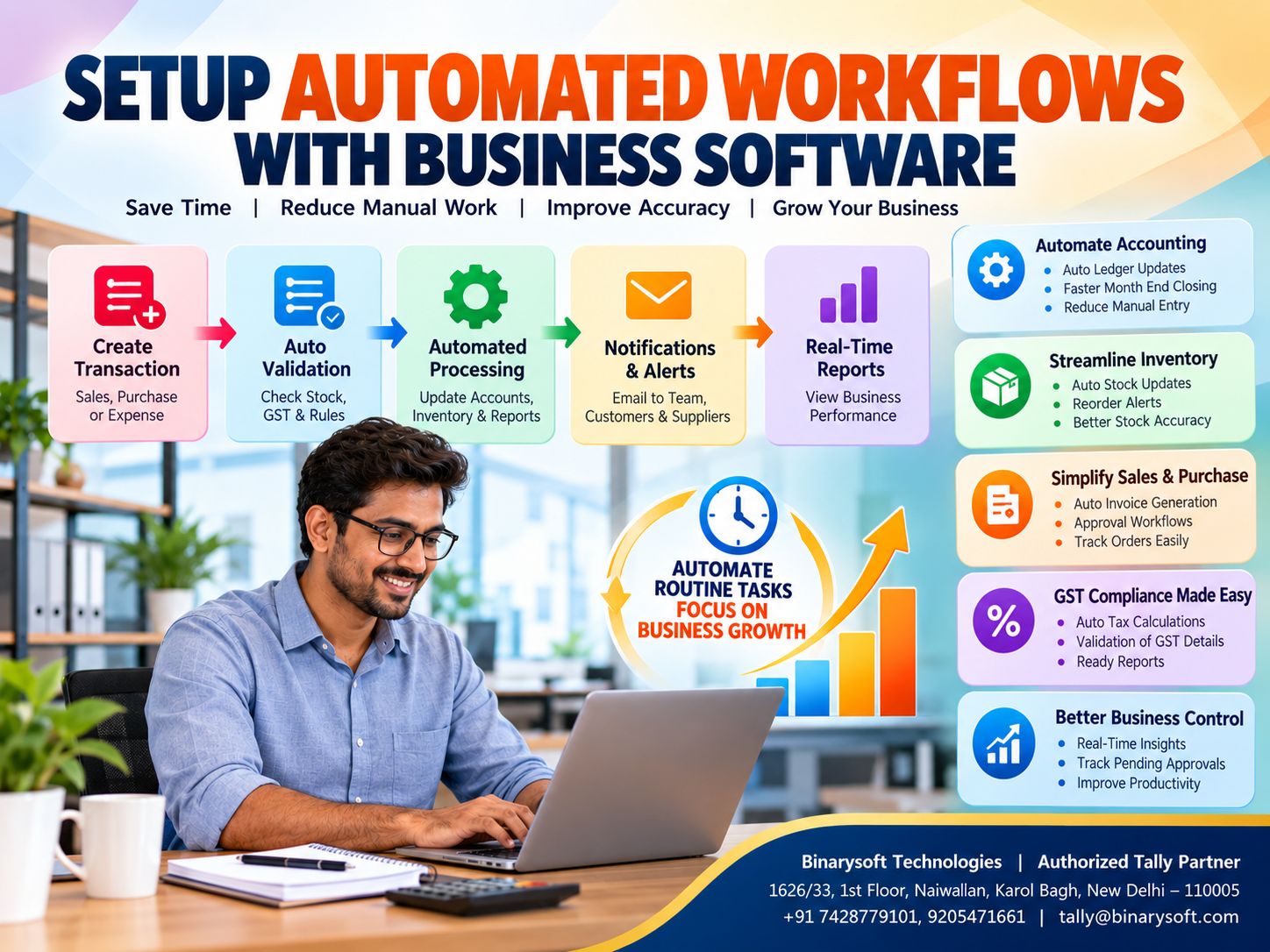
Featured Image and Short Description
Featured Image Title: How to Set Up Automated Workflows in Business Software
Image Description: Professional business automation infographic featuring accounting, inventory, invoicing, GST compliance, workflow management and financial reporting.
Suggested Image Size: 800 × 600 pixels
Image Alt Text: Automated business workflows for accounting, inventory management, GST billing and financial reporting using business software.
Short Description
Discover how automated workflows in business software help Indian businesses reduce manual work, improve accounting accuracy, streamline inventory management, simplify GST billing and increase productivity. Learn how Tally Prime supports efficient business operations and better financial control.
Powered by Binarysoft Technologies
Authorized Tally Partner
Location: 1626/33, 1st Floor, Naiwalan, Karol Bagh, New Delhi – 110005, INDIA
Contact Us: +91 7428779101, 9205471661
Email: tally@binarysoft.com
Business Hours: 10:00 AM – 6:00 PM, Monday to Friday
Frequently Asked Questions
What is workflow automation in business software?
Workflow automation involves using software to execute or coordinate business activities according to predefined rules and processes, reducing unnecessary manual intervention.
Why is workflow automation important for small businesses?
It helps reduce repetitive work, improve accuracy, increase productivity and maintain more consistent business records.
Can Tally Prime automate accounting processes?
Tally Prime supports integrated accounting transactions, calculations and financial reporting. More advanced automated workflows may require compatible additional tools.
How does workflow automation improve inventory management?
Integrated inventory workflows help businesses maintain consistent stock records and monitor inventory movement more efficiently.
CA. Ishaan Bagaria works closely with traders and service enterprises on accounting systems, GST compliance, and reporting processes. His focus is on improving record accuracy and simplifying day-to-day financial management.








