Call CA Tally HelpDesk
+91 9205471661,
7428779101
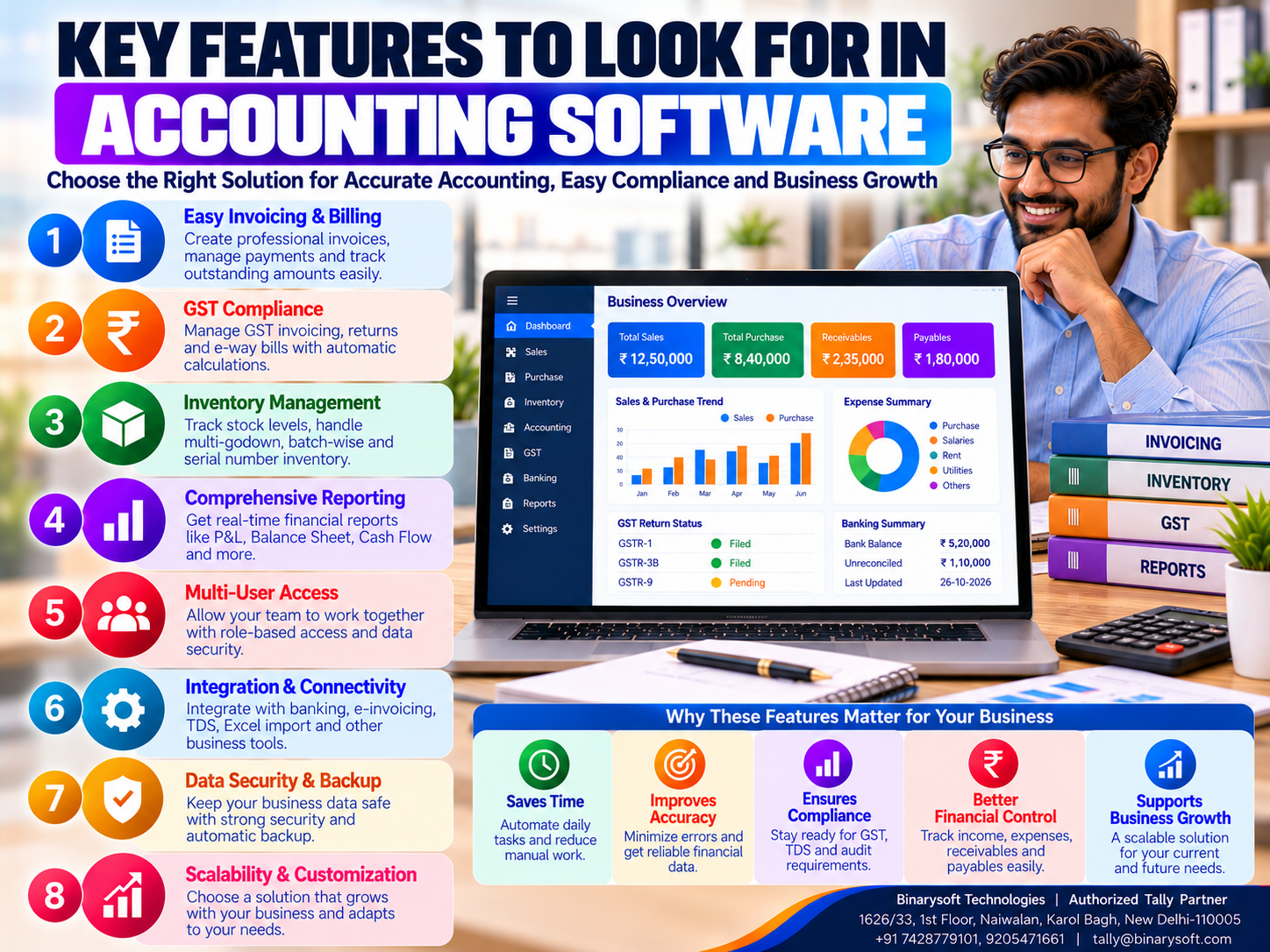
Introduction: Why Choosing the Right Accounting Software Matters
Every business owner wants to maintain accurate accounts, manage expenses, collect customer payments on time and understand whether the business is making a profit.
However, as business operations expand, managing these activities becomes increasingly difficult.
A small retailer may initially maintain sales and purchase records in notebooks or spreadsheets. A wholesale distributor may use separate systems for inventory and customer outstanding balances. A manufacturer may struggle to connect production expenses with financial reports.
These disconnected processes can create unnecessary work and increase the possibility of errors.
Accounting software helps businesses organize financial information and simplify daily transactions.
But not every accounting application offers the same capabilities.
Some products focus primarily on bookkeeping. Others provide GST billing, inventory management, banking, payroll, financial reporting and additional business management features.
Choosing software based only on price or popularity can create problems later.
A business may discover that its accounting system cannot manage multiple warehouses, track overdue invoices or provide the reports needed for expansion.
Therefore, understanding the essential features of accounting software is important before making an investment.
For Indian small and medium enterprises, Tally Prime offers several accounting, invoicing, inventory, banking and reporting capabilities.
This guide explains 20 important features businesses should evaluate, their practical benefits and how Tally Prime can support daily business operations.
A Business Owner's Story: The Software Decision That Changed His Business
Rohit operated a wholesale electronics distribution business in Nehru Place, New Delhi.
His father had started the business with a small shop selling computer accessories.
Over time, Rohit expanded the operation.
He began supplying networking equipment, storage devices and electronic accessories to retailers across Delhi NCR.
Sales increased steadily.
The business hired additional employees and rented a larger warehouse.
Rohit believed the company was moving toward a successful future.
However, behind the growing sales figures, problems were developing.
The accountant maintained financial records in basic software.
Warehouse employees updated inventory through spreadsheets.
Customer payments were tracked separately.
Purchase orders were exchanged through messages and emails.
One afternoon, a regular customer placed a large order for networking equipment.
The sales employee confirmed the order after checking the inventory spreadsheet.
Unfortunately, the recorded stock quantity was incorrect.
The warehouse had already dispatched several units to another customer.
Rohit could not fulfill the order on time.
The customer expressed disappointment and began considering another supplier.
A few days later, Rohit faced another problem.
An important supplier requested payment, but several customer invoices remained overdue.
Although the company was generating strong revenue, its available cash was insufficient to meet every immediate obligation.
That evening, Rohit sat alone in his office.
He remembered how carefully his father had managed the business when it was small.
He wondered why managing a larger company had become so stressful.
The problem was not a lack of effort.
His employees were working hard.
The problem was that the business lacked reliable, connected information.
Rohit decided to review the company's accounting software requirements.
Instead of selecting a product based only on price, he evaluated invoicing, inventory management, outstanding tracking, banking and financial reporting.
With professional assistance, the company introduced more structured accounting procedures using Tally Prime.
Employees received training.
Inventory records were standardized.
Customer outstanding reports were reviewed regularly.
The accounts team began reconciling bank transactions more consistently.
Over time, Rohit gained better visibility into daily operations.
He realized that choosing the right accounting software was not simply a technical decision.
It was an investment in business stability.
Good accounting software does more than record transactions. It helps business owners understand their financial position before small problems become serious challenges.
This is an illustrative story based on common business situations.
What Is Accounting Software?
Accounting software is a digital application designed to record, organize, process and report financial transactions.
It helps businesses maintain books of accounts and perform essential accounting activities.
These may include sales recording, purchase accounting, expense management, customer outstanding tracking, bank reconciliation and financial reporting.
Modern accounting software may also include inventory management, GST-related features, payroll and business analytics.
The exact functionality depends on the product.
For Indian SMEs, the right software should support everyday financial requirements while remaining practical for employees to use.
Why Accounting Software Features Are Important
Accounting software features determine what a business can manage efficiently.
A company processing hundreds of invoices needs reliable billing capabilities.
A distributor operating several warehouses needs location-wise inventory records.
A service provider may prioritize invoicing, expense tracking and customer collections.
A manufacturer may require material consumption and cost analysis.
Understanding these differences helps organizations avoid paying for unnecessary functionality or selecting software that cannot support essential processes.
20 Essential Features to Look for in Accounting Software
1. Easy and Accurate Bookkeeping
Bookkeeping is the foundation of financial management.
Accounting software should allow businesses to record transactions consistently.
Important functions include maintaining ledgers, recording vouchers and reviewing balances.
How Tally Prime Helps
Tally Prime supports sales, purchases, receipts, payments, journals and other relevant accounting vouchers.
Businesses can create ledgers under appropriate accounting groups.
Business Benefits
Structured bookkeeping can reduce dependence on manual registers and improve the consistency of financial records.
However, employees must still select the correct accounts and transaction types.
2. GST-Compliant Invoicing
GST billing is essential for many Indian businesses.
Suitable accounting software should support invoices containing applicable GST information.
Important details may include customer GSTIN, HSN or SAC classification, taxable value and relevant tax amounts.
Tally Prime Application
Tally Prime provides GST-related invoicing and accounting features.
Businesses can configure relevant tax information and prepare invoices according to their requirements.
Business Benefits
Structured invoicing can reduce repetitive calculations and improve invoice consistency.
Tax rates and transaction treatment must be verified against applicable rules.
3. Sales and Purchase Management
Sales and purchases are central to business accounting.
Software should support appropriate recording of customer and supplier transactions.
Important Functions
Sales invoices
Purchase vouchers
Credit notes
Debit notes
Relevant order processing
Customer and supplier records
How Tally Prime Helps
Tally Prime supports sales and purchase accounting along with relevant order-related capabilities.
Business Benefits
Organized transaction records help businesses review commercial activities more efficiently.
4. Inventory Management
Inventory management is especially important for retailers, wholesalers and manufacturers.
Inaccurate stock records can lead to excess purchases or missed customer orders.
Essential Inventory Features
Stock item management
Stock grouping
Units of measurement
Stock movement records
Inventory valuation
Stock reports
Tally Prime Features
Tally Prime supports stock items, stock groups, stock categories and relevant inventory reports.
Business Benefits
Better stock information supports purchasing, billing and inventory verification.
5. Multiple Warehouse Management
Businesses operating multiple locations need to monitor inventory separately.
For example, a distributor may maintain stock in Karol Bagh, Naraina and Bawana.
Tally Prime Application
Godown management supports location-wise inventory records.
Business Benefits
Businesses can review recorded stock quantities across locations and manage relevant stock movements.
However, physical stock verification remains necessary.
6. Accounts Receivable Management
Accounts receivable represents amounts customers owe to the business.
Delayed collections can affect cash flow.
Accounting software should help organizations monitor unpaid invoices.
Important Features
Customer balances
Invoice-wise outstanding details
Due dates
Ageing analysis
Payment allocation
Tally Prime Application
Tally Prime supports bill-wise accounting and outstanding reports.
Business Benefits
Regular reviews help accounts teams identify overdue invoices and prioritize payment follow-up.
7. Accounts Payable Management
Accounts payable represents money owed to suppliers.
Businesses must monitor payment obligations carefully.
Important Functions
Supplier ledger management
Purchase invoice recording
Bill-wise outstanding tracking
Payment allocation
Payables reporting
Tally Prime Features
Supplier ledgers and bill-wise accounting support payable management.
Business Benefits
Accurate supplier balances help businesses plan payments and maintain commercial relationships.
8. Banking and Bank Reconciliation
Bank transactions are an important part of financial accounting.
Differences between bank statements and accounting records can create confusion.
Important Features
Bank ledger management
Receipt and payment recording
Bank reconciliation
Relevant cheque records
Supported electronic banking workflows
How Tally Prime Helps
Tally Prime provides banking and reconciliation features.
Additional connected banking capabilities depend on supported releases and arrangements.
Business Benefits
Regular reconciliation helps identify missing or incorrectly recorded transactions.
9. Financial Reporting
Financial reports help management understand business performance.
Accounting software should provide essential statements without requiring extensive manual consolidation.
Important Reports
Profit and loss statement
Balance sheet
Trial balance
Cash and bank reports
Sales summaries
Purchase summaries
Outstanding reports
Tally Prime Application
Tally Prime generates financial reports based on recorded transactions.
Business Benefits
Management can review profitability, financial position and operating performance more efficiently.
10. Budgeting and Cost Control
Businesses need to monitor expenses and compare actual results with financial plans.
Important Features
Budget creation
Budget comparisons
Expense analysis
Department-wise reporting
Cost allocation
Tally Prime Features
Tally Prime supports relevant budgeting and cost centre capabilities.
Business Benefits
Businesses can investigate unexpected expenses and improve financial planning.
11. Cost Centre Accounting
Cost centres help businesses allocate selected transactions to departments, projects or operating units.
Example
A company may create separate cost centres for sales, administration and manufacturing.
Tally Prime Application
Relevant transactions can be allocated to configured cost centres.
Business Benefits
Management can review selected expenses by responsibility area.
Advanced product costing may require additional processes or tools.
12. Payroll Management
Businesses employing staff need accurate salary-related records.
Accounting software may provide payroll capabilities.
Important Functions
Employee records
Salary structures
Attendance-related information
Payroll processing
Relevant payroll reports
Tally Prime Application
Tally Prime provides payroll features for applicable business requirements.
Business Benefits
Structured payroll records can reduce repetitive calculations.
Applicable statutory obligations must be configured and verified correctly.
13. GST Return Reporting and Reconciliation
GST-registered businesses may need software that supports return preparation and reconciliation.
Important Capabilities
GSTR-1-related reporting
GSTR-3B-related reporting
Purchase reconciliation
Input tax credit review
Transaction exception identification
How Tally Prime Helps
Tally Prime provides GST-related reports and supported reconciliation capabilities.
Connected workflows depend on product release, configuration and applicable requirements.
Business Benefits
Regular reconciliation helps identify discrepancies before relevant filing deadlines.
14. E-Invoicing and E-Way Bill Support
Eligible Indian businesses may need e-invoicing and e-way bill functionality.
Tally Prime Application
Supported releases provide relevant connected e-invoicing and e-way bill capabilities.
Important Consideration
Applicability depends on current GST requirements and transaction circumstances.
Businesses should verify their obligations rather than assuming every invoice requires these processes.
15. Data Security and Access Control
Accounting systems contain sensitive financial information.
Businesses should evaluate security before selecting software.
Important Features
User authentication
Role-based access
Data protection
Change tracking
Backup procedures
Tally Prime Features
Tally Prime provides relevant user security features.
TallyVault offers encryption-related protection.
Applicable editions and configurations provide Edit Log capabilities.
Business Benefits
Security controls can reduce unauthorized access and support accountability.
16. Backup and Data Recovery
Financial records are essential business assets.
Data loss can interrupt operations and create significant recovery work.
Accounting software should support reliable backup procedures.
Important Considerations
Regular backups
Secure storage
Recovery testing
Access restrictions
Disaster recovery planning
Business Benefits
Reliable backups help reduce the impact of hardware failures, accidental deletion and other incidents.
Cloud hosting alone should not be treated as a substitute for a verified backup strategy.
17. Multi-Company Accounting
Business owners may operate multiple companies or legal entities.
Accounting software should support appropriate separation of records.
Tally Prime Application
Tally Prime supports maintaining multiple company datasets and relevant group reporting capabilities.
Business Benefits
Separate company records help maintain appropriate accounting boundaries.
However, statutory reporting requirements must be evaluated for each entity.
18. User-Friendly Interface
Accounting software should be practical for employees.
A complicated system can increase training requirements and entry errors.
Important Considerations
Clear navigation
Efficient transaction entry
Accessible reports
Consistent workflows
Relevant help and support
Business Benefits
An understandable interface can improve employee adoption.
Businesses should test software using actual work scenarios.
19. Integration and Scalability
As businesses expand, they may need additional applications.
Accounting software should be evaluated for compatibility with existing and future systems.
Possible Requirements
E-commerce integrations
Business-specific applications
Inventory tools
Reporting systems
Data import and export
Tally Prime Application
Tally Prime supports relevant data exchange and customization capabilities.
Specific integrations may require compatible add-ons, technical development or third-party applications.
Business Benefits
Suitable integration options can reduce duplicate entry and support future growth.
20. Reliable Technical Support and Training
Software functionality alone is not enough.
Businesses need employees who understand how to use the system.
Important Support Requirements
Initial configuration
Data migration assistance
Employee training
Troubleshooting
Software updates
Security guidance
Implementation support
Business Benefits
Reliable support can reduce operational disruption and help organizations use available features effectively.
Additional Features Worth Evaluating
Beyond the 20 essential features, some businesses may need specialized capabilities.
Manufacturers may require Bills of Materials and material consumption records.
Distributors may need batch-wise inventory or multiple price lists.
Service providers may require project-wise expense tracking.
Organizations with remote employees may evaluate cloud hosting or secure remote access.
Businesses should distinguish essential requirements from optional enhancements.
How Tally Prime Supports Business Accounting
Tally Prime combines several accounting and business management functions.
Its relevant capabilities include:
-
General ledger accounting and voucher recording
-
GST-related invoicing and reporting
-
Inventory and godown management
-
Customer and supplier outstanding tracking
-
Banking and reconciliation
-
Financial statements and selected dashboards
-
Cost centres and budgeting
-
Payroll for applicable requirements
-
Relevant manufacturing-related inventory functions
-
User security and applicable Edit Log features
These capabilities can support many Indian SMEs.
However, Tally Prime does not automatically provide every specialized enterprise function.
Advanced CRM, production scheduling, warehouse automation and complex supply chain planning may require additional applications.
Case Study 1: Accounting Software for an Electronics Distributor in Nehru Place
Business Type: Electronics wholesale distribution
Location: Nehru Place, New Delhi
Primary Challenges: Stock discrepancies, delayed customer collections and inconsistent financial records.
Business Background
Consider a distributor supplying computer accessories and networking equipment.
The company maintains inventory through spreadsheets while accounting records are maintained separately.
Employees frequently spend time reconciling information.
Implementation Strategy
The organization introduces structured accounting and inventory procedures using Tally Prime.
Stock items and relevant groups are configured.
Customer outstanding balances are reviewed regularly.
Bank reconciliation procedures are established.
Employees receive practical training.
Illustrative Outcomes
Inventory information becomes easier to review.
Customer balances become more visible.
Financial records are maintained more consistently.
Management spends less time requesting separate reports.
Key Learning
Integrated accounting and inventory features can improve coordination for distribution businesses.
This is an illustrative case study, not a verified customer implementation.
Case Study 2: Accounting Software for a Manufacturing SME in Faridabad
Business Type: Industrial components manufacturing
Location: Faridabad, Haryana
Primary Challenges: Material tracking, expense classification and delayed financial reporting.
Business Background
Consider a manufacturing company producing industrial components.
The business records accounting transactions but maintains material consumption separately.
Management struggles to review operating expenses consistently.
Implementation Strategy
Tally Prime is configured for relevant accounting and inventory requirements.
Stock items and applicable manufacturing-related records are established.
Cost centres are introduced where appropriate.
Employees receive role-based training.
Illustrative Outcomes
Material records become more organized.
Expense information becomes easier to analyze.
Financial reporting becomes more consistent.
Management can investigate selected operational costs more efficiently.
Key Learning
Accounting software becomes more valuable when accurate records are supported by consistent business procedures.
This is an illustrative case study, not a verified customer implementation.
Accounting Software Features for Different Industries
| Business Type | Important Features |
|---|
| Retail |
Billing, inventory, GST, customer balances |
| Wholesale distribution |
Inventory, godowns, receivables, payables, banking |
| Manufacturing |
Accounting, inventory, material records, costing |
| Professional services |
Invoicing, expenses, banking, reporting |
| Construction |
Project cost centres, purchases, accounting, taxation |
| Multi-location businesses |
Inventory locations, reporting, security, company management |
The appropriate combination depends on actual business requirements.
How to Choose the Right Accounting Software
Step 1: Identify Business Requirements
Document the problems that need to be solved.
Step 2: Prioritize Essential Features
Separate must-have capabilities from optional features.
Step 3: Review Integration Requirements
Check whether accounting, inventory and other relevant processes work together.
Step 4: Test GST Workflows
Verify invoicing and applicable reporting requirements.
Step 5: Evaluate Financial Reports
Confirm that management can access the required information.
Step 6: Assess Security and Backups
Review access controls and data recovery procedures.
Step 7: Compare Total Costs
Include software, implementation, training, infrastructure and support.
Step 8: Conduct a Practical Demonstration
Test real business transactions.
Step 9: Plan Employee Training
Provide instruction based on job responsibilities.
Step 10: Review Results After Implementation
Measure whether the software addresses the original problems.
Common Mistakes When Selecting Accounting Software
Choosing Software Based Only on Price
Low initial cost may not reflect long-term business requirements.
Ignoring Inventory Needs
A business selling physical products may require integrated stock management.
Overlooking Outstanding Management
Customer collections are essential for cash flow.
Assuming Every Feature Is Included
Software capabilities differ between products and editions.
Ignoring Employee Training
Even good software can produce unreliable results when employees use it incorrectly.
Failing to Test Reporting
Businesses should verify important reports before implementation.
Neglecting Security
Financial information requires appropriate protection.
Choosing Unnecessary Complexity
A system with excessive functionality may increase costs and training requirements.
How to Calculate Accounting Software ROI
Businesses should evaluate measurable benefits before investing.
The basic formula is:
ROI (%) = [(Financial Benefits − Total Costs) ÷ Total Costs] × 100
Suppose a business incurs accounting software-related costs of ₹1,20,000 over a selected period.
During the same period, it identifies measurable financial benefits worth ₹1,80,000.
Net benefit:
₹1,80,000 − ₹1,20,000 = ₹60,000
ROI:
(₹60,000 ÷ ₹1,20,000) × 100
ROI = 50%
This is an illustrative calculation.
Actual results depend on implementation quality, employee adoption and the financial value of improvements.
Future of Accounting Software for Indian Businesses
Accounting technology continues to evolve.
Businesses increasingly expect connected banking, digital invoicing, inventory integration and timely financial reporting.
Cloud infrastructure can support suitable remote access arrangements.
Advanced analytics and AI-assisted applications may help organizations review financial information and identify exceptions.
However, these capabilities vary between software products.
Businesses should verify actual features rather than assuming every accounting application includes advanced automation.
For Indian SMEs, the foundation remains accurate transaction recording, regular reconciliation and reliable financial reporting.
Conclusion
Choosing the right accounting software is an important decision for every business.
The best solution should support accurate bookkeeping, GST billing, inventory management, banking, outstanding tracking, financial reporting and appropriate data security.
For retailers, wholesalers, manufacturers and service providers, the required features will differ.
Tally Prime provides several accounting and business management capabilities that can support many Indian SMEs.
However, businesses should evaluate specialized requirements carefully and consider additional tools where necessary.
Successful implementation also depends on correct configuration, employee training and regular review.
Before investing, organizations should identify their operational problems, test essential workflows and compare total costs.
The right accounting software does not simply make bookkeeping faster. It helps business owners maintain reliable information, protect cash flow and make decisions with greater confidence.
Powered by Binarysoft Technologies
Authorized Tally Partner
Location: 1626/33, 1st Floor, Naiwalan, Karol Bagh, New Delhi – 110005, INDIA
Contact: +91 7428779101, 9205471661
Email: tally@binarysoft.com
Business Hours: 10:00 AM – 6:00 PM, Monday to Friday
Frequently Asked Questions
What are the most important features of accounting software?
Important features include bookkeeping, invoicing, inventory management, banking, outstanding tracking, taxation, financial reporting and security.
Why is accounting software important for small businesses?
It helps small businesses maintain organized financial records, reduce repetitive work and monitor financial performance.
Does accounting software help with customer outstanding payments?
Yes. Suitable software can track unpaid invoices and customer balances. Tally Prime provides bill-wise accounting and outstanding reports.
Can accounting software manage multiple warehouses?
Many applications provide location-wise inventory features. Tally Prime supports godown management.
CA. Atharv Nambiar provides advisory services in accounting, audit, and taxation. He shares practical guidance on financial reporting, business controls, and technology adoption for modern organizations.








