Call CA Tally HelpDesk
+91 9205471661,
7428779101
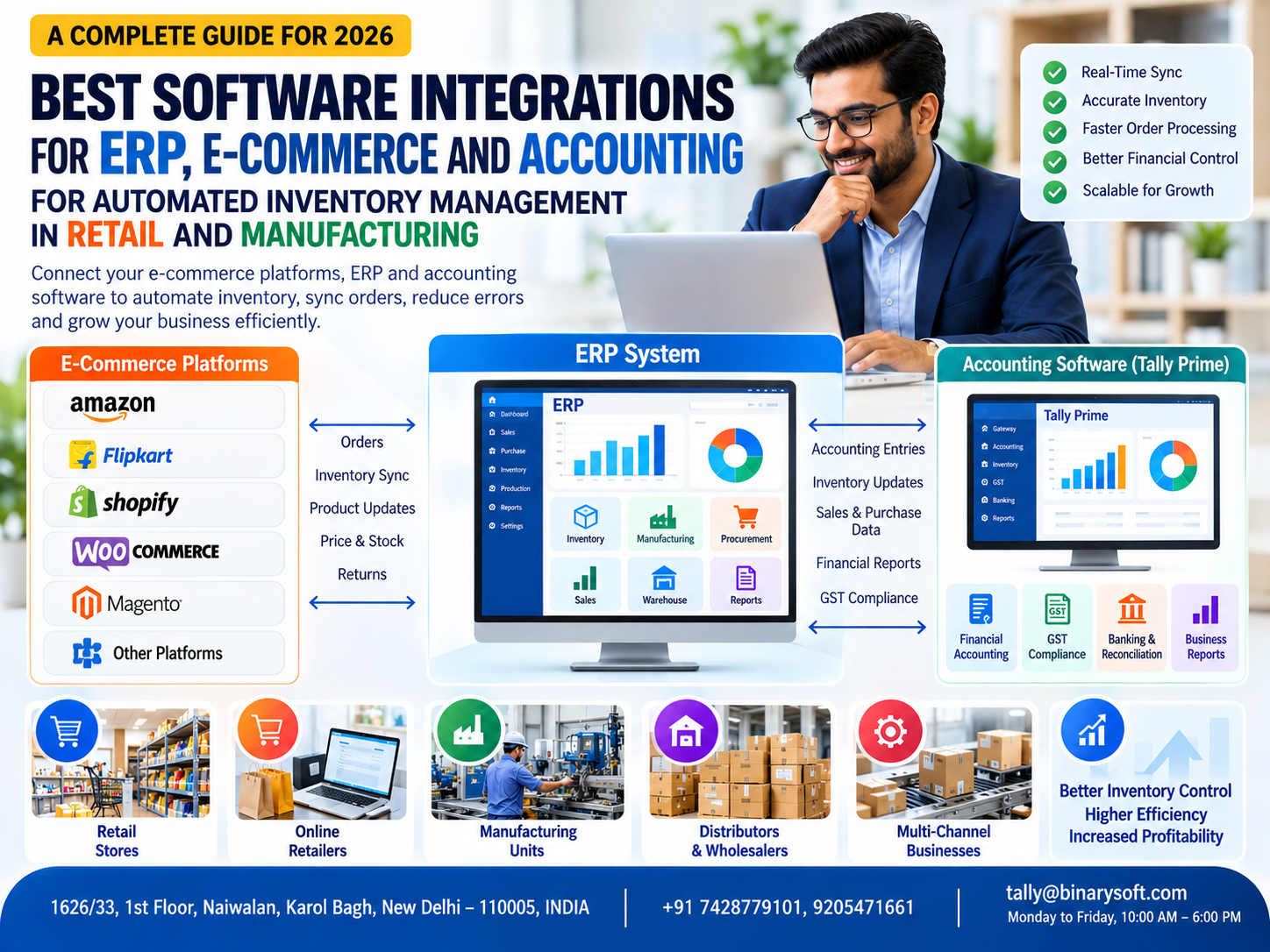
Introduction: Why Inventory Integration Has Become Essential in 2026
Imagine receiving 100 online orders in a single day, only to discover that several products are no longer available in your warehouse.
Your website shows sufficient stock, but your accounting software contains different quantities. Your warehouse team maintains another spreadsheet, while your sales department continues accepting orders.
This situation is common among businesses operating through multiple sales channels.
In 2026, Indian retailers, manufacturers and distributors increasingly need connected systems to manage inventory, accounting, online orders and financial reporting.
Managing these activities separately creates delays, duplicate data entry and inventory discrepancies.
ERP, e-commerce and accounting software integration helps businesses connect their operational systems and maintain more consistent information.
Instead of manually transferring orders, stock quantities and financial transactions between applications, businesses can use supported integrations to automate selected workflows.
For Indian businesses, Tally Prime provides accounting, inventory management, GST-related and financial reporting capabilities that can form an important part of an integrated business environment.
Understanding how these systems work together helps businesses improve inventory visibility, reduce operational errors and build more efficient retail and manufacturing operations.
A Business Owner's Story: When 300 Online Orders Became a Nightmare
Ankit owned a growing home appliances business in Delhi.
He had started with a small retail shop and gradually expanded into online selling.
His products were listed on Amazon, Flipkart and his own e-commerce website.
Initially, managing inventory was simple.
His warehouse team updated spreadsheets, his accountant recorded transactions in Tally Prime and online orders were processed manually.
As sales increased, the business became more difficult to manage.
One morning, Ankit received nearly 300 orders across different platforms.
His team was excited.
It appeared to be the most successful sales day in the company's history.
But by afternoon, problems began.
Several products had already sold out in the warehouse, although the online platforms continued showing available stock.
Customers started receiving cancellation notifications.
Some complained about delayed deliveries.
Others requested refunds.
Ankit watched helplessly as negative customer feedback began appearing.
He had spent years building his business reputation.
Now, disconnected inventory records were putting that reputation at risk.
That evening, he reviewed the situation with his accountant and warehouse manager.
The problem was clear.
His sales channels, inventory records and accounting system were not communicating effectively.
Ankit decided to introduce an integrated inventory management workflow.
His business implemented a centralized order and stock management application connected to its supported e-commerce channels.
Relevant accounting transactions were transferred to Tally Prime through a tested integration process.
Over time, inventory discrepancies reduced, order processing became more organized and employees spent less time updating spreadsheets.
The biggest change was not simply automation.
It was the confidence of knowing that his team could handle increasing sales without losing control of inventory.
This fictional story illustrates common challenges faced by growing multichannel retailers.
What Is ERP, E-Commerce and Accounting Software Integration?
ERP, e-commerce and accounting software integration is the process of connecting different business applications so they can exchange relevant information.
These applications generally perform different functions.
E-commerce platforms manage online product listings, customer orders, payments and customer-facing sales activities.
ERP systems coordinate operational activities such as inventory, purchasing, order management, manufacturing and warehouse processes.
Accounting software maintains financial transactions, tax-related information, receivables, payables and financial reports.
When these systems are integrated, information can move between applications through supported interfaces or structured data exchange.
For example, an online order may be transferred into an order management system.
After validation and fulfillment, relevant sales and inventory information can be recorded in the accounting system.
The exact workflow depends on the applications, integration architecture and business requirements.
Why Automated Inventory Management Is Important
Inventory is one of the most valuable assets for many retail and manufacturing businesses.
Excess inventory blocks working capital, while insufficient stock can result in lost sales and delayed deliveries.
Manual inventory management becomes increasingly difficult as product categories, warehouses and sales channels expand.
Automated inventory management helps businesses maintain more consistent records across connected systems.
Important Benefits
- Improved stock visibility
- Reduced duplicate data entry
- Faster order processing
- Better warehouse coordination
- Fewer avoidable overselling situations
- More accurate inventory-related accounting
- Improved purchasing decisions
- Better financial reporting
However, automation does not guarantee perfect inventory accuracy.
Businesses must still manage physical stock discrepancies, damaged goods, returns, integration failures and transaction timing.
7 Important Software Integrations for Automated Inventory Management
1. E-Commerce Platform and Inventory Management Integration
One of the most valuable integrations connects online selling platforms with a centralized inventory management system.
Businesses selling through multiple channels need consistent stock information.
Without integration, employees may need to update inventory quantities separately on every platform.
Common E-Commerce Platforms
Businesses may use platforms such as Amazon, Flipkart, Shopify, WooCommerce and Adobe Commerce.
Integration capabilities vary by platform, seller account, subscription and technical configuration.
How Integration Works
A centralized application receives relevant order information from supported sales channels.
It updates available inventory according to configured business rules.
Where supported, revised stock quantities can be communicated to connected platforms.
Practical Example
A retailer has 50 units of a product available for sale.
An order for 10 units is received through one platform.
After the order is accepted and inventory is reserved, the central system updates the available quantity.
Connected channels can then receive revised stock availability.
Business Benefits
This approach reduces manual stock updates and helps prevent avoidable overselling.
For reliable operation, businesses must account for synchronization delays, cancelled orders and inventory reservations.
2. ERP and Accounting Software Integration
ERP and accounting software integration connects operational transactions with financial records.
A business may use a specialized ERP application for warehouse operations while maintaining accounting in Tally Prime.
Information That May Be Exchanged
Depending on the integration, businesses may exchange:
- Sales invoices
- Purchase transactions
- Customer information
- Supplier information
- Inventory-related transactions
- Payment records
- Credit notes
- Tax-related details
How Tally Prime Helps
Tally Prime supports accounting, inventory management and relevant data integration capabilities.
Businesses can use supported import, export or integration methods to exchange validated information with compatible external applications.
Practical Example
A distributor uses a warehouse application to manage picking, packing and dispatch.
After dispatch confirmation, the application prepares the relevant transaction information for accounting.
A tested integration transfers the appropriate records to Tally Prime.
Business Benefits
Integrated accounting reduces duplicate entry, improves financial consistency and supports more efficient reporting.
3. Warehouse Management and ERP Integration
Warehouse management systems help businesses organize receiving, storage, picking, packing and dispatch operations.
For companies handling hundreds or thousands of products, warehouse efficiency directly affects customer satisfaction.
Important Warehouse Management Functions
- Goods receipt tracking
- Warehouse location management
- Barcode-based product identification
- Stock transfers
- Order picking and packing
- Dispatch confirmation
- Inventory adjustments
- Physical stock reconciliation
How Integration Works
A warehouse management application records operational inventory movements.
Relevant transactions are exchanged with the ERP or accounting system according to configured integration rules.
How Tally Prime Helps
Tally Prime provides inventory features such as stock items, godowns, stock transfers and inventory reports.
Businesses requiring advanced warehouse functionality can evaluate compatible external applications.
Practical Example
A wholesale distributor operates three warehouses.
When products move between warehouses, the operational system records the transfer.
The corresponding inventory information can be transferred to Tally Prime through a suitable integration.
Business Benefits
Warehouse integration can improve stock visibility, reduce dispatch errors and support better inventory control.
4. Manufacturing and Inventory Management Integration
Manufacturing businesses need to manage raw materials, work-in-progress and finished goods.
Unlike retail businesses, manufacturers must also consider production consumption, material requirements and manufacturing processes.
Important Manufacturing Functions
Manufacturing-related ERP applications may support production orders, Bills of Materials, material consumption, production-stage monitoring and finished goods tracking.
How Tally Prime Supports Manufacturing
Tally Prime provides Bills of Materials and manufacturing-related inventory voucher capabilities.
These features help businesses record raw material consumption and finished goods production.
For advanced production planning, businesses may require specialized manufacturing software.
Practical Example
A furniture manufacturer produces 100 wooden tables.
The company needs to monitor timber, hardware and other materials consumed during production.
A manufacturing application can manage detailed production workflows while relevant inventory and accounting information is maintained in Tally Prime.
Business Benefits
Manufacturing integration can improve material visibility, production coordination, purchasing decisions and cost analysis.
5. Point-of-Sale and Accounting Integration
Retail businesses often use Point-of-Sale (POS) systems for billing and payment collection.
When POS software operates separately from accounting, employees may need to manually transfer daily sales information.
How POS Integration Works
A POS application records retail transactions.
Relevant sales, tax, payment and inventory information can be exchanged with an accounting system.
Practical Example
A retail chain operates five stores.
Each location uses a POS application.
At the end of the day, validated sales information is transferred into the central accounting environment.
Tally Prime Integration
Businesses can evaluate compatible POS solutions that support suitable data exchange with Tally Prime.
Business Benefits
POS integration can reduce repetitive accounting entries, improve sales reporting and support more consistent inventory records.
6. Purchase Management and Supplier Integration
Inventory automation is not limited to sales.
Purchasing is equally important.
Businesses need to understand which products require replenishment and how purchasing decisions affect working capital.
Important Functions
Purchase management applications may support purchase requisitions, supplier quotations, purchase orders, goods receipts and supplier invoice processing.
How Tally Prime Helps
Tally Prime supports purchase orders, purchase vouchers, supplier ledgers and inventory-related transactions.
Practical Example
A distributor identifies that a fast-moving product is approaching its reorder level.
The purchasing team reviews stock information and places an order with the supplier.
Once the goods arrive, the business records the relevant purchase and inventory transactions.
Business Benefits
Integrated purchasing supports better replenishment planning, supplier coordination and inventory investment control.
7. Banking, GST and Financial Reporting Integration
Inventory movements eventually affect financial transactions.
Sales create revenue and customer receivables.
Purchases create expenses, inventory assets or supplier obligations, depending on the transaction.
Integrating operational and accounting information helps businesses maintain more consistent financial records.
Important Functions
Businesses may require banking reconciliation, GST-related transaction records, financial reporting and customer outstanding monitoring.
How Tally Prime Helps
Tally Prime provides accounting, GST-related reporting, banking and financial statement capabilities.
Available connected services and integration options depend on the software version and configuration.
Practical Example
An online retailer receives customer orders through multiple platforms.
The retailer must account for sales, returns, marketplace charges, taxes and payment settlements.
A properly designed integration can prepare validated transaction information for accounting.
Business Benefits
This supports more reliable financial records, improved reconciliation and better business visibility.
Case Study 1: How a Delhi E-Commerce Retailer Improved Inventory Management
Business Background
A growing electronics retailer in Delhi sold products through online marketplaces and its own website.
The business processed approximately 2,000 monthly orders.
Inventory records were maintained separately from online sales and accounting information.
Major Challenges
The company experienced frequent stock discrepancies, delayed order processing and manual accounting work.
Employees spent considerable time comparing order information with warehouse spreadsheets.
Integration Solution
The business introduced a centralized order and inventory management application.
Supported e-commerce channels were connected to the application, while validated financial transactions were transferred to Tally Prime.
Illustrative Results
| Performance Area | Before Integration | After Integration |
|---|
| Stock updates |
Manual |
Automated where supported |
| Order processing |
Separate workflows |
Centralized processing |
| Accounting entries |
Repetitive entry |
Validated integration |
| Inventory visibility |
Limited |
Improved |
| Financial reporting |
Manual consolidation |
More organized |
Key Learning
Centralized inventory management helped the company reduce information gaps between online sales, warehouse operations and accounting.
This fictional case study illustrates potential integration benefits rather than verified business results.
Case Study 2: How a Manufacturing Company Improved Inventory and Production Control
Business Background
A manufacturing company in Faridabad produced industrial components for engineering businesses.
The organization purchased raw materials from multiple suppliers and maintained several finished product categories.
Major Challenges
The company experienced difficulties tracking raw material consumption, production requirements and finished goods inventory.
Accounting and production information were maintained separately.
Integration Solution
The company introduced a manufacturing management application for production-related activities.
Tally Prime continued handling financial accounting and relevant inventory transactions.
The applications exchanged validated information through a configured integration process.
Illustrative Results
The company gained better visibility into material consumption, purchasing requirements and inventory movements.
Management could review production-related information alongside financial reports.
Key Learning
Manufacturing integration can help businesses connect operational processes with accounting while retaining specialized production functionality.
This case study is illustrative.
How to Integrate E-Commerce, ERP and Tally Prime: Step-by-Step Guide
Step 1: Identify Business Requirements
Determine which activities require integration.
These may include online orders, inventory synchronization, purchase transactions, warehouse operations and accounting.
Step 2: Select a Central Inventory System
Identify which application will maintain authoritative inventory quantities.
Avoid allowing multiple applications to independently modify the same stock records without defined synchronization rules.
Step 3: Evaluate E-Commerce Integration Options
Check whether the selected platforms support the required order, product and inventory interfaces.
Verify technical limitations and account-specific requirements.
Step 4: Configure Inventory Masters
Maintain consistent product identifiers, stock units and warehouse information.
Accurate master data is essential for reliable synchronization.
Step 5: Define Accounting Integration
Determine which transactions should be recorded in Tally Prime.
Establish appropriate mapping for sales, purchases, taxes, returns and payment settlements.
Step 6: Configure Inventory Synchronization
Define when stock quantities should change.
Consider confirmed orders, cancellations, dispatches, returns and damaged inventory.
Step 7: Test Integration Scenarios
Test normal orders, duplicate transactions, partial fulfillment, returns, cancellations and synchronization failures.
Step 8: Establish Security Controls
Protect integration credentials and restrict unauthorized access.
Maintain transaction logs and appropriate data protection procedures.
Step 9: Introduce the System Gradually
Where practical, begin with a limited number of products or sales channels.
Verify results before expanding.
Step 10: Monitor Integration Performance
Regularly reconcile inventory quantities, order records, accounting transactions and payment settlements.
Manual Inventory Management vs Automated Inventory Integration
| Business Function | Manual Inventory Management | Automated Integration |
|---|
| Stock updates |
Separate manual entries |
Connected updates |
| Online orders |
Manual consolidation |
Centralized processing |
| Accounting |
Repetitive entry |
Integrated transaction exchange |
| Inventory accuracy |
Higher risk of discrepancies |
Improved consistency |
| Warehouse operations |
Separate records |
Better coordination |
| Returns |
Manual adjustments |
Structured workflows |
| Financial reporting |
Manual consolidation |
More consistent information |
| Business scalability |
Increasing administrative work |
Better support for growth |
Automation reduces repetitive activities but still requires proper configuration, monitoring and reconciliation.
Common Mistakes to Avoid During Inventory Integration
Businesses should avoid implementing integrations without clearly defining how stock quantities and financial transactions will be managed.
Common problems include duplicate product identifiers, inconsistent units of measurement, incorrect tax mappings and missing transaction validations.
Another serious mistake is assuming that inventory synchronization is always instantaneous.
External platforms may introduce delays, API limitations or temporary connection failures.
Businesses should also account for returns, damaged stock, order cancellations and partial shipments.
A reliable integration must include error logging, retry procedures, duplicate prevention and regular reconciliation.
Future of Automated Inventory Management in 2026 and Beyond
Inventory management technology continues to evolve as businesses adopt multichannel selling, connected warehouses and integrated financial systems.
Important developments include API-based integrations, automated order processing, barcode-enabled operations, cloud applications and advanced inventory analytics.
Artificial intelligence may also support demand forecasting and inventory planning in suitable systems.
However, businesses should verify which capabilities are actually available in their selected applications.
For Indian retailers and manufacturers, the immediate priority should be accurate inventory records, reliable accounting integration and consistent operational processes.
Conclusion: Connected Inventory, ERP and Accounting Systems Create Smarter Businesses
Automated inventory management can significantly improve how retail, manufacturing and distribution businesses operate.
Integrating e-commerce platforms, ERP applications, warehouse systems and accounting software helps reduce repetitive work and improve information consistency.
The most important benefits include better stock visibility, faster order processing, improved warehouse coordination, stronger financial control and more informed purchasing decisions.
Tally Prime can provide an accounting and inventory management foundation within a connected business software environment.
Where specialized requirements exist, compatible external applications can support e-commerce operations, warehouse management and advanced manufacturing workflows.
However, successful integration requires accurate data, proper technical design, transaction validation and ongoing monitoring.
The greatest advantage of inventory automation is not simply faster stock updates. It is helping businesses maintain control over inventory, customer commitments and financial performance as they grow.
Powered by Binarysoft Technologies
Authorized Tally Partner
Location: 1626/33, 1st Floor, Naiwalan, Karol Bagh, New Delhi – 110005, INDIA
Contact Us: +91 7428779101, 9205471661
Email: tally@binarysoft.com
Business Hours: Monday to Friday, 10:00 AM – 6:00 PM
Frequently Asked Questions
What is ERP and e-commerce integration?
ERP and e-commerce integration connects online selling platforms with business management systems to exchange relevant information about orders, inventory and transactions.
Why is automated inventory management important?
Automated inventory management reduces repetitive work, improves stock visibility and helps businesses coordinate orders across multiple sales channels.
Can Tally Prime integrate with e-commerce platforms?
Tally Prime supports integration capabilities that can be used with compatible external applications. The availability of specific e-commerce integrations depends on the chosen solution.
Can Flipkart sales be integrated with accounting software?
Yes. Compatible integration applications may transfer relevant Flipkart transaction information into accounting systems, subject to supported interfaces.
CA. Samarth Toshniwal works on business accounting, taxation, and transaction reconciliation. His professional focus is on helping enterprises maintain organized financial records and develop efficient accounting practices.








