Call CA Tally HelpDesk
+91 9205471661,
7428779101
Introduction: When Standard Accounting Software Is Not Enough for Your Business
Every business operates differently.
A wholesale distributor may need specialized inventory reports. A manufacturing company may require additional production-related calculations. An e-commerce seller may want sales information imported automatically, while a service provider may need customized invoice formats and customer reports.
Standard accounting software provides essential functionality, but growing organizations often develop requirements that extend beyond its default features.
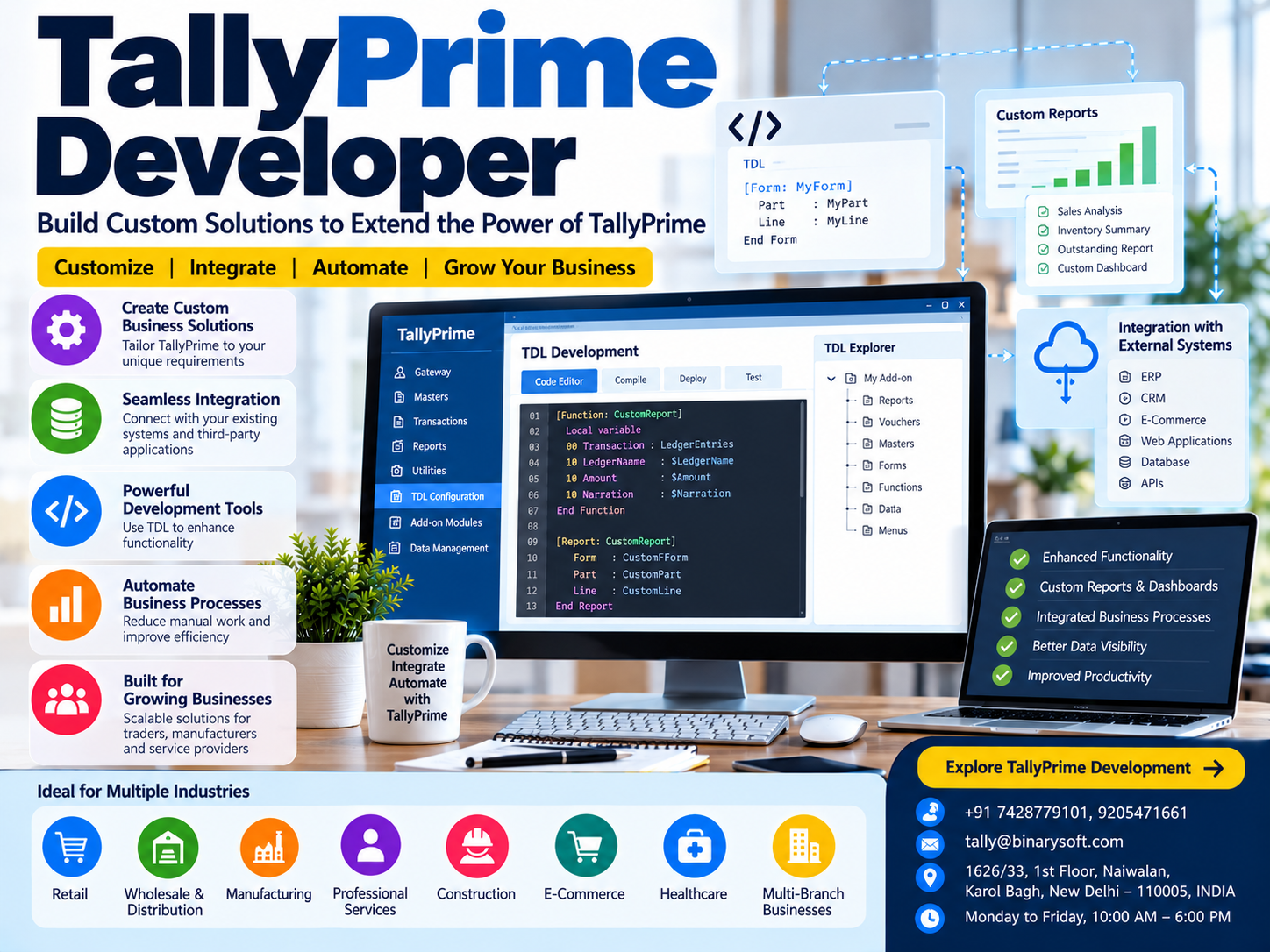
TallyPrime Developer provides a development environment for creating customized solutions that extend TallyPrime's functionality through Tally Definition Language (TDL).
Developers can use TDL to create specialized reports, modify supported interfaces, develop additional business functionality and build solutions for industry-specific requirements.
TallyPrime can also exchange data with external applications through supported integration mechanisms, enabling businesses to connect accounting operations with other systems.
For organizations looking to reduce repetitive work and improve reporting, customization can provide significant operational benefits.
This guide explains TallyPrime Developer, its features, practical applications, TDL development, integration possibilities and how customized accounting solutions can help Indian businesses operate more efficiently in 2026.
A Business Owner's Story: When Success Created More Work Than His Team Could Handle
At 10:45 PM, Arjun was still sitting in his office in Delhi.
His company supplied industrial components to manufacturers across North India.
The business had grown steadily.
Customer orders were increasing, new products were being introduced and employees were handling more transactions than ever before.
Yet Arjun was frustrated.
His accounting team used TallyPrime successfully for invoicing, GST accounting and inventory management.
But every morning, employees spent hours preparing specialized management reports.
They exported accounting information, reorganized it in spreadsheets and manually calculated figures required by different departments.
The sales manager needed a customer-wise profitability report.
The purchase department wanted a customized supplier performance summary.
The owner wanted one report showing overdue payments, sales performance and inventory values.
Although the underlying information existed in TallyPrime, preparing these specialized reports required additional work.
One evening, Arjun asked his accountant a simple question.
"Why are we entering information into one system and then spending hours preparing the same information again?"
The company decided to explore TallyPrime customization.
A developer reviewed the requirements and created suitable TDL-based reports.
Instead of manually combining multiple spreadsheets, employees could access customized information through their accounting environment.
The company also evaluated integration options for reducing repetitive data entry.
Gradually, reporting became more organized.
Employees spent less time preparing routine summaries and more time reviewing the information.
Arjun realized that business growth did not always require more employees.
Sometimes, it required better tools.
This fictional story illustrates how carefully designed accounting customizations can help reduce repetitive work.
What Is TallyPrime Developer?
TallyPrime Developer is a development environment used to create and maintain customizations for TallyPrime.
It is primarily intended for developers, technical consultants and organizations building specialized business solutions.
The development environment supports work with Tally Definition Language (TDL), the language used to extend supported TallyPrime functionality.
Through TDL, developers can build additional reports, screens, forms, fields and business-specific features.
TallyPrime Developer is not a replacement for the main accounting application.
Instead, it provides tools for developing solutions that work with compatible TallyPrime installations.
What Can Developers Create?
Developers can build solutions such as:
-
Customized accounting reports
-
Specialized invoice layouts
-
Additional data-entry fields
-
Business-specific dashboards
-
Inventory analysis reports
-
Customer and supplier summaries
-
Industry-specific accounting extensions
-
Data validation rules
-
Workflow enhancements
-
Supported external data integrations
The actual possibilities depend on the software version, available TDL capabilities and technical requirements.
1. Understanding Tally Definition Language (TDL)
TDL is the programming language used to customize and extend TallyPrime.
It provides a structured way to define interfaces, reports, data elements and business functionality.
Unlike general-purpose programming languages, TDL is designed specifically for working with the Tally application environment.
Important TDL Concepts
Definitions
Definitions describe different elements of a customization, such as reports, forms, parts and fields.
Reports
Reports organize information for display or output.
Forms
Forms define the visual structure used to present information.
Parts
Parts help organize sections within forms.
Lines
Lines define rows or groups of fields.
Fields
Fields display or accept specific information.
Collections
Collections help retrieve and organize data for use in reports and other functionality.
Functions
Functions support calculations and business logic.
Methods
Methods provide access to relevant data attributes.
By combining these elements, developers can create solutions tailored to specific business requirements.
2. Why Businesses Need TallyPrime Customization
Standard accounting functionality is sufficient for many businesses.
However, some organizations require additional features because of their industry, reporting structure or operational procedures.
Industry-Specific Requirements
A manufacturing business may need specialized material consumption reports.
A wholesale distributor may require customer-wise sales analysis.
A service provider may need additional information on invoices.
Management Reporting
Business owners may want consolidated reports combining several financial indicators.
Data Entry Requirements
Organizations may need additional fields for internal reference numbers, project details or other business information.
Process Automation
Repetitive activities may be reduced through carefully designed customization.
External Integration
Businesses may need to exchange information between TallyPrime and other applications.
Customization helps bridge the gap between standard software functionality and specialized business requirements.
3. Creating Customized Reports in TallyPrime
Customized reporting is one of the most valuable applications of TDL.
Businesses often maintain detailed accounting information but require reports arranged differently from standard formats.
TallyPrime Developer allows developers to create reports that present relevant information according to business needs.
Customer-Wise Sales Reports
A distributor may want a report showing customer names, sales values, outstanding amounts and transaction trends.
Product-Wise Profitability
A trading company may require additional analysis of product sales and costs.
Supplier Performance
A purchase department may need information about supplier transactions, pending payments and purchasing activity.
Expense Analysis
Management may want expenses grouped by department, branch or project.
Custom Management Dashboard
A dashboard may combine selected accounting indicators into one view.
Business Benefits
Customized reports can reduce manual spreadsheet preparation and provide information in a more convenient format.
However, report calculations must be tested carefully to ensure that they reflect the intended accounting logic.
4. Custom Invoice Formats and Document Personalization
Businesses frequently require invoice formats that reflect their operational requirements.
For example, a distributor may need additional product information.
A manufacturer may require internal order references.
A service provider may want project details displayed on invoices.
TDL customization can support additional invoice layouts and fields.
Possible Customizations
-
Additional customer reference information
-
Internal purchase order details
-
Product-specific descriptions
-
Delivery-related information
-
Customized invoice presentation
-
Additional business fields
-
Specialized print formats
Practical Example
A wholesale business supplies electrical equipment to contractors.
Its customers require project reference numbers on invoices.
A developer can evaluate whether the requirement can be handled through standard configuration or whether a suitable customization is necessary.
If customization is required, a supported field and print layout can be developed.
This helps reduce manual invoice modifications.
Important: Customized invoices must continue to satisfy applicable GST and other statutory requirements.
5. Automating Repetitive Accounting Processes
Repetitive administrative work consumes valuable employee time.
Businesses may spend hours exporting reports, preparing summaries or transferring information between systems.
Appropriate TDL customizations can help automate selected activities.
Examples of Automation
Automated Calculations
Custom business calculations can be performed using defined logic.
Data Validation
Additional checks can help identify incomplete or inconsistent entries.
Customized Reporting
Reports can be designed to reduce repeated manual formatting.
Workflow Enhancements
Supported processes can be adjusted to better match business procedures.
Data Exchange
Integration solutions can reduce manual re-entry of information.
Benefits
Automation can improve consistency, reduce repetitive tasks and help employees focus on more valuable activities.
However, automated processes should include suitable validation and error-handling procedures.
6. Integrating TallyPrime with External Applications
Many businesses use multiple software applications.
An organization may maintain customer information in a CRM system, orders in an e-commerce platform and accounting records in TallyPrime.
Without integration, employees may need to enter the same information repeatedly.
TallyPrime supports data exchange through documented integration mechanisms, including XML-based interfaces and other supported methods.
Developers can use these capabilities to build suitable integration solutions.
Common Integration Scenarios
E-Commerce Platforms
Transfer relevant sales, customer or inventory information through a compatible integration solution.
CRM Applications
Exchange supported customer and transaction information.
ERP Systems
Connect selected operational processes with accounting records.
Custom Web Applications
Develop interfaces for transferring validated business information.
Order Management Systems
Reduce repeated entry of order-related information.
Reporting Applications
Extract permitted accounting information for specialized analysis.
Important Considerations
Integrations require careful planning.
Developers must evaluate data formats, authentication, error handling, duplicate prevention and reconciliation.
Not every third-party application provides a ready-made TallyPrime connector.
Some integrations require custom development.
7. TallyPrime Developer for Inventory Customization
Inventory management requirements vary across industries.
A retail store may need product-wise stock reports.
A distributor may require warehouse-specific analysis.
A manufacturing company may need additional production-related information.
TDL can be used to develop suitable inventory reports and supported extensions.
Examples
Stock Ageing Analysis
Help identify inventory that has remained unsold for extended periods.
Product Movement Reports
Analyze inward and outward stock movements.
Warehouse-Specific Reports
Present inventory information according to storage locations.
Customized Stock Summaries
Organize stock information using business-specific classifications.
Product Performance Reports
Combine relevant sales and inventory information.
These solutions can help businesses make better purchasing and inventory decisions.
8. Data Validation and Error Prevention
Incorrect accounting information can create serious business problems.
A missing reference number, incorrect classification or incomplete transaction may affect reporting.
TDL customization can introduce additional validation rules where supported.
Practical Examples
A business may require an internal order reference before saving selected transactions.
Another organization may want to check whether specific fields have been completed.
A developer can evaluate whether the requirement can be implemented through supported TDL validation logic.
Benefits
Proper validation can reduce incomplete records and improve data consistency.
However, validation rules should be tested to ensure that they do not unnecessarily interrupt legitimate transactions.
9. Developing Industry-Specific TallyPrime Solutions
Different industries have different operational requirements.
TallyPrime Developer can support specialized solutions when standard functionality is insufficient.
Retail Businesses
Retailers may require customized sales reports, product analysis and inventory summaries.
Wholesale Distribution
Distributors may need customer-wise sales analysis, outstanding reports and specialized inventory classifications.
Manufacturing
Manufacturers may require material consumption analysis, production-related reporting and additional cost calculations.
Professional Services
Service organizations may need project-based reports, customized invoices and expense analysis.
Construction
Construction businesses may require project references, cost summaries and specialized reporting.
E-Commerce
Online sellers may require data exchange with order management systems and marketplace platforms.
Healthcare
Healthcare businesses may need specialized accounting and inventory reporting.
Any industry-specific solution should be designed around documented business requirements.
10. TallyPrime Developer and Business Scalability
As businesses grow, reporting and integration requirements often become more complex.
A company may initially require only a customized invoice.
Later, it may need specialized dashboards, data validation and integration with other applications.
TDL-based solutions can be developed incrementally.
However, scalability requires more than adding features.
Developers should consider maintainability, performance, compatibility and testing.
A poorly designed customization can introduce operational problems.
A well-planned solution should be documented and reviewed regularly.
11. TallyPrime Developer vs Standard TallyPrime
Although both products belong to the TallyPrime ecosystem, they serve different purposes.
| Feature | TallyPrime | TallyPrime Developer |
|---|
| Primary purpose |
Accounting and business management |
Development and customization |
| Financial accounting |
Yes |
Not a standalone accounting application |
| GST billing |
Yes |
Can develop supported extensions |
| Inventory management |
Yes |
Can customize supported functionality |
| Standard reports |
Yes |
Can create specialized reports |
| TDL development |
Loads supported customizations |
Dedicated development environment |
| External integrations |
Supports documented interfaces |
Helps develop integration solutions |
| Intended users |
Accountants and business owners |
Developers and technical consultants |
Businesses do not necessarily need TallyPrime Developer for routine accounting.
It becomes relevant when specialized features or custom development are required.
12. How to Develop a Custom TallyPrime Solution
A successful customization project should follow a structured development process.
Step 1: Identify the Business Problem
Understand the existing workflow and determine what needs improvement.
For example, a distributor may spend two hours preparing a daily customer outstanding report.
Step 2: Review Standard Functionality
Check whether TallyPrime already provides the required feature.
Customization should be considered when standard configuration cannot adequately address the requirement.
Step 3: Prepare a Requirement Document
Define the required fields, calculations, reports and expected outputs.
Step 4: Design the TDL Solution
Identify the appropriate TDL definitions, collections, methods and functions.
Step 5: Develop the Customization
Create the required functionality using supported TDL capabilities.
Step 6: Test with Sample Data
Verify calculations, data entry, report outputs and error handling.
Step 7: Test Compatibility
Confirm that the customization works with the intended TallyPrime version.
Step 8: Deploy Carefully
Create backups and introduce the customization through a controlled deployment process.
Step 9: Train Employees
Explain how to use the new functionality.
Step 10: Maintain the Solution
Review compatibility after software updates and modify the customization when necessary.
Case Study 1: Wholesale Distributor Reduces Manual Reporting Work
Illustrative case study.
Business Background
A Delhi-based electrical goods distributor used TallyPrime for accounting, invoicing and inventory management.
The company supplied hundreds of products to retailers and contractors.
Challenges
Although its accounting records were maintained in TallyPrime, management required a specialized daily report.
The report needed to combine customer sales, outstanding balances and selected inventory information.
Employees exported several reports into spreadsheets and manually consolidated the information.
This process consumed valuable time and created opportunities for errors.
Solution
The company engaged a TDL developer to create a customized management report.
The developer studied the existing workflow, identified the required data and designed a report using supported TDL functionality.
The solution was tested against existing accounting records before deployment.
Results
The accounting team could access the required information in a more convenient format.
Manual spreadsheet preparation was reduced.
Management received more consistent reporting.
Key Learning
Customized reports can help businesses use existing accounting data more effectively without introducing unnecessary parallel systems.
Case Study 2: Manufacturing Company Improves Production-Related Reporting
Illustrative case study.
Business Background
A manufacturing company produced electrical components for industrial customers.
It used TallyPrime for accounting and inventory management.
Challenges
The production department needed specialized reports showing selected material movements and manufacturing-related information.
Standard reports did not present the information in the preferred format.
Employees prepared additional spreadsheets for internal analysis.
Solution
A developer evaluated the company's reporting requirements.
Suitable TDL-based reports were created to present the relevant accounting and inventory information.
The implementation included data validation, report testing and employee training.
Results
The company gained more convenient access to selected production-related information.
Management could review material movements more systematically.
Employees spent less time reorganizing accounting data.
Key Learning
Industry-specific customization can improve reporting efficiency when the underlying accounting and inventory records are accurate.
13. TallyPrime Developer and Cloud-Based Accounting
Businesses increasingly use cloud-hosted accounting environments to support employees working from different locations.
A TDL customization developed for TallyPrime may also be usable in a compatible hosted environment.
However, deployment depends on several factors.
These include the TallyPrime version, hosting infrastructure, security policies, external connectivity and customization requirements.
Important Considerations
Compatibility: Verify that the customization works with the installed TallyPrime release.
Security: Protect access to accounting data and integration services.
Performance: Evaluate the effect of custom reports and integrations on system resources.
Maintenance: Establish procedures for updating and troubleshooting customizations.
Backups: Maintain verified backups before introducing changes.
Cloud hosting does not automatically make every customization compatible with every environment.
Technical testing is essential.
14. Important Security Practices for TDL Development
Customizations can access and process important business information.
Therefore, security must be considered throughout development.
Developers should follow appropriate practices, including restricting unnecessary data access, validating inputs and handling errors safely.
Sensitive information should not be exposed through reports or integrations without authorization.
External integrations should use suitable authentication and network protection.
Businesses should also maintain version-controlled development files and tested backups.
A customization should never bypass necessary accounting controls simply to make a workflow faster.
15. Common Mistakes to Avoid in TallyPrime Customization
Developing Features Without Clear Requirements
Incomplete requirements can lead to repeated changes and unnecessary costs.
Customizing Existing Standard Features
Businesses should first check whether TallyPrime already supports the required functionality.
Ignoring Software Compatibility
Customizations may require updates when the underlying application changes.
Insufficient Testing
Incorrect calculations or data handling can affect business reports.
Poor Documentation
Undocumented customizations become difficult to maintain.
Ignoring Security
Integrations and custom reports must protect sensitive business information.
Excessive Customization
Adding too many unnecessary features can make the system harder to use and maintain.
The objective should be to simplify business operations rather than introduce additional complexity.
16. How to Choose a TallyPrime Development Partner
Selecting the right development partner is important for successful customization.
Businesses should evaluate the developer's understanding of accounting, TDL and business workflows.
A technically functional customization may still be unsuitable if it does not follow correct accounting practices.
Before beginning a project, clarify the scope, expected deliverables, testing procedures, documentation and maintenance arrangements.
Also discuss compatibility with future TallyPrime updates.
A good customization project should include clear acceptance criteria so that the business can verify whether the solution meets its requirements.
17. TallyPrime Developer Pricing and Customization Costs
The cost of TallyPrime customization depends on the complexity of the required solution.
A simple report modification may require less development effort than a complete integration with an external business application.
Factors affecting development costs include:
-
Number of customized reports
-
Complexity of business calculations
-
Additional data-entry requirements
-
External system integration
-
Data validation rules
-
Testing and deployment requirements
-
Documentation and training
-
Future maintenance
TallyPrime Developer licensing and custom development services are separate considerations.
Businesses should obtain current licensing information and a detailed project quotation before proceeding.
18. Why Choose Binarysoft Technologies for TallyPrime Customization?
Binarysoft Technologies is an Authorized Tally Partner providing TallyPrime-related business solutions.
Businesses considering customized accounting functionality can discuss their operational requirements and evaluate suitable implementation approaches.
Whether the requirement involves specialized reports, additional fields, business automation or integration with another application, the first step should be a clear understanding of the existing process.
A well-designed solution should improve efficiency while preserving accounting accuracy and data security.
Businesses should also consider employee training and ongoing maintenance when planning customized functionality.
Conclusion: Transform TallyPrime into a More Powerful Business Solution
Every organization has unique business processes.
While standard accounting software provides essential functionality, some businesses require specialized reports, additional fields, automated workflows and external integrations.
TallyPrime Developer provides tools for creating these solutions through Tally Definition Language.
With suitable development, organizations can extend supported TallyPrime functionality to address specific operational requirements.
Customized reports can reduce repetitive spreadsheet work.
Data validation can improve record consistency.
Integration solutions can reduce duplicate data entry.
Industry-specific extensions can help businesses organize information in more useful ways.
However, customization should always begin with clear business requirements.
Proper development, testing, security and maintenance are essential for long-term success.
The real value of TallyPrime Developer is not simply adding more features. It is creating practical solutions that help businesses work more efficiently, make better decisions and prepare for future growth.
Contact Binarysoft Technologies
Powered by Binarysoft Technologies
Authorized Tally Partner
Location: 1626/33, 1st Floor, Naiwalan, Karol Bagh, New Delhi – 110005, INDIA
Contact Us: +91 7428779101, 9205471661
Email: tally@binarysoft.com
Business Hours: Monday to Friday, 10:00 AM – 6:00 PM
Frequently Asked Questions
Is TallyPrime Developer suitable for manufacturing businesses?
Yes. Developers can create suitable extensions for manufacturing-related reporting and other supported requirements.
Can TDL customizations work with TallyPrime on Cloud?
They may work in compatible hosted environments, subject to technical testing and deployment requirements.
Is TDL difficult to learn?
TDL requires an understanding of its definitions, data structures and programming concepts. Prior knowledge of accounting and software development can be helpful.
Can TallyPrime integrate with external applications?
Yes. TallyPrime supports documented data exchange mechanisms that developers can use to build compatible integrations.
CA. Advait Chitale advises businesses on taxation, audit, and financial controls. He is passionate about helping organizations adopt technology-driven accounting solutions that enhance productivity and ensure regulatory compliance.