Call CA Tally HelpDesk
+91 9205471661,
7428779101
Introduction: Why Knowing Your Available Stock Can Save a Business
Imagine a wholesale electronics distributor receiving an urgent call from an important customer.
The customer wants 150 units of a particular product and needs immediate confirmation.
The salesperson believes sufficient stock is available but cannot verify the exact quantity.
He calls the warehouse supervisor, who contacts another employee to check the shelves.
After several minutes, the team discovers that only 90 units are available at the dispatch location.
The remaining products may be stored in another warehouse.
By the time the business confirms availability, the customer has already contacted a competitor.
This situation demonstrates why quick access to accurate stock information is essential.
In modern business operations, inventory information must be available when decisions are being made.
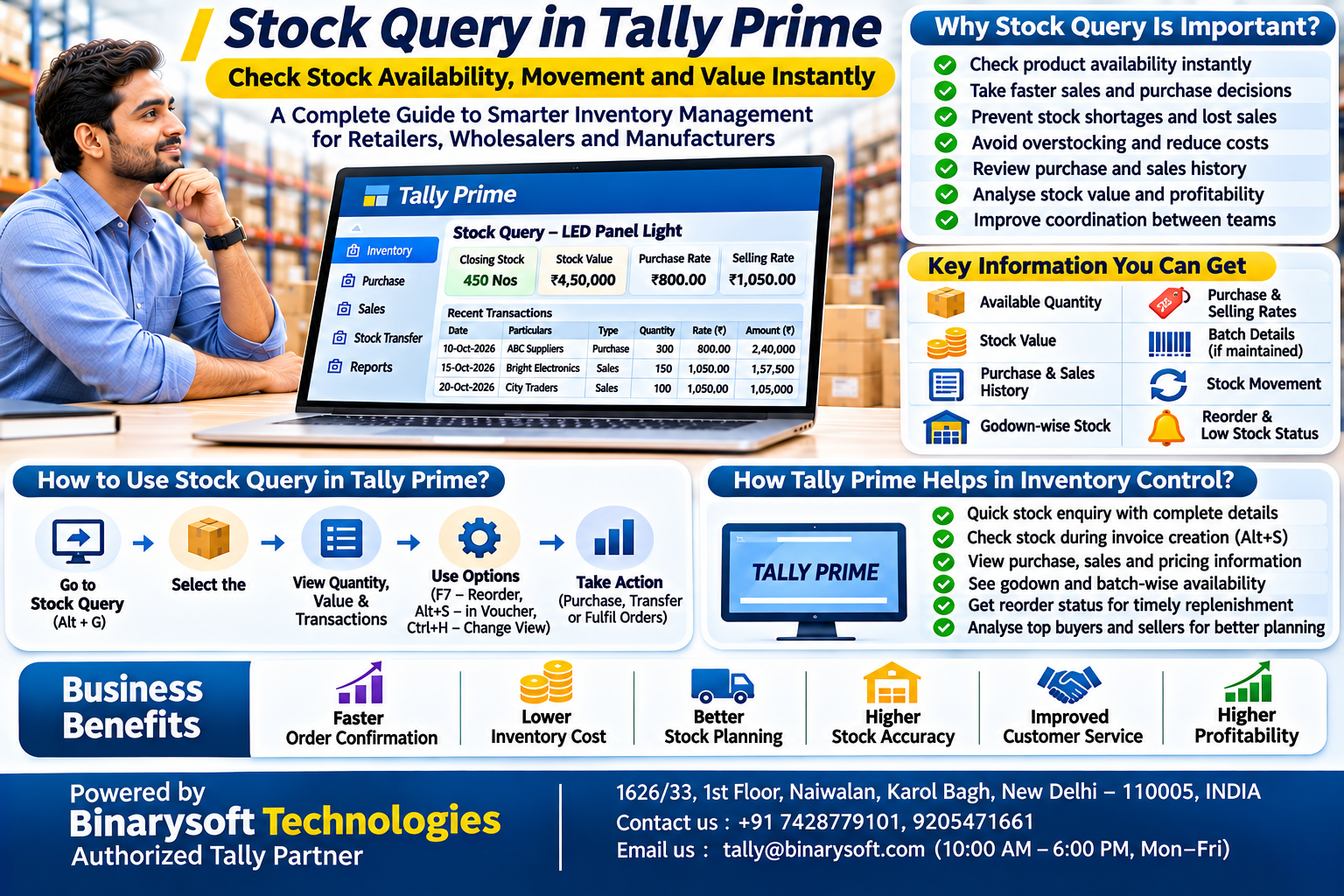
Stock Query in Tally Prime helps businesses examine inventory information without relying entirely on manual stock counts, spreadsheets or repeated communication with warehouse employees.
It supports faster decisions about sales commitments, purchasing requirements and product availability.
For Indian retailers, wholesalers, distributors and manufacturers, accurate inventory visibility can improve customer service, reduce unnecessary purchases and support better working capital management.
This guide explains Stock Query, its importance, key features, practical uses and how businesses can integrate stock reporting into daily operations.
What Is Stock Query?
Stock Query is an inventory enquiry facility that allows users to examine information about a selected stock item.
It helps businesses answer important questions such as:
-
How much stock is available?
-
What is the current stock value?
-
What quantities have been purchased or sold?
-
Where is the inventory stored?
-
What inventory movement information is available?
-
Does the business need to purchase additional stock?
Instead of manually searching through multiple transactions, users can examine relevant stock information through inventory reports and item-level enquiries.
Stock Query is particularly useful for businesses maintaining large product catalogues or handling frequent sales and purchase transactions.
Why Stock Query Is Important for Inventory Management
1. Faster Stock Availability Checks
Sales teams frequently need to confirm whether products are available before accepting customer orders.
Stock Query helps users access inventory information quickly.
This reduces dependence on telephone calls or manual warehouse enquiries.
2. Better Customer Service
Customers expect accurate information about product availability.
When sales employees can check stock records promptly, they can provide more reliable delivery commitments.
3. Reduced Stock Shortages
Regular stock enquiries help identify products approaching low stock levels.
Management can initiate replenishment before shortages disrupt sales.
4. Improved Purchasing Decisions
Purchasing teams can review existing stock before ordering additional products.
This helps prevent duplicate purchases and excessive inventory accumulation.
5. Better Working Capital Control
Unnecessary inventory purchases block funds that could support other business requirements.
Accurate stock information helps businesses maintain more appropriate inventory quantities.
6. Improved Coordination Between Departments
Purchasing, sales, warehouse and accounting teams benefit from using consistent inventory information.
This reduces confusion and supports smoother operations.
What Information Can Stock Query Provide?
Depending on the report, configuration and inventory features enabled, Tally Prime can provide information such as:
|
Information
|
Business purpose
|
|---|
|
Stock item name
|
Identify the product
|
|
Opening balance
|
Review stock at the beginning of a period
|
|
Inward quantity
|
Examine incoming stock
|
|
Outward quantity
|
Examine stock issued or sold
|
|
Closing quantity
|
Review remaining stock
|
|
Stock value
|
Understand inventory investment
|
|
Godown details
|
Identify storage locations
|
|
Batch information
|
Examine batch-wise stock
|
|
Stock movement
|
Review inventory transactions
|
These details help businesses understand not only how much inventory exists but also how that inventory changes over time.
How Stock Query Supports Daily Business Operations
Retail Businesses
Retailers can review product availability before confirming customer requirements.
For example, an electronics retailer can check whether a particular accessory is available without physically searching every shelf.
Wholesale Distributors
Wholesalers often manage large quantities of products across multiple warehouses.
Stock enquiries help sales and purchasing teams coordinate inventory requirements.
Manufacturing Companies
Manufacturers can examine raw material availability before beginning production.
This helps reduce delays caused by missing components.
Automobile Spare Parts Dealers
Spare parts dealers may maintain thousands of items with different specifications.
Quick stock enquiries help employees identify available quantities and support faster customer service.
Food and FMCG Distributors
Businesses handling packaged food and fast-moving consumer goods can combine stock enquiries with batch and expiry tracking.
This supports more informed dispatch and replenishment decisions.
Stock Query vs Stock Summary: Understanding the Difference
Although these facilities are closely related, they serve different purposes.
|
Feature
|
Stock Query
|
Stock Summary
|
|---|
|
Primary purpose
|
Examine a selected stock item
|
Review inventory balances across items
|
|
Typical use
|
Quick product enquiry
|
Overall inventory analysis
|
|
Main users
|
Sales and purchasing teams
|
Owners, accountants and managers
|
|
Information focus
|
Item-specific details
|
Consolidated stock information
|
|
Business benefit
|
Faster operational decisions
|
Better inventory oversight
|
Businesses can use Stock Summary to identify products requiring attention and then examine individual items in greater detail.
Practical Example: Using Stock Information to Prevent Lost Sales
Consider an electrical goods distributor maintaining the following stock:
|
Product
|
Available quantity
|
Average monthly sales
|
|---|
|
LED Panel Light
|
450
|
300
|
|
Modular Switch
|
1,200
|
800
|
|
Ceiling Fan
|
120
|
200
|
|
Extension Board
|
350
|
150
|
|
Cable Roll
|
90
|
180
|
The report indicates that ceiling fans and cable rolls may require replenishment attention.
However, purchasing decisions should also consider pending customer orders, incoming purchases, supplier lead times and safety stock.
For example, a low stock quantity does not necessarily indicate a shortage if a large replenishment shipment is arriving shortly.
Stock Query provides information that helps management investigate these requirements.
It does not replace demand forecasting or purchasing judgement.
How to Use Stock Query in Tally Prime: Step-by-Step Guide
Tally Prime provides a dedicated Stock Query report that combines purchase history, sales history, godown or batch details, closing balances and stock-related pricing information for a selected item.
Step 1: Create and Maintain Stock Items
Before using Stock Query, ensure that stock items have been created correctly.
Maintain consistent item names, units of measurement and appropriate stock groups.
Create godowns and enable batch tracking when required.
Step 2: Open the Stock Query Report
In Tally Prime:
-
Press Alt+G (Go To).
-
Type or select Stock Query.
-
Press Enter.
-
Select the required item from the List of Stock Items.
The report opens with information about the selected product.
Step 3: Review Purchase and Sales Details
Examine recent purchase and sales transactions, including relevant parties, quantities, rates, discounts and amounts.
This helps businesses understand recent buying and selling activity.
Step 4: Check Godown and Batch Details
Review the quantities available across godowns and batches, where these features are maintained.
This is particularly useful when stock is distributed across multiple warehouses.
Step 5: Change the Report View
Press Ctrl+H (Change View) to switch between horizontal and vertical presentation.
Choose the format that makes the information easier to review.
Step 6: Configure Transaction Details
Press F12 (Configure) and set the number of recent transactions to display.
This allows users to examine more or fewer historical purchase and sales entries.
Step 7: Review Reorder Status
Press F7 (Show Reorders) to examine reorder information for the selected item.
This helps purchasing teams evaluate replenishment requirements.
Step 8: Examine Top Buyers and Sellers
Press Ctrl+F7 (Top Buyers/Sellers) to identify important customers and suppliers associated with the selected product.
This information can support purchasing negotiations and customer relationship management.
Step 9: Switch Between Products
Press F4 (Stock Item) to select another item without navigating back through multiple screens.
Step 10: Open Transaction Details
Select a purchase or sales transaction and press Enter to view the corresponding voucher.
Use Alt+F5 (Detailed) when additional transaction information is required.
These functions make Stock Query a practical enquiry tool for day-to-day inventory decisions.
How to Check Stock While Creating an Invoice
One particularly useful feature is the ability to open Stock Query during voucher entry.
For example, while preparing a sales invoice or purchase order, select the required stock item and press Alt+S (Stock Query).
This helps employees examine relevant item information without abandoning the transaction.
A salesperson can check stock details before confirming quantities, while a purchasing employee can review existing inventory before placing another order.
However, physical stock, stock-in-hand and saleable stock are not always identical.
Pending sales orders, reservations and other operational commitments should also be considered before promising delivery.
How Stock Query Helps Improve Inventory Profitability
Stock Query is useful for more than quantity checking.
By reviewing purchase and selling rates, businesses can identify changes that may affect product margins.
Suppose a distributor purchases an item at ₹800 and sells it at ₹1,050.
The difference is ₹250 per unit before considering applicable discounts, taxes, freight and other relevant costs.
If the supplier increases the purchase price to ₹900 while the selling price remains unchanged, the apparent spread decreases to ₹150.
Regular review of purchase and selling information helps management identify such changes.
Stock Query also helps businesses recognise products with repeated purchasing activity but limited sales movement.
These products may require further analysis through Stock Ageing or Movement Analysis reports.
Case Study 1: Faster Order Confirmation for a Delhi Electronics Distributor
Illustrative case study with hypothetical results.
A Delhi electronics distributor maintained approximately 800 products, including networking equipment, computer accessories and electrical components.
Sales employees frequently contacted warehouse staff to confirm stock availability.
During busy periods, customers waited several minutes for order confirmation.
Management introduced a structured stock enquiry process using Tally Prime.
Employees were trained to check Stock Query and relevant stock availability reports before accepting large orders.
Godown information was maintained consistently, and stock transfers were recorded promptly.
In this hypothetical scenario, average stock confirmation time decreased from 12 minutes to 3 minutes.
The company also reduced incorrect delivery commitments.
The main lesson was that faster access to reliable inventory information improved both customer service and internal coordination.
Case Study 2: Better Raw Material Purchasing for a Faridabad Manufacturer
Illustrative case study; figures are hypothetical.
A Faridabad manufacturer purchased steel components, packaging materials and electrical fittings from multiple suppliers.
The purchasing team occasionally placed duplicate orders because employees could not quickly verify available quantities.
Management introduced regular stock enquiries before purchase order approval.
Tally Prime was used to review stock item details, recent purchases, supplier information and reorder requirements.
In this illustrative six-month scenario, unnecessary material purchases decreased by 15%.
The business also improved communication between its purchasing and production teams.
The case demonstrates how stock enquiries can support more disciplined procurement without requiring complicated manual reporting.
An Emotional Story: One Missed Customer Order Changed a Family Business
This fictional story illustrates how inventory visibility can affect a small business owner's confidence and livelihood.
For eighteen years, Anil operated a small electronics business in Delhi.
He started with a rented shop and a limited number of products.
Over time, he expanded his business and employed several people.
But as the product catalogue grew, maintaining accurate stock information became difficult.
One afternoon, a long-standing customer requested a large quantity of networking accessories.
Anil believed the products were available and promised delivery the following morning.
When employees began preparing the order, they discovered that several items were missing.
The customer cancelled the order and purchased from another supplier.
That evening, Anil returned home disappointed.
His daughter asked what had happened.
He replied, "I worked so hard to build this business, but today I lost a customer because I didn't know what was in my own warehouse."
She suggested organising stock records and making product enquiries part of the daily sales process.
Together, they reviewed inventory entries, corrected discrepancies and introduced consistent transaction recording.
Employees began checking stock availability before confirming orders.
Over time, Anil regained confidence in his inventory information.
He could answer customer questions more quickly and make purchasing decisions with greater certainty.
For him, the improvement was not simply technological.
It meant protecting the trust he had built with customers over many years.
Accurate stock information helps businesses protect relationships, reputation and the financial security of the people who depend on them.
Best Practices for Using Stock Query Effectively
Businesses should maintain consistent stock item names and avoid duplicate product masters.
Purchases, sales, returns and stock transfers should be recorded promptly.
Godown and batch details should be maintained accurately wherever applicable.
Sales employees should review stock availability before making delivery commitments.
Purchasing teams should examine recent transactions and reorder status before approving new orders.
Management should combine Stock Query with Stock Summary, Movement Analysis and Stock Ageing Analysis for broader inventory control.
Regular physical verification remains important because software reports depend on the accuracy of recorded transactions.
Common Stock Query Mistakes to Avoid
One common mistake is assuming that recorded closing stock is automatically available for immediate sale.
Some inventory may already be committed to pending orders or held at another location.
Another mistake is ignoring outdated purchase rates when evaluating product profitability.
Businesses should also avoid creating multiple stock items for the same product under slightly different names.
Inconsistent units of measurement can make stock quantities misleading.
Finally, Stock Query should not replace physical stock verification or comprehensive demand planning.
It is an enquiry tool that becomes most effective when used alongside reliable inventory procedures.
Conclusion
Stock Query in Tally Prime is a valuable inventory enquiry facility for businesses that need fast access to product-level information.
It helps users examine closing balances, purchase and sales transactions, pricing information, godown-wise quantities, batch details and reorder requirements.
For retailers, wholesalers, distributors and manufacturers, these capabilities can support faster customer responses, more accurate purchasing and better inventory coordination.
Tally Prime simplifies stock enquiries through its dedicated Stock Query report, voucher-level access, configurable views and detailed transaction information.
When combined with Stock Summary, Godown Summary, Movement Analysis and regular physical verification, Stock Query becomes an important part of a structured inventory management process.
The goal is straightforward: know what stock you have, where it is available, how it is moving and what action your business should take next.
Powered by Binarysoft Technologies
Authorized Tally Partner
Location: 1626/33, 1st Floor, Naiwalan, Karol Bagh, New Delhi – 110005, INDIA
Contact us: +91 7428779101, 9205471661
Email us: tally@binarysoft.com
Business Hours: 10:00 AM – 6:00 PM, Monday–Friday
Frequently Asked Questions
What is Stock Query in Tally Prime?
Stock Query is an inventory report that provides detailed information about a selected stock item, including closing balance, purchases, sales, prices and godown or batch details.
What is the difference between Stock Query and Stock Summary?
Stock Query focuses on detailed information for a selected item, while Stock Summary provides broader inventory balances across products and groups.
Does Stock Query automatically guarantee accurate stock availability?
No. Accuracy depends on timely transaction recording, proper configuration and regular physical verification. Pending orders and other commitments should also be considered.
How can Binarysoft Technologies help with Stock Query and inventory management?
Binarysoft Technologies, an Authorized Tally Partner, can assist businesses with Tally Prime inventory configuration, stock enquiry procedures, reporting, employee training and related implementation support.
CA. T.R Venkat is a Chartered Accountant with extensive experience in accounting systems, GST compliance, and MSME advisory. He has worked closely with Indian traders and businesses on inventory control and accounting process improvement. His writing draws from real operational challenges faced by growing enterprises.








