Call CA Tally HelpDesk
+91 9205471661,
7428779101
Introduction: Why Choosing the Right Accounting Software Matters More Than Ever
Running a small business is not easy. Every day brings new responsibilities, from managing customers and suppliers to maintaining inventory, collecting payments, preparing invoices and meeting tax obligations.
For many entrepreneurs, financial management becomes one of the most challenging responsibilities.
Imagine spending hours preparing invoices, searching for payment records or contacting your accountant just to understand how much money your business has earned.
These activities consume valuable time that could otherwise be invested in attracting customers and expanding operations.
Cloud accounting technology offers an opportunity to simplify these challenges.
By enabling authorised users to access accounting applications and financial information through internet-connected environments, cloud accounting can improve operational flexibility.
However, choosing the wrong solution can create new problems.
Unexpected subscription charges, inadequate security, limited features and poor technical support may affect business operations.
This is why selecting cloud accounting software requires careful evaluation.
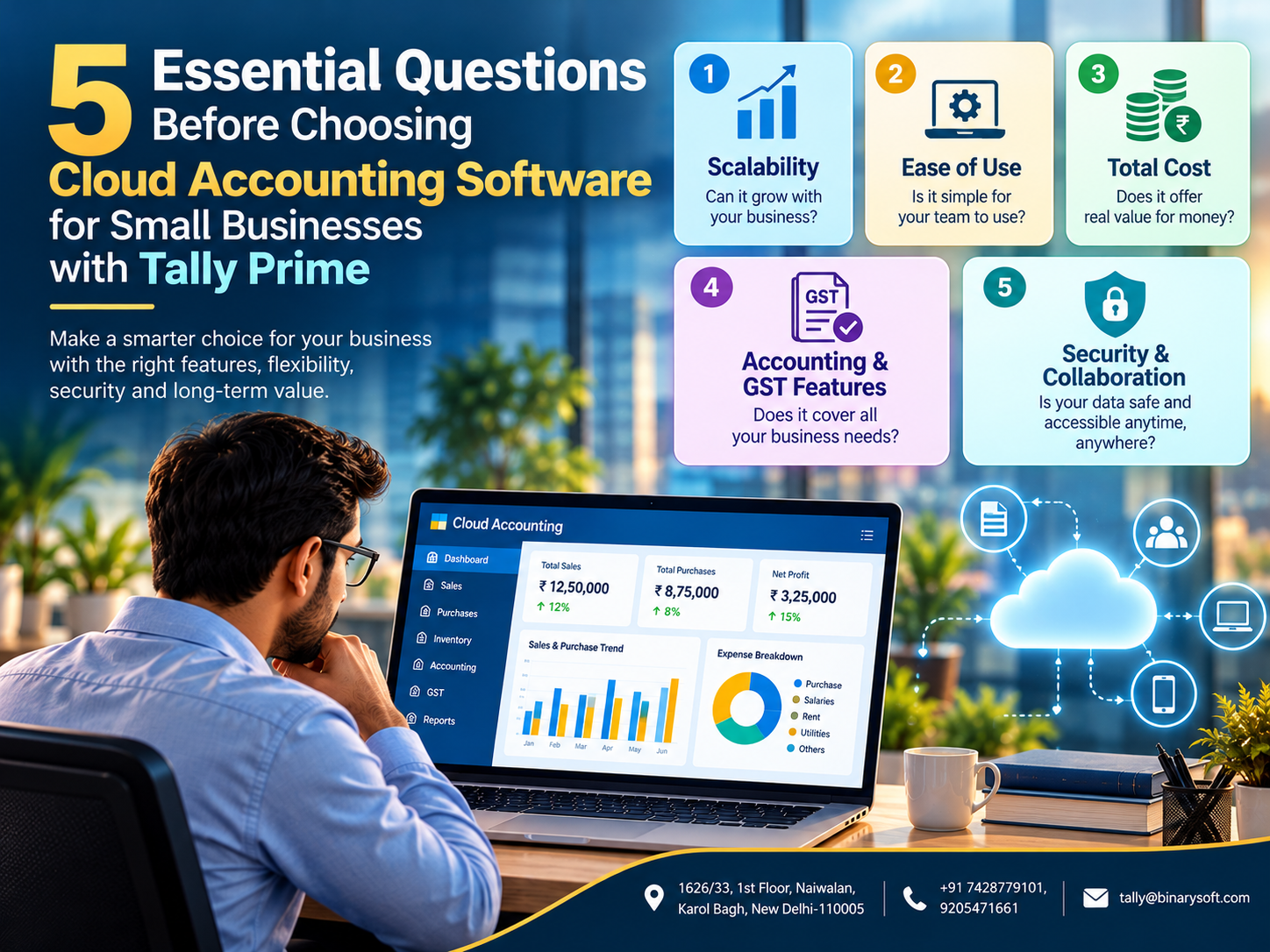
Before investing in cloud accounting, every small business owner should ask five important questions about scalability, usability, cost, functionality and security.
Understanding these questions can help entrepreneurs make informed decisions and select technology that supports long-term growth.
1. What Is Cloud Accounting Software?
Cloud accounting software allows businesses to manage financial information using applications or infrastructure accessible through a network, typically the internet.
Depending on the solution, the accounting application may run directly in a web browser or operate on a remotely hosted computer.
Business owners and authorised employees can access information without necessarily working from the same physical office.
Cloud accounting solutions may support activities such as sales invoicing, purchase recording, expense tracking, financial reporting and inventory management.
Some platforms also provide banking integrations, tax-related functionality and collaboration features.
However, not every cloud accounting solution offers identical capabilities.
A browser-based accounting application, a hosted desktop application and a remotely accessible office system can have significantly different features, costs and technical requirements.
Understanding these differences is essential before making a purchasing decision.
2. An Emotional Story: The Small Business Owner Who Nearly Lost Control of His Finances
Sanjay owned a small garment distribution business in Karol Bagh, New Delhi.
His father had started the business with a modest investment and a dream of building something meaningful for the family.
After taking responsibility for operations, Sanjay worked tirelessly to expand the customer base.
He introduced new products, hired employees and began supplying retailers across Delhi and neighbouring cities.
Business was growing, but financial management was becoming increasingly difficult.
His accountant maintained records on an office computer.
Whenever Sanjay travelled to meet customers, he struggled to obtain updated financial information.
He frequently called his accountant to ask about outstanding payments, available stock and daily sales.
Sometimes, important information arrived too late.
One evening, while returning from a customer meeting, Sanjay received an urgent call from a supplier.
A significant payment was overdue.
Sanjay believed the payment had already been processed.
After several phone calls, he discovered that the payment had been recorded incorrectly in a spreadsheet.
The supplier temporarily stopped further deliveries.
Sanjay felt frustrated and embarrassed.
He remembered how carefully his father had built relationships with suppliers over many years.
The possibility of losing that trust was deeply upsetting.
That night, he decided to modernise the company's accounting system.
With professional assistance, he evaluated a suitable cloud-hosted accounting environment.
He reviewed security arrangements, user access, software features and backup procedures before proceeding.
His employees received training, and the business established more consistent accounting processes.
Gradually, financial information became easier to access and review.
Sanjay could examine important reports while travelling, subject to network availability and authorised access.
His accountant could work more efficiently with organised business records.
Most importantly, Sanjay felt more confident about understanding his company's financial position.
The lesson was simple: the right accounting technology does not merely save time. It helps business owners protect the trust, effort and relationships behind their success.
This fictional story illustrates the importance of selecting accounting software carefully.
3. Question One: Can the Cloud Accounting Solution Grow with My Business?
Every entrepreneur hopes to expand.
A business that currently employs five people may eventually require twenty employees.
A company operating from one location may open additional branches or warehouses.
An accounting solution should accommodate reasonable business growth without forcing unnecessary system replacement.
Evaluate User Scalability
Determine whether additional employees can access the system when required.
Ask whether the software supports multiple users and how licensing costs change as the team expands.
Consider Transaction Volume
A growing business may process substantially more invoices, payments and inventory transactions.
The selected environment should be capable of handling expected workloads.
Check Branch and Warehouse Requirements
Businesses operating from multiple locations may need consolidated accounting information and stock visibility.
Review Infrastructure Flexibility
Cloud infrastructure may provide options for increasing computing resources, but upgrades depend on the hosting arrangement.
How Tally Prime Helps
Tally Prime supports accounting, inventory management and financial reporting for businesses with different operational requirements.
Suitable licensing and deployment configurations can support multi-user environments.
Businesses with more demanding requirements may also evaluate TallyPrime Server.
The appropriate solution depends on transaction volumes, user requirements and infrastructure.
Important question to ask your provider: Can the accounting environment support additional users, branches and transaction volumes without unexpected performance or licensing problems?
4. Question Two: Is the Accounting Software Easy for My Employees to Use?
Technology should simplify business operations rather than introduce unnecessary complexity.
Small businesses often operate with limited administrative resources.
Employees may not have extensive technical training.
Therefore, usability should be a major consideration.
Simple Navigation
Employees should be able to locate common functions without repeatedly searching through complicated menus.
Easy Invoice Creation
Sales staff should be able to prepare invoices accurately and efficiently.
Convenient Financial Reporting
Business owners should be able to review important reports without requiring extensive technical assistance.
Training Requirements
Ask how much training employees will need.
Support Availability
Technical support becomes especially important when employees encounter problems during business hours.
How Tally Prime Helps
Tally Prime provides structured accounting workflows for recording transactions and reviewing business information.
Its familiar accounting-oriented interface can be useful for teams already experienced with Tally-based accounting.
When Tally Prime is deployed through a suitable hosted environment, employees may continue using familiar workflows while accessing the application remotely.
However, remote-access configuration, employee permissions and available functionality depend on the chosen deployment.
Important question to ask your provider: Can my employees perform routine accounting activities confidently after reasonable training?
5. Question Three: What Is the Total Cost of Cloud Accounting?
Price is an important consideration for small businesses.
However, selecting software based only on the advertised subscription amount can be misleading.
Businesses should evaluate the complete cost of ownership.
Software Licensing
Determine whether the accounting software licence is included or purchased separately.
Cloud Hosting Charges
Hosted environments may involve monthly or annual infrastructure charges.
Additional User Costs
Some providers charge according to the number of users or concurrent sessions.
Setup and Migration
Initial configuration and historical data migration may involve additional expenses.
Backup and Recovery
Ask whether backup services and restoration assistance are included.
Technical Support
Determine whether support is available during the hours your business operates.
Renewal Charges
Understand how future subscription or hosting costs may change.
Illustrative Annual Cost Comparison
| Expense | Example Annual Amount |
|---|
| Cloud hosting |
₹18,000 |
| Software licensing allocation |
₹12,000 |
| Backup and security services |
₹4,000 |
| Technical support |
₹6,000 |
| Illustrative annual total |
₹40,000 |
These figures are hypothetical and are not actual product quotations.
Businesses should obtain written pricing based on their specific requirements.
How Tally Prime Helps
Tally Prime provides several business management functions within one accounting application.
This may reduce the need for separate tools for routine invoicing, inventory accounting and financial reporting.
However, cloud hosting, licensing and optional services may carry separate charges.
Important question to ask your provider: What will the complete annual cost be, including licensing, hosting, additional users, backups and support?
6. Question Four: Does the Solution Provide All the Accounting and GST Features My Business Needs?
Accounting software should support the actual operations of the business.
A retailer, manufacturer, distributor and service provider may have different requirements.
Before selecting a solution, identify the activities employees perform regularly.
Sales and Purchase Accounting
The software should support accurate recording of business transactions.
GST Invoicing
Businesses operating under GST should evaluate invoicing, tax classification and reporting capabilities.
Inventory Management
Companies dealing with physical products may need stock tracking, inventory valuation and warehouse-related information.
Outstanding Payment Tracking
Customer receivables and supplier payables should be easy to monitor.
Financial Reporting
Important reports may include the Balance Sheet, Profit and Loss Account, Cash Flow Statement and ledger statements.
Banking and Reconciliation
Businesses should evaluate whether the software supports their banking and reconciliation workflows.
How Tally Prime Helps
Tally Prime provides accounting, invoicing, inventory management and GST-related features.
Businesses can use it to maintain financial records, review outstanding balances and generate management reports.
Depending on the applicable software version, configuration and eligibility, additional connected features may be available.
Businesses should verify that required compliance capabilities are supported before making a purchase.
A hosted deployment generally provides access to the installed application; it does not automatically add features that are unavailable in the licensed software.
Important question to ask your provider: Will I be able to complete my normal accounting, inventory and GST-related activities without purchasing several additional applications?
7. Question Five: How Secure Is My Accounting Data, and Can My Team Work Remotely?
Financial information is among a business's most valuable assets.
Accounting records may contain customer details, supplier information, payment records and commercially sensitive transactions.
Protecting this information is essential.
Data Encryption
Ask whether financial information is encrypted during transmission and while stored.
User Access Controls
Employees should receive permissions appropriate to their responsibilities.
Authentication
Strong authentication helps reduce unauthorised access.
Backup Management
Ask how frequently backups are created and where they are stored.
Disaster Recovery
Determine how quickly the provider can restore operations after an infrastructure failure.
Data Ownership
Businesses should understand how to retrieve their records if they change providers.
Remote Collaboration
The solution should support authorised employees working from different locations according to the selected licensing and hosting arrangement.
How Tally Prime Helps
Tally Prime includes user-access and data-management capabilities.
In a properly configured hosted environment, businesses can combine these application controls with infrastructure-level security measures.
Cloud security, backup schedules and disaster recovery depend on the actual service provider and deployment.
No business should assume that cloud hosting automatically guarantees complete protection against data loss or cyberattacks.
Important question to ask your provider: Who controls my data, how is it protected, and what happens if the server becomes unavailable?
8. Additional Factors Small Businesses Should Evaluate
Beyond the five essential questions, several practical considerations deserve attention.
Internet Connectivity
Remote cloud access generally depends on reliable network connectivity.
Businesses should evaluate connection quality at their offices and branches.
Data Migration
Existing accounting information must be transferred carefully.
Opening balances, outstanding invoices, inventory records and ledger information should be verified after migration.
Regulatory Requirements
Businesses should consult qualified professionals regarding applicable accounting, tax, audit-trail and record-retention obligations.
Integration Capabilities
Some organisations require connections with e-commerce platforms, payment systems or external applications.
Compatibility should be confirmed before implementation.
Exit and Portability
Businesses should understand how data can be exported or recovered if they discontinue the service.
These considerations help reduce long-term technology risks.
9. Case Study One: A Retail Business Improves Financial Visibility
Illustrative case study
A retail business operated three stores and employed fifteen people.
Each store maintained separate daily sales information.
The owner struggled to review consolidated financial performance.
The Challenge
Employees spent considerable time preparing reports and communicating sales figures.
Management often received financial information after important purchasing decisions had already been made.
The Solution
The business introduced Tally Prime in a suitable multi-user hosted environment.
Employees received access according to their responsibilities.
The company established standard procedures for recording transactions and reviewing reports.
Illustrative Results
During an internal evaluation, management estimated that routine financial reporting preparation time decreased by approximately 35%.
The owner gained more convenient access to business information.
Employees spent less time manually consolidating records.
Key Learning
Centralised accounting workflows and properly configured remote access can improve financial visibility for growing retail businesses.
10. Case Study Two: A Distribution Company Improves Accounting Collaboration
Illustrative case study
A distribution company supplied products to customers across northern India.
Its accounting team worked from the head office, while sales employees frequently travelled.
The Challenge
Sales representatives depended on office employees for updated outstanding balances.
Payment follow-ups were sometimes delayed because information was not readily available.
The Solution
The company implemented a suitable hosted Tally Prime environment.
Authorised employees could access relevant accounting information according to configured permissions.
The company also introduced regular reconciliation and backup procedures.
Illustrative Results
Management estimated a 25% reduction in administrative time spent obtaining and consolidating payment information.
Communication between sales and accounting teams improved.
Key Learning
Cloud-hosted accounting can support collaboration when access permissions, connectivity and financial processes are properly managed.
11. Common Mistakes to Avoid When Choosing Cloud Accounting
Businesses sometimes make purchasing decisions too quickly.
One common mistake is selecting the cheapest available solution without reviewing its limitations.
Another is assuming that every cloud service provides the same security arrangements.
Some businesses overlook additional user charges or fail to verify data recovery procedures.
Others migrate financial records without properly reconciling opening balances and outstanding transactions.
Businesses should also avoid assuming that cloud hosting eliminates the need for employee training or accounting controls.
A successful implementation requires planning, testing and professional support.
12. How to Move Your Business to Tally Prime Cloud
Businesses considering a hosted Tally Prime environment can follow a structured approach.
Step 1: Assess Business Requirements
Identify the number of users, locations, transaction volumes and accounting features required.
Step 2: Evaluate Deployment Options
Compare supported remote-access and cloud-hosting arrangements.
Step 3: Review Licensing
Confirm that the selected software licence supports the intended number of users and deployment method.
Step 4: Prepare Accounting Data
Review existing records and create a verified backup.
Step 5: Configure the Environment
Set up the hosted application, network access and user permissions.
Step 6: Test Important Workflows
Verify invoicing, inventory management, reporting and other essential operations.
Step 7: Train Employees
Provide practical training for daily accounting activities.
Step 8: Establish Monitoring and Backups
Define backup schedules, recovery responsibilities and support procedures.
Step 9: Review Performance
Monitor application responsiveness and user feedback after implementation.
This approach can help businesses minimise disruption during migration.
13. The Future of Cloud Accounting for Small Businesses
Small businesses increasingly need financial information beyond the traditional office environment.
Owners may travel frequently, operate multiple branches or collaborate with accountants working remotely.
Cloud-enabled accounting can provide greater flexibility when supported by reliable infrastructure.
Future business systems are likely to offer more connected workflows, automated data exchange and advanced reporting capabilities.
However, businesses should continue prioritising accounting accuracy, security and operational control.
Technology should support professional judgment rather than replace it.
For businesses using Tally Prime, the opportunity lies in combining familiar accounting capabilities with carefully selected remote-access and hosting arrangements.
The best solution is not necessarily the one with the largest number of advertised features.
It is the solution that supports everyday business requirements reliably and remains suitable as the organisation grows.
Conclusion
Choosing cloud accounting software is an important business decision.
The right solution can improve financial visibility, employee collaboration and access to accounting information.
However, businesses should carefully evaluate scalability, ease of use, total cost, essential accounting features and data security before investing.
Tally Prime can provide a strong foundation for accounting, inventory management, invoicing and financial reporting.
When combined with a compatible cloud-hosting arrangement, it can support remote access and coordinated business operations.
Business owners should compare available deployment options, review licensing requirements and confirm security and support arrangements before making a final decision.
The smartest cloud accounting investment is not simply the most affordable solution today. It is the one that helps protect your financial information, supports your employees and grows alongside your business.
Powered by Binarysoft Technologies
Authorized Tally Partner
Location: 1626/33, 1st Floor, Naiwalan, Karol Bagh, New Delhi – 110005, INDIA
Contact Us: +91 7428779101, 9205471661
Email: tally@binarysoft.com
Business Hours: 10:00 AM – 6:00 PM, Monday to Friday
Binarysoft Technologies helps businesses implement Tally Prime, organise accounting operations, manage inventory information and evaluate suitable cloud-hosted accounting environments.
Frequently Asked Questions
Does Tally Prime support GST invoicing?
Yes. Tally Prime provides GST-related invoicing and accounting capabilities, subject to applicable software features and regulatory requirements.
What is the cost of Tally Prime Cloud?
Costs depend on software licensing, hosting arrangements, user requirements and optional services. Businesses should request a quotation based on their needs.
What should I check before moving accounting data to the cloud?
Review data security, migration procedures, backups, software compatibility, licensing, user permissions and support arrangements.
How can cloud accounting help a growing business?
Cloud accounting can improve access to financial information, support collaboration and provide infrastructure flexibility as business requirements expand.
CA. Kairav Dalmia focuses on GST reporting, bookkeeping controls, and accounting automation for trading and service businesses. He translates technical accounting requirements into practical processes that businesses can follow in their daily operations.