Call CA Tally HelpDesk
+91 9205471661,
7428779101
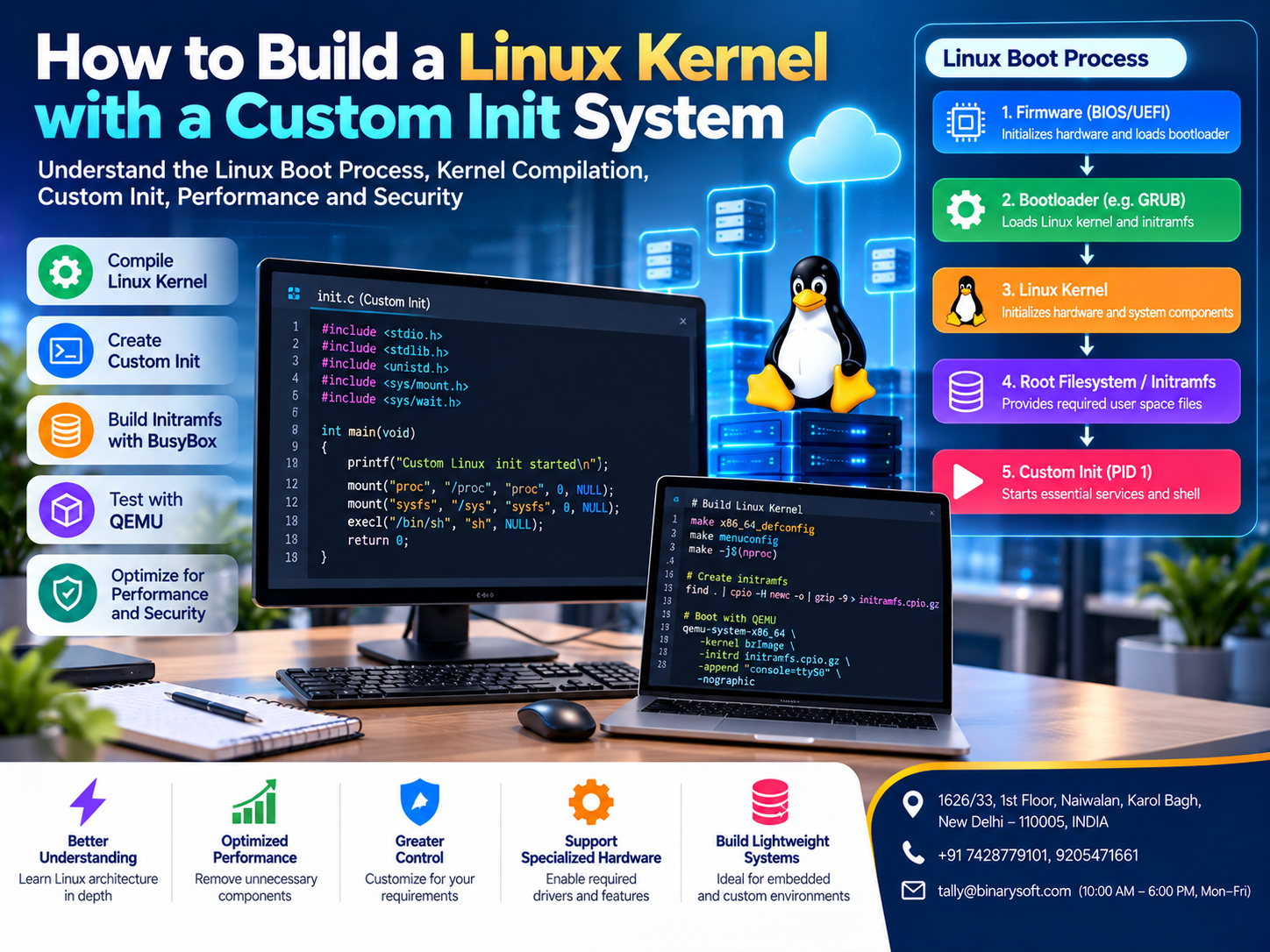
Introduction: Why Understanding the Linux Kernel Matters
Linux is one of the most important technologies powering modern computing infrastructure.
From cloud servers and enterprise applications to embedded devices, networking equipment and development environments, Linux provides a flexible foundation for building reliable computing systems.
However, many developers use Linux without fully understanding what happens when the operating system starts.
When a Linux-based computer boots, the kernel initializes essential hardware and system components before starting the first userspace process.
That process is commonly known as init.
In traditional Linux environments, init is responsible for starting services, managing system initialization and coordinating important operating-system activities.
Modern distributions frequently use systemd, while lightweight and specialized systems may use alternatives such as BusyBox init, OpenRC or custom initialization programs.
Building a Linux kernel with a custom init process allows developers to understand the relationship between the kernel and userspace.
It also provides opportunities to create lightweight operating systems for specialized applications.
For organizations developing cloud infrastructure, embedded devices or specialized computing environments, this knowledge can support better architecture decisions, security controls and performance optimization.
This guide explains how the Linux kernel boots, how to compile a kernel, how to create a custom init program and how to test the resulting system safely.
A Developer's Story: The Night a Failed Boot Became a Breakthrough
Arjun was a young software engineer working at a technology company in Bengaluru.
He had spent several years developing web applications and backend services.
Although he regularly deployed software on Linux servers, he had never built a Linux kernel himself.
One day, his manager assigned him a challenging task.
The company wanted to develop a lightweight Linux environment for a specialized industrial monitoring device.
The existing operating system contained numerous services that the device did not require.
The team wanted to understand whether a smaller system could simplify maintenance and reduce unnecessary components.
Arjun began studying the Linux boot process.
He learned about bootloaders, kernel initialization, root filesystems and the first userspace process.
After several attempts, he compiled a kernel and created a minimal init program.
But the first test failed.
The virtual machine stopped during startup.
Arjun reviewed the console output and discovered that the kernel could not successfully start the expected init process.
He corrected the init configuration and rebuilt the test environment.
The next attempt reached the custom userspace program.
A simple message appeared on the screen:
"Custom Linux system started successfully."
It was only one line of text.
Yet for Arjun, it represented hours of learning, debugging and persistence.
He finally understood how the operating system moved from kernel initialization into userspace.
The experience changed how he approached software development.
Instead of treating Linux as a mysterious platform, he began understanding the individual components that made it work.
The lesson: mastering the foundations of technology creates opportunities to build systems that are more efficient, understandable and appropriate for specific business requirements.
This is an illustrative story created to explain the learning process involved in Linux kernel development.
What Is the Linux Kernel?
The Linux kernel is the central component of the Linux operating system.
It manages communication between hardware and software.
The kernel is responsible for important activities such as:
Applications generally do not communicate directly with hardware.
Instead, they request services through interfaces provided by the operating system.
For example, when an application reads a file, it relies on kernel functionality to interact with the underlying storage system.
The kernel therefore plays a critical role in overall system performance and reliability.
Why Build a Custom Linux Kernel?
Developers may compile a custom kernel for several reasons.
Learning Operating-System Architecture
Kernel compilation helps developers understand how Linux is configured and initialized.
Supporting Specialized Hardware
Embedded systems may require specific drivers or hardware-related configuration options.
Reducing Unnecessary Components
A custom kernel can exclude features that are not required by a particular environment.
However, removing components does not automatically guarantee better performance.
Testing Kernel Features
Developers may need to test kernel functionality or investigate compatibility issues.
Supporting Specialized Applications
Certain industrial, research or embedded environments require customized operating-system behavior.
Custom kernels should be tested carefully because incorrect configurations can create boot failures, security problems or hardware incompatibilities.
Understanding the Linux Boot Process
Before building a custom init system, it is important to understand how Linux starts.
A typical Linux boot process involves several stages.
Stage 1: Firmware Initialization
When a computer starts, its firmware initializes essential hardware.
Modern computers commonly use UEFI firmware.
Some systems use traditional BIOS mechanisms.
The firmware identifies a suitable boot target and transfers control to the bootloader.
Stage 2: Bootloader Execution
The bootloader prepares the environment required to start the operating system.
Common Linux bootloaders include GRUB and U-Boot.
The bootloader loads the Linux kernel and may also load an initial RAM filesystem.
Stage 3: Kernel Initialization
The Linux kernel begins execution.
It initializes important subsystems, including memory management, scheduling and device support.
The kernel then prepares to start userspace.
Stage 4: Root Filesystem Availability
The kernel requires access to a root filesystem containing the files needed for userspace operation.
The root filesystem may be stored on a physical disk, virtual disk, embedded storage device or temporary RAM filesystem.
Stage 5: Starting the Init Process
After the required initialization steps, the kernel starts the first userspace process.
This process typically receives process identifier 1, commonly called PID 1.
Stage 6: Starting Additional Services
The init system may start additional programs and services.
In a minimal custom environment, init might simply display a message or launch a shell.
In a complete operating system, init usually manages a much larger set of responsibilities.
What Is a Custom Init System?
A custom init system is a userspace program that performs the initial tasks required after the Linux kernel starts.
In a typical Linux distribution, an established init system manages services and system state.
A custom init program allows developers to control these initial activities directly.
For example, a minimal init program might:
-
Display a startup message.
-
Mount essential virtual filesystems.
-
Initialize required devices.
-
Launch a shell or application.
-
Handle child processes.
-
Remain active as PID 1.
A custom init process is particularly useful for learning, testing and specialized environments.
However, developing a complete production init system requires additional work.
PID 1 has special responsibilities involving signal handling and child-process management.
A program that works as an ordinary process may behave differently when executed as PID 1.
Tools Required to Build a Linux Kernel with Custom Init
The following example uses an Ubuntu-based development environment and QEMU virtualization.
The goal is to build a minimal experimental system without modifying the computer's normal boot configuration.
Recommended tools include:
Linux Development Environment: A supported Ubuntu or similar Linux distribution.
Compiler and Build Tools: GCC, Make and related utilities.
Linux Kernel Source: Source code for the kernel version being tested.
BusyBox: A collection of lightweight Unix utilities.
QEMU: A virtualization and emulation platform.
Cpio: A tool used to create the initial filesystem archive.
Git: A version-control tool used to obtain source code.
A virtual machine or dedicated test environment is recommended.
Developers should avoid replacing the kernel used by a production system during experimentation.
Step-by-Step Guide to Building a Linux Kernel with Custom Init
Step 1: Prepare the Development Environment
Start by installing the required development tools.
On an Ubuntu-based system, use:
sudo apt update

sudo apt install -y \
  build-essential \
  git \
  flex \
  bison \
  libssl-dev \
  libelf-dev \
  bc \
  cpio \
  qemu-system-x86 \
  busybox-static
These packages provide tools commonly required for compiling and testing a Linux kernel.
Package names may vary depending on the Linux distribution.
Step 2: Download the Linux Kernel Source
Obtain the Linux kernel source from the official upstream repository or an appropriate maintained release.
For example:
git clone --depth 1 https://git.kernel.org/pub/scm/linux/kernel/git/stable/linux.git
Move into the source directory:
cd linux
For reproducible builds, production development should use a specifically selected and verified kernel release rather than an unspecified moving branch.
Step 3: Configure the Linux Kernel
The Linux kernel supports many configuration options.
For a basic x86-64 virtual machine experiment, start with:
make x86_64_defconfig
This creates a default configuration suitable for the target architecture.
To review available options, use:
make menuconfig
The configuration interface allows developers to enable or disable supported kernel features.
For a minimal system, important considerations include:
-
Processor architecture
-
Console support
-
Initial RAM filesystem support
-
Executable format support
-
Required filesystem functionality
-
Device drivers
For this example, the kernel must support an initial RAM filesystem and execution of the custom init program.
Step 4: Compile the Linux Kernel
Compile the kernel using:
make -j"$(nproc)"
The -j option allows multiple compilation tasks to run concurrently.
Compilation time depends on available CPU resources, memory and storage performance.
After a successful x86-64 build, the kernel image is normally available at:
arch/x86/boot/bzImage
The kernel image can be loaded by QEMU for testing.
Step 5: Create a Minimal Root Filesystem
The root filesystem contains the userspace files required by the system.
For a simple experiment, create a separate working directory outside the kernel source tree.
mkdir -p ~/custom-linux/rootfs

cd ~/custom-linux/rootfs
Create basic directories:
mkdir -p bin sbin etc proc sys dev tmp
Copy the statically linked BusyBox executable:
cp /bin/busybox bin/
Create a shell link:
ln -s busybox bin/sh
BusyBox provides a lightweight shell and several basic Unix utilities.
Using a statically linked BusyBox executable avoids requiring a collection of shared libraries in the minimal root filesystem.
Verify that the installed executable is appropriate for the target architecture.
Step 6: Create a Custom Init Program
The next step is to create a simple init program.
Create a file named:
init.c
Use the following example:
#include <stdio.h>
#include <stdlib.h>
#include <unistd.h>
#include <sys/mount.h>
#include <sys/wait.h>
#include <signal.h>

int main(void)
{
    printf("Custom Linux init started successfully!\n");

    if (mount("proc", "/proc", "proc", 0, NULL) != 0)
        perror("mount /proc");

    if (mount("sysfs", "/sys", "sysfs", 0, NULL) != 0)
        perror("mount /sys");

    pid_t pid = fork();

    if (pid == 0) {
        execl("/bin/sh", "sh", NULL);
        perror("exec shell");
        _exit(127);
    }

    if (pid < 0) {
        perror("fork");
    }

    for (;;) {
        int status;
        pid_t child = wait(&status);

        if (child < 0) {
            pause();
        }
    }

    return 0;
}
This program demonstrates several important init concepts.
It prints a startup message, mounts virtual filesystems and launches a shell as a child process.
The parent remains active and waits for child processes.
This is a learning example rather than a production-quality init system.
A production implementation requires more robust signal handling, child-process supervision, error recovery and shutdown management.
Step 7: Compile the Custom Init Program
Compile the program using GCC.
For a minimal initramfs, static linking is convenient:
gcc -static -O2 -Wall -Wextra \
    -o init init.c
The resulting executable is named:
init
Place the executable at the root of the initial filesystem.
Make sure it has execution permission:
chmod +x init
The init program must be compatible with the architecture of the kernel being tested.
Step 8: Create the Initramfs Archive
The initial RAM filesystem, or initramfs, provides an early userspace environment during boot.
Create a compressed archive containing the root filesystem.
From inside the rootfs directory, run:
find . -print0 \
  | cpio --null -ov --format=newc \
  | gzip -9 > ../initramfs.cpio.gz
The archive should contain the custom init executable and the required BusyBox files.
The kernel can unpack this archive into memory during startup.
For a direct initramfs boot, the executable /init is used as the initial userspace program.
Step 9: Boot the Custom Linux System with QEMU
QEMU allows developers to test the kernel without changing their computer's normal operating system.
From the project directory, run:
qemu-system-x86_64 \
  -kernel ~/linux/arch/x86/boot/bzImage \
  -initrd ~/custom-linux/initramfs.cpio.gz \
  -append "console=ttyS0" \
  -nographic \
  -m 1024
The exact kernel path may need adjustment depending on where the source was downloaded.
If the build and filesystem are configured correctly, the kernel should initialize and execute the custom init program.
A startup message similar to the following should appear:
Custom Linux init started successfully!
The system should then attempt to launch the BusyBox shell.
For interactive shell access, ensure the test environment provides a suitable console device and that the shell's standard input and output are connected appropriately.
The example demonstrates the core process, but a more complete setup may require creating appropriate device nodes or mounting devtmpfs.
Understanding the Role of PID 1
PID 1 is a special process in Linux.
It is normally the first userspace process started by the kernel.
A conventional init system performs several important responsibilities.
Process Management
Init starts and supervises services.
Child-Process Reaping
When child processes terminate, their exit status must be collected.
Otherwise, terminated processes may remain as zombies until reaped.
Signal Handling
PID 1 requires careful signal handling because Linux treats certain signals differently for this process.
Shutdown Coordination
A complete init system should support orderly service shutdown and system termination.
Service Recovery
Production init systems may restart failed services according to defined policies.
A simple custom init program usually implements only a small subset of these capabilities.
This is why established init systems remain preferable for many general-purpose production environments.
Custom Init vs systemd vs BusyBox Init
| Feature | Custom Init | systemd | BusyBox Init |
|---|
| Complexity |
Depends on implementation |
Comprehensive |
Relatively lightweight |
| Startup Control |
Fully customizable |
Extensive service management |
Basic service management |
| Resource Requirements |
Can be minimal |
Depends on configuration |
Usually modest |
| Service Supervision |
Must be implemented |
Built-in capabilities |
Limited compared with systemd |
| Best Use |
Learning and specialized systems |
General-purpose Linux distributions |
Embedded and lightweight systems |
| Maintenance |
Developer responsibility |
Established ecosystem |
Established lightweight ecosystem |
The appropriate init system depends on application requirements.
A custom init may be useful for experimentation.
BusyBox init can be suitable for certain embedded environments.
systemd provides a broad set of service and system-management features for general-purpose Linux distributions.
Benefits of Building a Custom Linux Kernel and Init System
1. Better Understanding of Linux Architecture
Developers gain practical knowledge of kernel initialization, userspace execution and system services.
2. Lightweight System Design
Specialized environments may operate with fewer unnecessary components.
This can be valuable for certain embedded devices.
3. Greater Control
Developers can define exactly which programs start during initialization.
4. Improved Debugging Skills
Kernel and init development requires careful interpretation of boot logs and system behavior.
5. Specialized Hardware Support
Custom configurations can include drivers required by particular devices.
6. Reduced Unnecessary Functionality
Removing unused components may simplify certain deployments.
However, reduced functionality does not automatically mean stronger security.
7. Support for Research and Development
Custom kernels provide a controlled environment for studying operating-system behavior.
Security Considerations When Building Custom Linux Systems
Security should be considered throughout kernel and userspace development.
A custom Linux environment may contain fewer components than a full distribution.
However, it also places more responsibility on the developer.
Important security practices include:
Use Maintained Kernel Versions: Select kernel releases receiving appropriate security maintenance.
Apply Security Updates: Review relevant kernel and userspace vulnerabilities.
Restrict Permissions: Avoid unnecessary privileged processes.
Protect Sensitive Data: Implement suitable filesystem and access controls.
Disable Unnecessary Services: Reduce exposure by running only required functionality.
Review Kernel Configuration: Evaluate security-related kernel options according to the intended environment.
Test Boot and Recovery: Confirm that the system behaves correctly after failures.
Maintain Build Records: Document source versions, configuration files and dependencies.
Custom systems require ongoing maintenance.
They should not be considered secure simply because they are small.
Common Problems During Linux Kernel Compilation
Kernel Compilation Fails
Possible causes include missing development packages, incompatible compiler versions or incorrect configuration.
Review compiler output and install required dependencies.
Kernel Cannot Find Init
The init executable may be missing, incorrectly located or incompatible with the target architecture.
For initramfs-based startup, verify that /init exists and is executable.
Kernel Panic During Boot
A kernel panic may occur when the system cannot complete essential initialization.
Review console output to identify the failing stage.
Missing Shared Libraries
A dynamically linked init executable may require libraries that are absent from the minimal filesystem.
Static linking can simplify minimal experiments.
Shell Does Not Start
Check that BusyBox exists, the shell link is correct and the process has access to an appropriate console.
Filesystem Mount Errors
Verify that the kernel includes the required filesystem support and that mount points exist.
How Linux Infrastructure Supports Cloud Computing
Linux is widely used in cloud computing environments.
Cloud providers and technology companies use Linux-based systems to support servers, containers, networking services and application platforms.
Linux infrastructure can support:
-
Web applications
-
Databases
-
Virtual machines
-
Container platforms
-
Development environments
-
Monitoring services
-
Automation systems
-
Network services
Understanding Linux kernel behavior can help infrastructure engineers investigate resource management, startup failures and performance issues.
However, general-purpose cloud environments usually benefit from established operating-system distributions with mature maintenance and security processes.
Custom kernels should be adopted only when they address a clearly defined technical requirement.
How Linux Infrastructure Relates to Tally Prime Cloud Environments
Tally Prime is primarily a Windows-based business application.
Therefore, compiling a Linux kernel or creating a custom Linux init system does not directly enable Tally Prime to run natively on Linux.
This distinction is important.
However, Linux can support certain infrastructure components surrounding a cloud-hosted business application.
1. Cloud Infrastructure Services
Linux-based systems may be used for monitoring, networking, automation or supporting services within a broader hosting environment.
2. Secure Network Connectivity
Linux servers can provide networking and security services when properly configured.
These may support communication between approved business systems.
3. Monitoring and Logging
Linux-based monitoring tools can help infrastructure teams observe server availability, network performance and operational activity.
4. Backup Infrastructure
Linux-based services may participate in backup storage or automation workflows.
The actual accounting data backup procedure must remain compatible with Tally Prime and its hosting arrangement.
5. Business Application Integration
Custom middleware or integration services may operate on Linux while communicating with appropriately configured business applications.
Such integrations require supported interfaces and careful testing.
6. Infrastructure Cost Management
Linux can be suitable for certain supporting infrastructure workloads.
However, total hosting costs depend on architecture, licensing, support and operational requirements.
7. Reliable Tally Prime Access
Businesses using Tally Prime through cloud hosting should ensure that the application runs in a supported environment.
Linux-based supporting services should not be confused with the operating-system requirements of the accounting application itself.
Case Study 1: Industrial Technology Company Develops a Lightweight Monitoring System
Business: Illustrative industrial automation company
Location: Pune, Maharashtra
Challenge: Creating a specialized Linux environment for an industrial monitoring device
An industrial technology company developed devices that collected operational information from manufacturing equipment.
Its initial software environment included several services that were unnecessary for the device's intended purpose.
The engineering team wanted greater control over system startup and resource consumption.
Solution
The team developed an experimental Linux environment using a custom kernel configuration and lightweight userspace components.
It created a minimal init process to launch the monitoring application.
The engineers tested startup behavior, device compatibility and recovery procedures.
Illustrative Results
The project helped the team:
-
Understand the Linux boot process more deeply
-
Identify unnecessary system components
-
Improve control over application startup
-
Simplify certain development tests
-
Document hardware and software dependencies
The team conducted additional reliability and security testing before considering production deployment.
Key Lesson: Custom Linux environments can be useful when organizations have specialized hardware and clearly defined operating-system requirements.
This case study is illustrative and does not represent verified customer results.
Case Study 2: Software Company Improves Linux Infrastructure Knowledge
Business: Illustrative software development company
Location: Bengaluru, Karnataka
Challenge: Limited understanding of low-level Linux system behavior
A software company operated cloud applications and supporting infrastructure.
Its development team regularly worked with Linux servers but had limited experience troubleshooting early boot failures.
Management introduced a technical training initiative focused on operating-system fundamentals.
Solution
Developers created a controlled virtual environment using QEMU.
They compiled a Linux kernel, built a minimal initramfs and developed a custom init program.
The team deliberately tested common failures involving missing executables, incorrect permissions and filesystem configuration.
Illustrative Results
The training helped engineers:
-
Understand kernel-to-userspace transitions
-
Interpret Linux boot messages
-
Improve troubleshooting procedures
-
Recognize the responsibilities of PID 1
-
Gain confidence working with low-level system components
Key Lesson: Practical experimentation can strengthen the technical knowledge required to maintain reliable Linux-based infrastructure.
This case study is hypothetical.
Best Practices for Custom Linux Kernel Development
Developers should use dedicated test environments.
Kernel source versions should be documented.
Build configurations should be stored in version control.
Experiments should begin with simple, reproducible setups.
Kernel logs should be reviewed carefully.
Userspace programs should be tested for architecture compatibility.
Custom init programs should handle errors and child processes appropriately.
Security controls should be evaluated before deployment.
Developers should also maintain recovery procedures and avoid making untested changes to production systems.
Most importantly, custom kernel development should address a real technical requirement rather than introduce unnecessary maintenance complexity.
The Future of Linux Kernel Development
Linux continues to evolve across cloud computing, embedded systems, networking and enterprise infrastructure.
Modern development practices increasingly emphasize automation, reproducible builds and security testing.
Container technologies and virtualization platforms continue to depend on operating-system capabilities.
Specialized devices may benefit from carefully configured kernels and lightweight userspace environments.
At the same time, general-purpose businesses often gain more value from maintained Linux distributions than from building custom operating systems.
The future of Linux development will involve balancing flexibility, performance, security and maintainability.
Understanding the kernel and init process provides developers with foundational knowledge that remains valuable across these environments.
Conclusion: Building a Custom Linux Kernel Is a Powerful Learning Experience
Building a Linux kernel with a custom init system provides a practical understanding of how an operating system starts and manages essential resources.
The process involves configuring the kernel, compiling source code, creating a root filesystem, developing an init program and testing the resulting environment.
For developers, this experience can improve debugging skills and deepen understanding of operating-system architecture.
For businesses developing specialized devices or infrastructure components, custom Linux environments may offer useful flexibility.
However, production deployment requires careful attention to security, reliability, compatibility and ongoing maintenance.
Linux can also support infrastructure services surrounding cloud-hosted business applications.
For organizations using Tally Prime, the priority should remain a supported application environment combined with reliable networking, backup and security controls.
The greatest benefit of building a custom Linux system is not simply creating a smaller operating system. It is gaining the knowledge needed to design, troubleshoot and maintain computing environments with greater confidence.
Improve Your Business Efficiency with Tally Prime and Cloud Solutions
Simplify accounting, GST-related recordkeeping, inventory management and financial reporting with professional Tally Prime assistance.
Powered by Binarysoft Technologies
Authorized Tally Partner
Location: 1626/33, 1st Floor, Naiwalan, Karol Bagh, New Delhi – 110005, INDIA
Contact Us: +91 7428779101, 9205471661
Email: tally@binarysoft.com
Business Hours: 10:00 AM – 6:00 PM, Monday to Friday
Frequently Asked Questions
Can Tally Prime run directly on a custom Linux kernel?
Tally Prime is primarily a Windows-based application. Building a custom Linux kernel does not make it a natively supported Linux application.
How does Linux support cloud computing?
Linux supports many cloud infrastructure workloads, including servers, containers, networking, monitoring and automation services.
Is building a custom Linux kernel suitable for beginners?
It can be a valuable learning project for developers familiar with Linux commands and basic programming. Beginners should use a virtual test environment and follow a controlled, reproducible process.
What is the difference between systemd and custom init?
systemd is a comprehensive service and system manager, while a custom init is designed specifically for selected initialization requirements.Linux Kernel
CA. Vivaan Deshmukh focuses on financial reporting, audit procedures, and taxation. He shares practical insights on accounting software, business process optimization, and compliance management for SMEs and growing enterprises.








