Call CA Tally HelpDesk
+91 9205471661,
7428779101
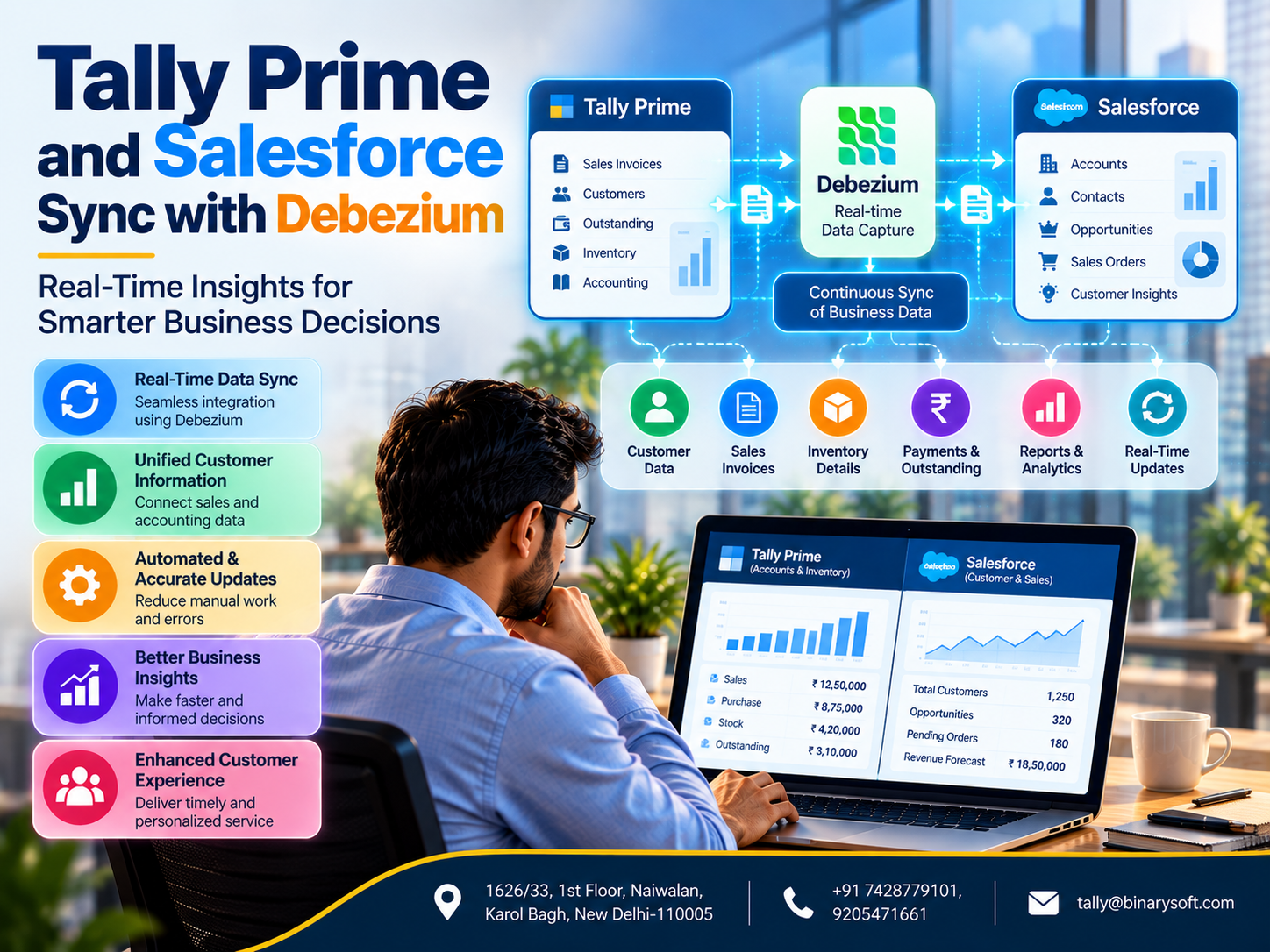
Introduction: Why Connected Business Data Matters More Than Ever
Imagine running a growing business where your sales team works in one application, your accounting department maintains records in another, and your management team depends on spreadsheets to understand what is happening.
Your sales representatives may know which customers are interested in purchasing products.
Your accountants may know which customers have outstanding payments.
Your warehouse team may know which products are available.
However, if this information remains disconnected, employees cannot always make decisions using the complete picture.
A salesperson might promise delivery without knowing that inventory is insufficient.
A customer relationship manager might offer additional credit without knowing that previous invoices remain unpaid.
An accountant might spend hours manually entering information that already exists in another application.
These situations create unnecessary delays, operational risks and customer dissatisfaction.
Modern businesses need more than individual software applications.
They need reliable communication between their systems.
This is where Tally Prime and Salesforce integration becomes valuable.
Tally Prime provides accounting, inventory management, invoicing and financial reporting capabilities.
Salesforce supports customer relationship management, sales processes, customer interactions and business opportunities.
By connecting these systems through appropriate integration services, organisations can improve the availability and consistency of business information.
Technologies such as Debezium can support this architecture by capturing changes from compatible databases and distributing events to other applications.
However, successful integration requires careful planning, secure interfaces, data validation and reliable error handling.
This guide explains how businesses can approach Tally Prime and Salesforce integration, where Debezium fits into the architecture and how connected information can support better business decisions.
1. What Is Tally Prime and Salesforce Integration?
Tally Prime and Salesforce integration refers to connecting accounting and business management information with customer relationship management workflows.
The objective is to reduce unnecessary duplication and improve coordination between departments.
For example, a company may want authorised sales representatives to view selected customer outstanding information while working in Salesforce.
Similarly, an approved sales order may need to initiate an accounting workflow in Tally Prime.
These processes can be implemented through suitable integration services.
Information That May Be Integrated
Depending on business requirements, integration may involve:
-
Customer account details.
-
Sales order information.
-
Invoice references.
-
Outstanding balances.
-
Payment status.
-
Inventory availability.
-
Product information.
-
Customer credit information.
-
Selected financial summaries.
Not every data field should be synchronised automatically.
Businesses must determine which application owns each type of information and which users are permitted to access it.
A well-designed integration maintains clear responsibility for financial records while allowing other departments to use appropriate business information.
2. An Emotional Story: The Customer Relationship That Nearly Ended
Rajesh owned a growing electrical equipment distribution company in Delhi.
His father had established the business many years earlier.
The company had built strong relationships with retailers, contractors and industrial customers.
Rajesh wanted to modernise operations without losing the personal service that had made the business successful.
He introduced Salesforce to help the sales team manage customer enquiries and opportunities.
The accounting department continued using Tally Prime.
Initially, the arrangement appeared effective.
Sales representatives could track leads and customer discussions.
Accountants maintained invoices, receipts and outstanding balances.
However, an important problem remained.
The two departments did not always have access to the same information.
One afternoon, a long-standing customer contacted a sales representative to place a large order.
The salesperson checked the CRM system and confirmed the order.
Unfortunately, the customer's earlier invoices had not been fully settled.
The accounting department identified the issue only after the order had progressed.
The customer received conflicting messages.
First, the sales team confirmed the order.
Later, the accounts department requested payment clarification.
The customer became frustrated.
He told Rajesh that he had trusted the company for years but was disappointed by the lack of coordination.
Rajesh felt deeply concerned.
The relationship had been developed over decades, beginning when his father personally delivered products to the customer's shop.
He realised that the problem was not caused by employees refusing to work together.
It was caused by disconnected information and unclear processes.
Rajesh began evaluating an integration between the company's CRM and accounting systems.
The organisation defined which information should be shared, introduced appropriate access controls and established automated data exchange where practical.
Sales representatives could receive approved financial status information without requesting repeated manual updates.
The accounting department gained a more structured process for handling relevant sales information.
Over time, coordination improved.
Rajesh learned an important lesson:
A business can invest in excellent software and still disappoint customers when important information cannot move reliably between departments.
This fictional story demonstrates why connected business information matters for customer trust.
3. Understanding the Role of Tally Prime
Tally Prime is a business management application that supports accounting and related operational activities.
Its capabilities include sales invoicing, purchase accounting, inventory management, outstanding tracking and financial reporting.
Accounting Management
Businesses can record financial transactions and maintain ledgers.
Sales and Purchase Transactions
Tally Prime supports the recording of invoices and purchase transactions.
Inventory Management
Businesses can maintain stock information and review inventory reports.
Outstanding Management
Accounts teams can monitor customer receivables and supplier payables.
Financial Reporting
Tally Prime provides reports such as the Balance Sheet, Profit and Loss Account and Cash Flow Statement.
GST-Related Workflows
Businesses can use supported GST invoicing and reporting features according to applicable requirements.
In an integration architecture, Tally Prime can remain the authoritative application for selected accounting records.
Other systems may receive approved information without independently changing the underlying financial records.
4. Understanding Salesforce CRM
Salesforce is a customer relationship management platform.
It helps organisations manage customer information, sales opportunities and business interactions.
Lead Management
Sales teams can track prospective customers.
Opportunity Management
Employees can monitor potential deals and their progress.
Customer Information
Salesforce can maintain customer accounts and contact details.
Sales Activities
Teams can organise calls, meetings and follow-up tasks.
Sales Reporting
Managers can review pipeline information and sales performance.
Workflow Automation
Supported Salesforce features can automate selected business processes.
When integrated appropriately with accounting systems, Salesforce can provide sales employees with additional operational context.
For example, authorised users may be able to review a customer's outstanding status before proposing new payment terms.
This helps sales teams make decisions using more complete information.
5. What Is Debezium?
Debezium is an open-source Change Data Capture technology.
Change Data Capture, commonly called CDC, identifies changes made to data in supported database systems.
Instead of repeatedly reading every record, CDC systems can capture relevant database changes and publish them as events.
For example, suppose an integration database contains a customer status record.
When the record changes, Debezium may capture the modification and publish an event.
A downstream integration service can process that event and update another authorised system.
Main Capabilities of Debezium
Change Detection
Debezium captures supported database changes.
Event Streaming
Captured changes can be delivered through supported streaming architectures.
Reduced Repeated Polling
CDC can reduce the need for applications to repeatedly query entire datasets.
Integration Support
Downstream services can transform and distribute change events.
Operational Visibility
Monitoring systems can help identify connector and processing failures.
Important Technical Clarification
Debezium does not directly monitor Tally Prime's internal accounting database.
A supported Tally Prime integration must first expose or transfer relevant information through appropriate interfaces into a compatible database or integration service.
Debezium can then capture changes from that compatible database.
This distinction is important when designing a reliable and supportable solution.
6. How Tally Prime, Debezium and Salesforce Can Work Together
A practical architecture can contain several components.
Component 1: Tally Prime
Tally Prime maintains the relevant accounting and business information.
Component 2: Tally Integration Service
An integration application exchanges authorised information with Tally Prime using supported interfaces and workflows.
Component 3: Integration Database
A compatible database stores selected information required by the integration.
Component 4: Debezium
Debezium captures changes from the supported integration database.
Component 5: Event Processing Platform
An event-processing system receives and distributes change events.
Component 6: Salesforce Integration Service
A separate service transforms approved events into the required Salesforce data format.
Component 7: Salesforce CRM
Salesforce receives updates through supported APIs and permissions.
Example Data Flow
Tally Prime → Supported Integration Interface → Integration Database → Debezium → Event Processing → Salesforce API → Salesforce CRM
This architecture is illustrative.
The exact design depends on software versions, available interfaces, transaction volumes and business requirements.
For information moving from Salesforce to Tally Prime, a separate supported integration workflow may be required.
7. Why Near-Real-Time Data Synchronisation Is Valuable
Businesses frequently depend on information that changes throughout the day.
Customers make payments.
Sales teams create orders.
Warehouse employees update inventory records.
Accountants post invoices.
If information is exchanged only once per day, employees may work with outdated records.
Near-real-time integration can reduce this delay.
Faster Information Availability
Approved changes can reach connected systems more quickly.
Improved Sales Coordination
Sales representatives can access more recent customer information.
Better Customer Communication
Employees can provide responses based on updated operational records.
Reduced Manual Work
Automated exchange can reduce repetitive data entry.
Improved Management Visibility
Business leaders can review information from multiple systems more conveniently.
Better Operational Planning
Teams can coordinate sales and accounting activities using more consistent information.
Near-real-time does not mean that every change becomes visible instantly.
Actual delays depend on system availability, processing queues, API limits and network conditions.
8. Understanding Change Data Capture in Business Applications
Traditional data synchronisation often relies on scheduled transfers.
For example, an application may export customer information every evening.
Another system imports the information the following morning.
This can work for processes that do not require frequent updates.
However, time-sensitive operations may benefit from event-driven processing.
CDC identifies database changes as they occur.
Example
A customer's payment status changes in an integration database.
Debezium captures the change.
The event is published to an appropriate processing system.
An integration service validates the information.
The service updates the corresponding Salesforce record.
The process may complete within seconds under suitable conditions, but no fixed delay should be assumed without testing.
Advantages of CDC
CDC can support efficient change tracking.
It can reduce unnecessary full-dataset transfers.
It can also provide an event stream for downstream processing.
However, CDC does not automatically guarantee correct business interpretation.
Integration services must still validate records and handle errors.
9. How Integration Can Improve Customer Management
Customer relationships involve more than sales conversations.
They also involve invoices, payments, product availability and service commitments.
Connecting relevant information can help employees understand these relationships more clearly.
Customer Account Visibility
Sales representatives may access approved accounting status information.
Outstanding Payment Awareness
Teams can identify situations requiring payment clarification.
Better Order Coordination
Sales and accounting departments can exchange relevant order information.
More Accurate Communication
Employees can reduce conflicting messages caused by outdated records.
Improved Customer Service
Customer-facing teams can respond more efficiently when authorised information is available.
The goal is not to expose every financial detail to every employee.
It is to provide the right information to the right person at the right time.
10. Case Study One: A Wholesale Distributor Improves Sales and Accounting Coordination
Illustrative case study
A wholesale distribution company supplied electrical products to retailers across northern India.
The company employed separate sales and accounting teams.
The Challenge
Sales representatives maintained customer information in Salesforce.
The accounts department maintained financial records in Tally Prime.
Employees regularly exchanged spreadsheets to verify outstanding balances.
The Solution
The company implemented a controlled integration architecture.
Selected accounting information was transferred through supported interfaces to an integration database.
A CDC-based event-processing system distributed relevant updates.
Salesforce received approved customer status information through its APIs.
Illustrative Results
During a three-month evaluation, management estimated a 35% reduction in routine manual requests for customer outstanding information.
Sales representatives gained more convenient access to authorised financial status details.
The accounts department spent less time responding to repetitive enquiries.
Key Learning
Reliable information exchange can improve coordination between sales and accounting teams.
11. Case Study Two: A Manufacturing Company Improves Inventory Communication
Illustrative case study
A manufacturing company produced industrial components for distributors and commercial customers.
Its sales team used Salesforce to manage customer enquiries.
Inventory and accounting activities were maintained in Tally Prime.
The Challenge
Sales representatives sometimes committed to delivery schedules without receiving sufficiently recent stock information.
The warehouse team then had to clarify product availability.
The Solution
The company introduced a structured integration process.
Selected inventory information was exchanged through supported interfaces.
An integration service processed relevant updates and provided approved information to Salesforce.
The organisation also established rules for distinguishing available stock from stock already committed to other orders.
Illustrative Results
Management estimated a 25% reduction in stock-related clarification requests during the evaluation period.
Sales and warehouse employees developed more consistent communication procedures.
Key Learning
Connected inventory information can improve customer communication when stock calculations and business rules are carefully defined.
12. How Tally Prime Supports Financial Visibility
Financial visibility helps businesses understand revenue, expenses, receivables and operational performance.
Tally Prime provides reports that can support these activities.
Sales Information
Businesses can review sales transactions and related reports.
Customer Outstanding Reports
Management can monitor receivables and payment obligations.
Inventory Reports
Stock information can support purchasing and sales planning.
Ledger Statements
Accounting teams can examine transaction histories.
Profit and Loss Reporting
Businesses can review financial performance.
Cash Flow Information
Management can examine cash movement and liquidity requirements.
Selected information from these reports may be useful to external business applications.
However, integration must respect the distinction between operational reporting and authoritative accounting records.
13. Data Mapping: A Critical Part of Successful Integration
Different applications may represent the same business information differently.
For example, a customer may have one identifier in Salesforce and another in Tally Prime.
A reliable integration must establish a consistent relationship between these identifiers.
Customer Mapping
Match records using approved identifiers.
Product Mapping
Ensure that product codes correspond correctly.
Invoice Mapping
Maintain reliable relationships between invoice references.
Payment Mapping
Define how payment status should be represented.
Tax Information
Preserve required accounting and tax details.
Date and Currency Handling
Use consistent formats and clearly defined conversion rules.
Poor data mapping can create duplicate customers, incorrect balances or misleading reports.
Therefore, mapping rules should be tested carefully before production deployment.
14. Security Considerations for Tally Prime and Salesforce Integration
Financial and customer information must be protected.
A secure integration should include appropriate technical and organisational controls.
Authentication
Only authorised applications should access integration interfaces.
Access Permissions
Services should receive only the permissions necessary for their responsibilities.
Encryption
Sensitive information should be protected during transmission and storage.
Secure Credential Storage
API credentials and passwords should be maintained using appropriate secret-management practices.
Audit Logging
Important integration activities should be recorded.
Error Monitoring
Failed updates should generate alerts or enter controlled recovery workflows.
Data Minimisation
Only necessary information should be exchanged.
Privacy Compliance
Businesses should handle personal information according to applicable legal and contractual requirements.
Security must be considered throughout the integration lifecycle.
15. Common Challenges in Real-Time Data Synchronisation
Duplicate Records
Different systems may contain multiple records for the same customer.
Network Failures
Temporary connectivity problems may interrupt data exchange.
API Limits
Salesforce APIs and other interfaces may impose usage restrictions.
Event Processing Delays
Messages may accumulate during periods of heavy workload.
Incorrect Data Mapping
Fields may be interpreted incorrectly.
Conflicting Updates
Two systems may attempt to modify the same information.
Integration Errors
Unexpected data formats may cause processing failures.
Recovery Complexity
Failed events may require controlled reprocessing.
Businesses should implement appropriate validation, monitoring, retry mechanisms and reconciliation procedures.
16. Best Practices for Reliable Integration
Begin by defining the business objectives.
Identify which data should move between systems.
Assign ownership for each important data field.
Use supported Tally Prime integration interfaces.
Avoid direct modification of unsupported internal application storage.
Establish reliable customer and product identifiers.
Validate information before processing updates.
Use idempotent operations where practical to prevent duplicate processing.
Implement secure authentication.
Monitor event-processing failures.
Maintain appropriate retry and dead-letter handling procedures.
Perform regular data reconciliation.
Test integration behaviour under realistic transaction volumes.
Document recovery procedures.
Finally, introduce changes gradually rather than synchronising every available field immediately.
These practices help organisations build a more dependable integration environment.
17. How to Measure Integration Success
Businesses should evaluate whether integration improves operations.
Useful measurements include:
| Performance Indicator | What It Measures |
|---|
| Synchronisation Delay |
Time between a source change and its availability in the destination |
| Processing Success Rate |
Percentage of updates processed successfully |
| Error Rate |
Frequency of failed integration events |
| Manual Data Entry Time |
Employee time spent transferring information |
| Duplicate Record Rate |
Frequency of duplicate customer or transaction records |
| Reconciliation Differences |
Discrepancies between connected systems |
| Customer Response Time |
Time required to answer customer enquiries |
| System Availability |
Availability of the integration components |
Management should review these indicators regularly.
A successful integration should improve business outcomes, not merely transfer large quantities of data.
18. The Future of Connected Accounting and CRM Systems
Businesses increasingly depend on multiple specialised applications.
Accounting software manages financial records.
CRM platforms organise customer relationships.
E-commerce systems handle online transactions.
Warehouse applications coordinate inventory movement.
Connecting these systems can help organisations reduce information gaps.
Event-driven architectures and CDC technologies provide useful options for distributing changes.
Cloud infrastructure can also support scalable processing and monitoring.
Artificial intelligence may assist with forecasting, anomaly detection and business analysis when suitable data and external analytical tools are available.
However, automation does not eliminate the need for accurate source records.
Businesses must maintain clear data ownership, proper security controls and dependable reconciliation procedures.
For organisations using Tally Prime and Salesforce, the future lies in creating connected workflows that preserve accounting accuracy while improving customer-facing operations.
Conclusion
Tally Prime and Salesforce integration can help businesses connect financial information with customer relationship management workflows.
When designed carefully, this integration can reduce repetitive manual work, improve coordination and provide more timely operational insights.
Debezium can support event-driven integration by capturing changes from compatible databases.
However, it is not a direct replacement for supported Tally Prime interfaces or Salesforce APIs.
A dependable architecture requires an integration layer, accurate data mapping, secure communication, monitoring and reconciliation.
For growing businesses, the greatest value comes from making relevant information available across departments without compromising financial accuracy.
Connected business systems do more than move data. They help employees make informed decisions, serve customers more effectively and build stronger foundations for sustainable growth.
Powered by Binarysoft Technologies
Authorized Tally Partner
Location: 1626/33, 1st Floor, Naiwalan, Karol Bagh, New Delhi – 110005, INDIA
Contact Us: +91 7428779101, 9205471661
Email: tally@binarysoft.com
Business Hours: 10:00 AM – 6:00 PM, Monday to Friday
Binarysoft Technologies helps businesses implement Tally Prime, improve accounting workflows, manage inventory and evaluate suitable business software solutions.
Frequently Asked Questions
Does integration eliminate manual accounting work?
Integration can reduce repetitive tasks, but accounting validation, reconciliation and appropriate employee oversight remain necessary.
Is Tally Prime and Salesforce integration secure?
It can be designed with secure authentication, encryption, access controls and monitoring. Security depends on the actual implementation.
What are the main benefits of connecting CRM and accounting systems?
Benefits can include improved information availability, reduced duplication, better coordination and more informed business decisions.
Can small businesses benefit from this integration?
Yes, particularly when disconnected systems create significant manual work. The benefits should be evaluated against implementation and maintenance costs.
What should businesses consider before implementing integration?
Businesses should review data ownership, supported APIs, software versions, transaction volumes, security requirements, reconciliation procedures and long-term maintenance responsibilities.
CA. Yashvardhan Kedia focuses on taxation, business accounting, and compliance management for MSMEs. He helps business owners understand financial information and establish practical processes for maintaining accurate books.








