Call CA Tally HelpDesk
+91 9205471661,
7428779101
Introduction: Why SmartFind Matters More Than Ever
Accounting systems have evolved from simple data entry tools to intelligent financial management platforms. As businesses grow, so does the volume of transactions, ledgers, and reports. Searching manually through menus can slow down workflows and increase the risk of missing critical information.
SmartFind in Tally Prime 7.0 addresses this challenge by providing a Google-like search experience inside your accounting software. Whether you need a specific sales voucher, a party ledger, or a stock report, SmartFind retrieves it instantly — helping professionals work faster and with greater confidence.
What is SmartFind in Tally Prime 7.0
SmartFind is a universal search tool that allows users to quickly locate:
-
Vouchers (Sales, Purchase, Payment, Journal, etc.)
-
Ledger accounts
-
Stock items and groups
-
Reports and registers
-
Masters and configurations
Instead of remembering the navigation path, users simply type a keyword, amount, voucher number, or party name, and SmartFind displays relevant results in real time.
Key Benefits of Using SmartFind
1. Saves Significant Time
Users can access any information within seconds without navigating multiple menus.
2. Improves Accuracy
Direct search reduces the risk of opening the wrong voucher or report.
3. Enhances Productivity
Accountants can focus on analysis rather than searching for data.
4. Simplifies Training
New users can quickly find features without learning complex navigation.
5. Better Audit Support
Auditors can instantly retrieve required documents, improving audit efficiency.
Step-by-Step Guide: How to Use SmartFind
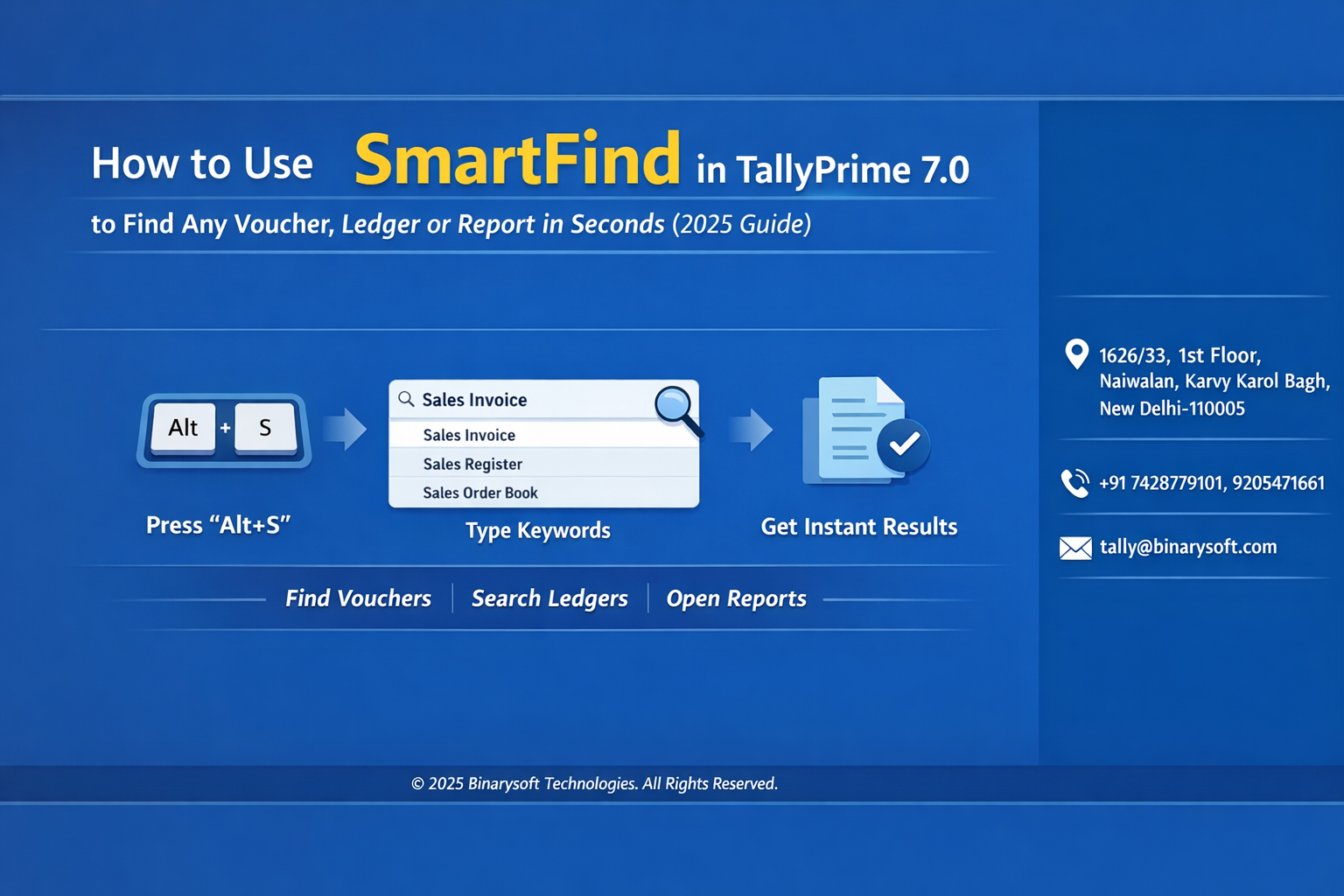
Step 1: Open SmartFind
From the Tally Prime dashboard, press the SmartFind shortcut key (usually available in the top bar search field).
Step 2: Enter Your Search Query
Type any of the following:
-
Voucher number
-
Party name
-
Ledger name
-
Amount
-
Report name
Step 3: View Instant Results
SmartFind displays a categorized list such as:
Step 4: Select the Required Item
Click or press Enter to open the desired record instantly.
Step 5: Refine Your Search
Use more specific keywords if you need to narrow down results.
Practical Use Cases
Finding a Voucher During GST Filing
Instead of browsing through sales registers, simply search by invoice number to open it instantly.
Checking Outstanding Payments
Search the party name to directly access ledger and outstanding reports.
Reviewing Expense Entries
Type the expense ledger name to see all related vouchers quickly.
Emotional Story: A Real-World Scenario
Ravi, a small hardware distributor, used to spend late evenings reconciling transactions. During GST return preparation, finding a single purchase invoice sometimes took ten minutes, especially when dealing with hundreds of entries. One evening, facing a tight filing deadline, he discovered SmartFind.
He typed the supplier’s name — and within seconds, the exact voucher appeared. What once felt stressful suddenly became manageable. Over time, Ravi noticed he was finishing his accounting work earlier, spending more time with his family instead of searching through reports. For him, SmartFind wasn’t just a feature — it was a small change that brought peace of mind to his daily routine.
Tips to Use SmartFind More Effectively
-
Use partial keywords if you don’t remember full names
-
Search using amounts to locate transactions quickly
-
Combine terms like party name + voucher type for precise results
-
Use it during audits to instantly fetch supporting documents
SmartFind vs Traditional Navigation
Traditional navigation requires remembering the path and menu structure. SmartFind eliminates this dependency, making the software more intuitive and user-friendly, especially for growing teams.
SEO Keywords to Target
SmartFind in Tally Prime 7.0
Tally Prime search feature
Find voucher in Tally quickly
Tally universal search guide
How to search ledger in Tally
Conclusion
SmartFind in Tally Prime 7.0 represents a major shift toward smarter and faster accounting workflows. In a business environment where time directly impacts productivity and compliance, the ability to instantly locate vouchers, ledgers, and reports is invaluable. By simplifying navigation and reducing manual effort, SmartFind empowers accountants, business owners, and auditors to work with greater efficiency and confidence. As transaction volumes continue to grow in 2026 and beyond, adopting features like SmartFind will not just improve convenience but also strengthen financial control and decision-making.
Company Details
Powered by Binarysoft Technologies
Authorized Tally Partner
Location:
1626/33, 1st Floor, Naiwalan, Karol Bagh, New Delhi – 110005, INDIA
Contact Us:
+91 7428779101
+91 9205471661
+91 8368262875
Email:
tally@binarysoft.com
Business Hours:
10:00 AM – 6:00 PM (Mon–Fri)
Frequently Asked Questions
What is SmartFind in Tally Prime 7.0
SmartFind is a built-in universal search feature that allows users to instantly locate vouchers, ledgers, stock items, and reports from a single search bar without navigating through multiple menus.
Where can I access SmartFind in Tally Prime
You can access SmartFind directly from the search field available on the top of the Tally Prime screen or by using the search shortcut provided in the software.
Can SmartFind search all voucher types
Yes, SmartFind can locate all voucher types including Sales, Purchase, Payment, Receipt, Contra, and Journal vouchers.
Can I search using partial names
Yes, you do not need to remember the exact name. Even partial keywords such as part of a party name or ledger will show relevant results.
CA. Rohin Mehtaal is a Chartered Accountant with experience in accounting systems, audit support, and GST compliance. He has assisted businesses in adopting structured financial processes and improving inventory accuracy. His writing emphasizes clarity, control, and data-driven decision making.