Call CA Tally HelpDesk
+91 9205471661,
7428779101
Cross-border business is no longer limited to large corporations. Even small and mid-sized businesses in India are actively dealing with clients in the Middle East, especially in the UAE and Saudi Arabia. But here’s the real challenge—many accounting systems are still not properly configured for foreign currencies like AED and SAR. This leads to incorrect invoicing, compliance issues, and financial mismatches.
Recent changes in global trade practices and digital accounting expectations have made multi-currency support a necessity, not a choice. Businesses that fail to adapt face delayed payments, reconciliation errors, and loss of credibility with international clients. The benefit of proper currency configuration is immediate—accurate invoicing, seamless transactions, and professional financial reporting. In a competitive global market, even a small mistake in currency handling can cost big opportunities.
Introduction: Why Multi-Currency Setup is Important
As businesses expand globally, handling multiple currencies becomes essential. If your accounting software is not configured correctly:
- Invoices may show incorrect symbols
- Exchange values may be miscalculated
- Reports may become inaccurate
- Client trust may be affected
Adding UAE Dirham (AED) and Saudi Riyal (SAR) correctly ensures smooth international transactions.
Real Story: Winning an International Client with the Right Setup
Rohit, a Delhi-based exporter, secured his first client from Dubai. Excited about the deal, he quickly raised an invoice—but made a mistake. The invoice showed INR instead of AED.
The client questioned his professionalism.
After that incident, Rohit properly configured AED and SAR in his accounting system. His next invoice was accurate, professional, and aligned with international standards.
Today, he handles multiple overseas clients confidently—all because he fixed a small but critical setup.
What is Multi-Currency in Accounting Software?
Multi-currency feature allows businesses to:
- Record transactions in foreign currencies
- Generate invoices in client’s currency
- Track exchange rate differences
- Maintain accurate financial reports
Understanding AED & SAR Currency Details
UAE Dirham (AED)
- Country: United Arab Emirates
- Currency Code: AED
- Symbol: د.إ
Saudi Riyal (SAR)
- Country: Saudi Arabia
- Currency Code: SAR
- Symbol: ﷼
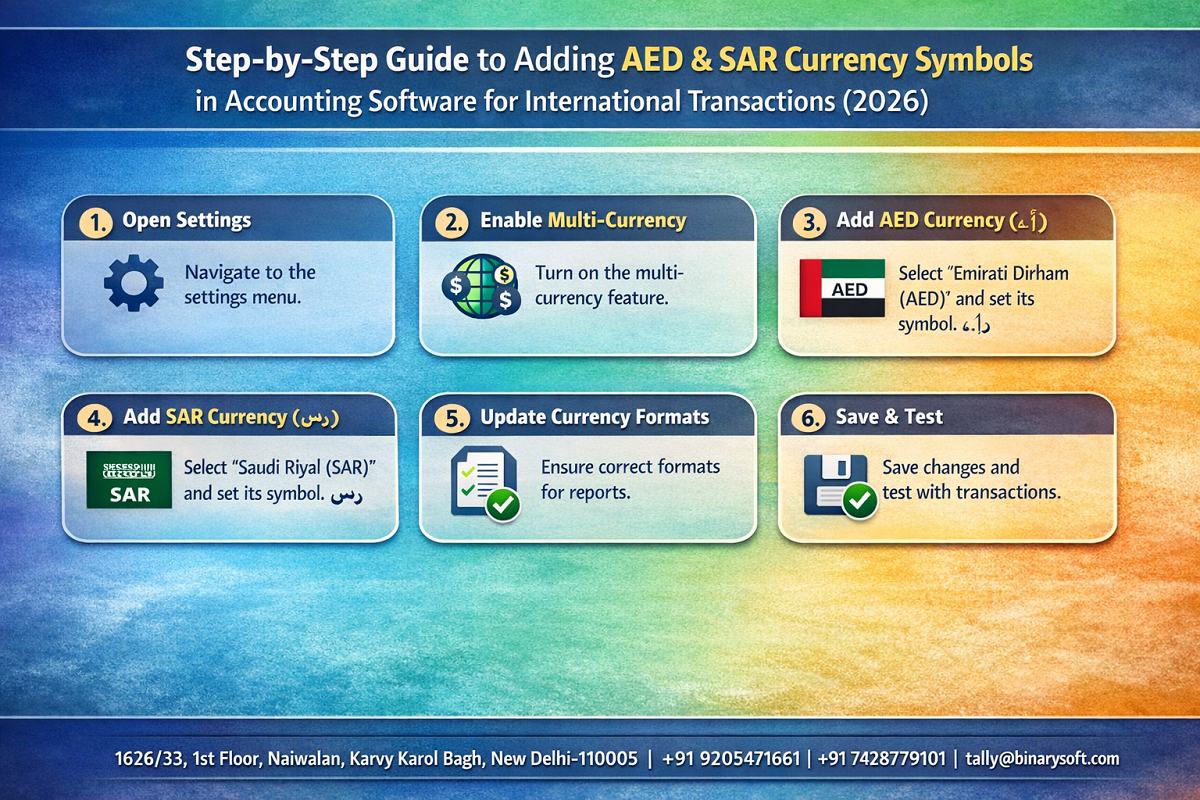
Step-by-Step Guide: Add AED & SAR in Accounting Software (Tally Prime Example)
Step 1: Enable Multi-Currency Feature
- Open Tally Prime
- Go to Gateway of Tally
- Press F11 (Features)
- Enable Multi-Currency option
Step 2: Create Currency (AED)
- Go to Gateway of Tally → Create → Currency
- Enter details:
- Symbol: AED or د.إ
- Formal Name: UAE Dirham
- Number of Decimal Places: 2
- Save
Step 3: Create Currency (SAR)
- Repeat the same steps
- Enter details:
- Symbol: SAR or ﷼
- Formal Name: Saudi Riyal
- Decimal Places: 2
- Save
Step 4: Set Exchange Rate
- Go to Gateway of Tally → Alter Currency
- Select AED or SAR
- Enter current exchange rate against INR
Step 5: Use Currency in Transactions
- While creating invoice, select currency (AED/SAR)
- Tally will automatically calculate INR equivalent
Best Practices for Multi-Currency Accounting
1. Update Exchange Rates Regularly
Always use latest rates for accuracy.
2. Use Standard Currency Symbols
Maintain consistency across invoices and reports.
3. Verify Before Sending Invoice
Double-check currency before sharing with clients.
4. Maintain Currency-wise Reports
Helps in better financial analysis.
Common Mistakes to Avoid
- Using wrong currency symbol
- Not updating exchange rates
- Mixing INR and foreign currency
- Ignoring rounding differences
- Not enabling multi-currency feature
Benefits of Proper Currency Configuration
- Professional international invoicing
- Accurate financial reporting
- Better client trust
- Smooth reconciliation
- Improved global business operations
Why This Matters in 2026
With increasing exports, freelancing, and global services, businesses must be ready for international transactions. Proper currency setup is not just technical—it directly impacts revenue and reputation.
Conclusion
Adding AED and SAR currency symbols in your accounting software is a small step with a big impact. It ensures accuracy, professionalism, and smooth global operations.
In 2026, businesses that adapt to multi-currency systems will grow faster, serve international clients better, and avoid costly mistakes. Don’t overlook this simple setup—it could be the key to your global success.
Frequently Asked Questions
How to enable multi-currency in Tally Prime?
Go to F11 Features and enable the multi-currency option.
Can I use AED and SAR in invoices?
Yes, once created, you can use them in invoices and transactions.
CA. Priya Tanvi specializes in accounting compliance, GST advisory, and business reporting for small and growing enterprises. She works with business owners to improve record-keeping and financial clarity. Her articles focus on practical compliance solutions and operational discipline.