Call CA Tally HelpDesk
+91 9205471661,
7428779101
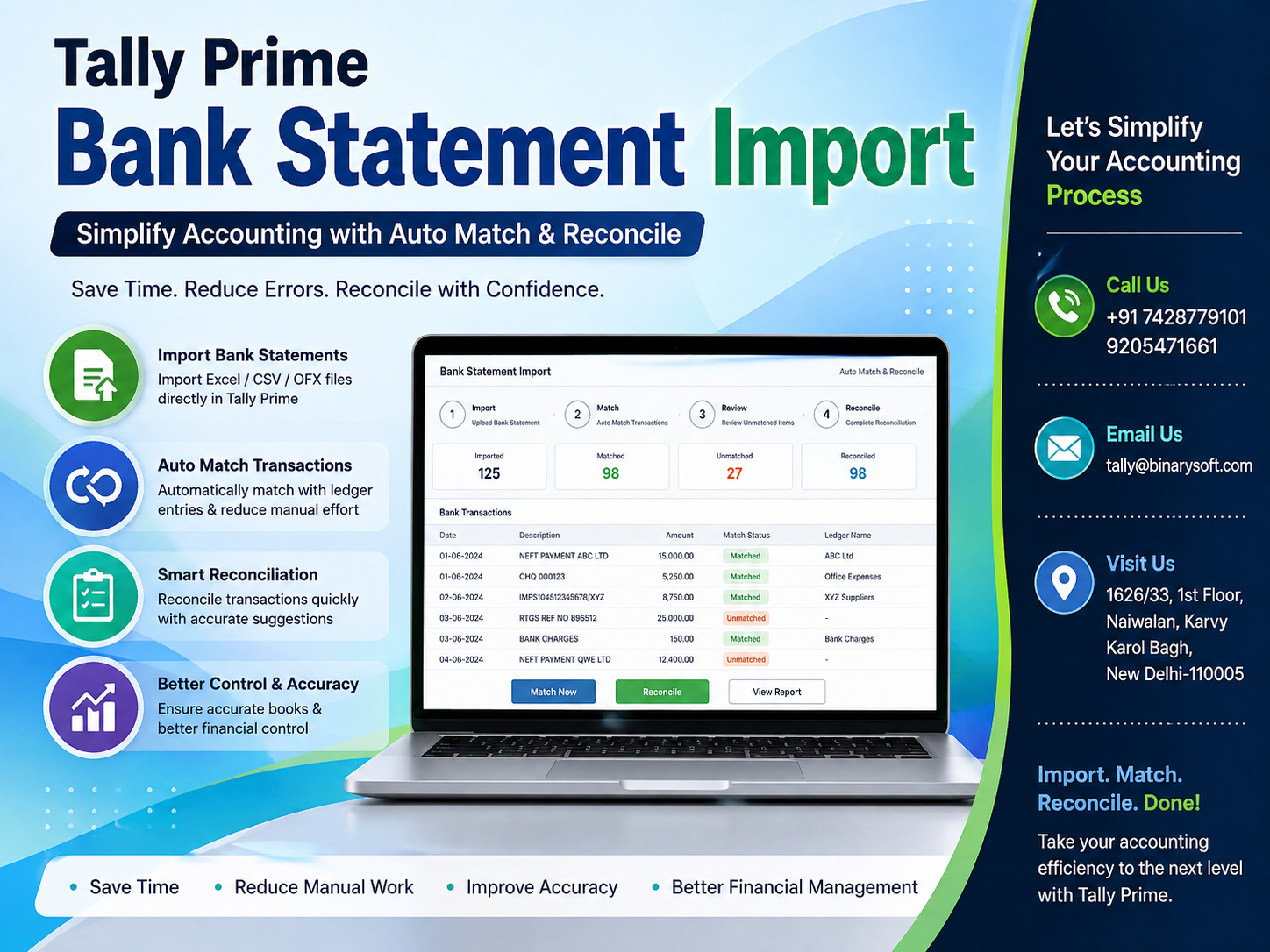
What Changed in 2026: Bank Reconciliation Is Moving from Manual Checking to Smarter Matching
In 2026, businesses are processing more digital payments, bank transfers, UPI collections, vendor settlements and online transactions than ever before. That convenience has created a new accounting pressure: your bank statement may contain hundreds or thousands of entries while your books still need every transaction to be identified, recorded and reconciled correctly. Manually comparing dates, amounts, references and ledger entries can consume valuable accounting hours and increase the possibility of missed or duplicate transactions.
This is where TallyPrime Bank Statement Import can make a major difference. By importing supported bank statements into TallyPrime and using reconciliation and matching capabilities, businesses can reduce repetitive checking, identify matching transactions faster and maintain cleaner books. Instead of waiting until month-end to discover differences, accountants can review banking activity more regularly, investigate unmatched transactions and keep financial records better prepared for GST compliance, audits, cash-flow reviews and management reporting.
What Is TallyPrime Bank Statement Import?
TallyPrime Bank Statement Import is designed to help businesses bring banking transaction information into their accounting environment instead of manually checking every line of a bank statement against the books.
For a business with frequent receipts and payments, bank reconciliation can become one of the most repetitive accounting activities.
Consider the transactions happening during a normal business day:
Customer payments are received.
Suppliers are paid.
Employees receive reimbursements.
Bank charges are deducted.
Interest may be credited.
Loan instalments are debited.
Online subscriptions are charged.
Taxes are paid electronically.
Refunds may be received.
UPI and other electronic collections may reach the account.
Each transaction eventually needs to be correctly reflected and reconciled in the books.
Importing bank statement data can simplify the process by providing accounting teams with banking information that can be compared with transactions recorded in TallyPrime.
Why Bank Reconciliation Matters More in 2026
The role of a bank account has changed dramatically for businesses.
Earlier, many small businesses handled a significant portion of their transactions through cash and cheques. Today, business banking increasingly involves electronic transactions.
A wholesaler might receive dozens of customer payments through NEFT, RTGS, IMPS or other digital channels.
A retailer may receive collections from several payment sources.
A manufacturer may make regular vendor payments and receive payments from distributors.
A service company might handle subscriptions, professional fees, employee reimbursements and tax payments electronically.
As transaction volume grows, manual reconciliation becomes more difficult.
One missing transaction may look insignificant initially, but multiple unresolved transactions can create confusion in:
Bank balances
Customer outstanding reports
Supplier balances
Cash-flow analysis
Payment tracking
Audit preparation
Financial reporting
Management decisions
Regular reconciliation therefore becomes an important accounting control rather than simply a month-end accounting task.
The Traditional Bank Reconciliation Problem
Imagine receiving a bank statement containing 700 transactions.
Your accountant opens the bank statement in one window and TallyPrime in another.
Then the checking begins.
₹18,450 received — find corresponding customer receipt.
₹62,000 transferred — identify vendor.
₹590 deducted — determine whether it is a bank charge.
₹1,25,000 received — check invoice settlement.
₹27,800 paid — locate purchase or expense transaction.
₹2,950 deducted automatically — identify subscription or service.
The process continues line after line.
The problem is not simply the amount of work.
Manual reconciliation requires concentration.
After checking hundreds of entries, mistakes become easier to make.
An amount may be matched with the wrong voucher.
A bank charge may remain unrecorded.
A customer payment may not be identified.
A duplicate entry may go unnoticed.
The bank statement import and reconciliation workflow in TallyPrime is intended to reduce this repetitive effort.
How TallyPrime Bank Statement Import Helps
Instead of treating the bank statement and accounting records as completely separate sources, TallyPrime allows businesses to work with imported bank transaction information for reconciliation.
Depending on the TallyPrime release, banking configuration, bank support and transaction information available, the workflow can help accountants identify transactions that correspond with existing accounting entries.
The basic idea is straightforward:
Bank statement data comes into TallyPrime.
TallyPrime compares banking information with accounting records.
Potential matches can be identified.
The accountant reviews the results.
Matched transactions can be reconciled.
Unmatched entries remain visible for investigation or accounting action.
This turns reconciliation from a completely manual search exercise into a more structured review process.
Auto Match: The Feature That Can Save Accounting Time
One of the biggest advantages of a smarter reconciliation workflow is matching.
Suppose your books contain a receipt voucher for:
Customer: ABC Enterprises
Amount: ₹48,750
Payment Mode: Bank Transfer
The bank statement also contains a credit of ₹48,750.
Instead of requiring the accountant to search manually through numerous transactions, matching capabilities can help identify corresponding entries based on available transaction information.
The accountant can then verify whether the suggested match is correct.
This is especially valuable when a business processes hundreds of similar banking transactions every month.
The objective is not to remove accounting control.
The objective is to remove unnecessary searching.
Auto Match Does Not Mean “Never Review Again”
Automation is useful, but accounting still requires oversight.
Businesses should not interpret automated matching as permission to stop reviewing banking transactions.
Consider two customers who both pay ₹25,000 on the same day.
If the transaction narration or reference does not clearly identify the payer, the accountant may need additional information before deciding which customer ledger should receive the payment.
The same applies to:
Combined payments
Partial invoice settlements
Advance payments
Bank charges
Payment gateway settlements
Loan transactions
Interest credits
Refunds
Returned payments
Transfers between accounts
Unknown credits or debits
Automation should therefore support accountants rather than replace accounting judgment.
A Story from the Accounts Desk: The ₹1.85 Lakh Payment Nobody Could Find
It was the final week of the month.
A growing distribution business was preparing its outstanding receivables report.
The sales manager called the accounts department.
“Why is this customer still showing ₹1.85 lakh outstanding? They told me they paid several days ago.”
The accountant searched the ledger.
No receipt.
The sales team checked their messages.
The customer insisted payment had already been transferred.
For nearly an hour, three people searched through emails, WhatsApp messages and accounting records.
Eventually, someone downloaded the bank statement.
There it was.
₹1,85,000 had reached the bank four days earlier.
The payment reference contained an abbreviated business name that nobody had immediately recognized.
The money was in the bank, but the books still showed it as outstanding.
The sales manager had nearly called the customer again asking for payment.
That could have turned an accounting oversight into an embarrassing customer conversation.
After the business began reviewing imported banking transactions and unreconciled entries more frequently, unidentified receipts became easier to notice.
The biggest benefit was not merely saving an hour.
It was avoiding an unnecessary call that could have damaged customer trust.
Import Bank Statements Instead of Entering Every Transaction Manually
Manual bank transaction entry creates two major costs.
The first is obvious: time.
The second is less visible: error risk.
When accountants repeatedly type:
Dates
Amounts
Reference numbers
Narrations
Bank details
Transaction information
there is always a possibility of human error.
Importing supported bank statement information reduces the need to repeatedly reproduce information that already exists electronically.
This can make the reconciliation process faster and more systematic.
TallyPrime Bank Reconciliation Explained Simply
Bank reconciliation answers one important question:
“Do the banking transactions in our books correctly correspond with the transactions recorded by the bank?”
Your accounting records may show a particular balance while the bank statement shows another.
This does not automatically mean something is wrong.
Timing differences can exist.
For example, a cheque may have been recorded but not yet cleared.
A payment could have been initiated but reflected by the bank later.
A bank charge might have been deducted but not yet entered into the books.
A customer payment may have reached the bank but not yet been recorded.
Reconciliation helps identify and explain these differences.
Typical Transactions That Require Reconciliation
Businesses should regularly review transactions such as:
Customer receipts
Supplier payments
Bank charges
Interest credits
Interest debits
EMI payments
Loan repayments
Credit card settlements
UPI collections
NEFT receipts
RTGS transfers
IMPS transactions
Online banking payments
Tax payments
Salary payments
Refunds
Payment reversals
Returned transactions
Cheque clearances
Internal bank transfers
Regular reconciliation makes it easier to identify discrepancies while transaction information is still fresh.
Example: Customer Payment Matching
Assume a business raises an invoice:
Invoice Amount: ₹75,000
Customer: XYZ Traders
The customer transfers ₹75,000 through NEFT.
The bank statement reflects:
Credit: ₹75,000
If the receipt has already been correctly recorded in TallyPrime, matching and reconciliation capabilities can help the accountant connect the banking entry with the corresponding accounting transaction.
Once verified, the entry can be reconciled appropriately.
Now consider another scenario.
The customer pays ₹70,000 instead of ₹75,000.
The accountant needs to determine why.
Was ₹5,000 deducted as TDS?
Was there a credit note?
Was it a partial payment?
Was there a dispute?
This demonstrates why automation and human accounting judgment work best together.
Find Unmatched Transactions Faster
An unmatched transaction is not necessarily an error.
It is a transaction that needs attention.
Suppose your bank statement contains:
Debit ₹2,360
but there is no obvious corresponding accounting entry.
Possible explanations could include:
Bank charges
Software subscription
Automatic debit
Payment gateway charge
Loan-related deduction
Insurance payment
Card payment
Employee expense
Incorrect debit
Instead of discovering the transaction months later, regular reconciliation can bring it to the accountant's attention sooner.
That improves financial visibility.
Detect Missing Customer Receipts
Customer outstanding reports are extremely important for wholesalers, distributors, manufacturers and service companies.
If a customer pays but the receipt is not properly accounted for, the ledger can continue showing an outstanding amount.
This may lead the sales or collection team to follow up unnecessarily.
A regular bank reconciliation workflow helps accounting teams identify credits that have reached the bank but still need proper accounting treatment.
This can improve customer account accuracy.
Detect Missing Vendor Payments
The same problem can happen on the payment side.
A supplier payment might leave the bank account while the corresponding accounting record remains incomplete.
The supplier ledger may then show an incorrect payable balance.
When accounts teams reconcile banking activity regularly, these discrepancies can be investigated before they affect reporting or vendor communication.
Identify Bank Charges
Bank charges are easy to overlook because they may occur automatically.
Examples may include:
Transaction charges
Account service charges
Cheque-related charges
Processing charges
Loan charges
Foreign transaction charges
Other banking fees
If such charges appear in the bank statement but are missing from the books, the bank ledger will not reconcile correctly.
A structured bank reconciliation process makes these entries easier to identify.
Reconciliation Helps Improve Cash-Flow Visibility
Business owners frequently ask:
“How much money do we actually have available?”
The answer should not depend only on an accounting balance that has not been reconciled.
Uncleared payments, missing receipts, unidentified deductions and unrecorded banking transactions can affect the accuracy of cash-flow information.
Regular bank reconciliation helps management obtain a clearer picture of actual banking activity.
This becomes particularly important when making decisions about:
Supplier payments
Inventory purchases
Salary commitments
Tax payments
Loan instalments
Capital expenditure
Business expansion
Working capital
Useful for Wholesalers
Wholesale businesses often process large numbers of transactions with dealers, retailers, suppliers and distributors.
A typical wholesale business may have:
Hundreds of customer invoices
Multiple collections each day
Partial payments
Advance receipts
Supplier transfers
Freight payments
GST payments
Employee expenses
Bank charges
With such volumes, monthly manual reconciliation can become difficult.
A structured TallyPrime banking workflow can help accounts teams review transactions more efficiently and maintain better control over outstanding receivables and payables.
Useful for Retail Businesses
Modern retail businesses may receive money through multiple channels.
Depending on the business model, collections may include:
Bank transfers
UPI
Cards
Payment gateways
Marketplace settlements
Cash deposits
Other digital channels
When money arrives through different sources, identifying settlements and reconciling banking activity becomes increasingly important.
TallyPrime can become a central accounting environment where these transactions are reviewed against the books.
Useful for Manufacturers
Manufacturing businesses usually have more complex payment flows.
They may pay:
Raw material suppliers
Transporters
Contractors
Utility providers
Employees
Government departments
Equipment suppliers
Maintenance vendors
At the same time, payments are received from distributors, dealers and customers.
Bank statement reconciliation can therefore support better financial control and reduce the workload involved in verifying large transaction volumes.
Useful for Service Businesses
Professional and service businesses also benefit from regular reconciliation.
Examples include:
Consulting companies
IT companies
Marketing agencies
CA firms
Architects
Training organisations
Professional service providers
Contractors
For these organisations, payments may arrive against invoices, retainers, advances or project milestones.
Correct reconciliation helps ensure that customer ledgers and bank balances remain aligned.
Bank Reconciliation and GST Accounting
Bank reconciliation is not itself a replacement for GST compliance procedures.
However, accurate accounting records support better compliance.
When receipts, expenses and payments are properly identified, accounting teams have cleaner financial data available when reviewing:
Sales
Purchases
Expenses
Input tax credit-related records
Vendor transactions
Customer accounts
Tax payments
Bank reconciliation should therefore be viewed as part of broader accounting discipline.
Bank Reconciliation and Audit Readiness
Auditors frequently examine banking transactions because bank accounts provide an important independent trail of financial activity.
Unexplained differences can result in additional questions.
Businesses that reconcile regularly can generally investigate discrepancies closer to the transaction date rather than trying to reconstruct them months later.
This can make audit preparation more organised.
Supporting documents can also be located while the transaction is still familiar to the relevant employee.
Daily vs Weekly vs Monthly Reconciliation
How frequently should a business reconcile its bank accounts?
There is no single frequency suitable for every organisation.
High-volume businesses may benefit from daily reconciliation.
Medium-volume businesses may choose every few days or weekly.
Smaller businesses may perform reconciliation weekly or monthly.
The key principle is simple:
The greater the banking transaction volume, the more valuable frequent reconciliation becomes.
Waiting until year-end is rarely an efficient approach.
A Better 2026 Banking Workflow
A practical accounting workflow may look like this:
Step 1: Record Business Transactions Properly
Enter sales, purchases, receipts, payments and other transactions with appropriate ledgers and references.
Step 2: Obtain the Bank Statement
Download the statement from your bank in a format supported by your accounting and banking workflow.
Step 3: Import the Bank Statement into TallyPrime
Use the applicable bank statement import functionality available for your bank, format and TallyPrime release.
Step 4: Review Matching Transactions
Check transactions that correspond with entries already recorded in the books.
Step 5: Investigate Unmatched Entries
Identify transactions requiring further attention.
Step 6: Record Missing Transactions Where Appropriate
After verifying the nature of a transaction, enter the necessary accounting voucher with the correct ledger treatment.
Step 7: Complete Reconciliation
Verify reconciled entries and investigate remaining differences.
Step 8: Review the Final Bank Position
Check that the bank ledger accurately reflects the business's banking activity.
Auto Reconciliation vs Manual Reconciliation
Manual reconciliation means the accountant performs most comparisons personally.
This often involves:
Opening bank statements
Searching accounting vouchers
Comparing dates
Comparing amounts
Checking references
Marking transactions manually
Automated or assisted matching reduces repetitive comparison work by helping identify possible corresponding transactions.
However, unusual entries still require review.
Therefore, the most effective approach is often:
Automation for repetitive matching.
Human review for exceptions.
Why Exception-Based Accounting Is More Efficient
Traditional accounting teams often spend considerable time verifying transactions that are already correct.
A smarter workflow shifts attention toward exceptions.
For example:
500 transactions imported.
440 transactions correspond clearly.
60 require review.
Instead of giving the same attention to all 500 entries, the accountant can focus more closely on the 60 exceptions.
Those exceptions may include:
Missing vouchers
Duplicate transactions
Incorrect amounts
Unknown receipts
Bank charges
Payment reversals
Uncleared transactions
Incorrect ledger allocation
This is where technology can significantly improve accounting productivity.
Reduce Month-End Accounting Pressure
Month-end is already busy.
Businesses need to review:
Sales
Purchases
Expenses
Outstanding customers
Supplier balances
GST-related records
Payroll
Inventory
Cash flow
Bank balances
Adding hundreds of unreconciled banking transactions creates unnecessary pressure.
Frequent statement import and reconciliation can spread the workload throughout the month.
Instead of spending an entire day resolving old transactions, accountants can review exceptions regularly.
Better Control Over Receivables
Receivables management depends on accurate customer balances.
If receipts are missing or incorrectly allocated, outstanding reports become unreliable.
This can affect collection decisions.
Sales teams might contact customers who have already paid.
Alternatively, an actual overdue amount may not receive the attention it deserves because ledger information is incorrect.
Bank reconciliation supports better receivables management by helping ensure recorded customer receipts align with banking activity.
Better Control Over Payables
Accurate supplier ledgers are equally important.
A business needs to know:
Which vendors have been paid?
Which invoices remain outstanding?
Were payments correctly allocated?
Did a transaction fail or reverse?
Were bank charges deducted separately?
Reconciliation provides an additional layer of verification.
How Bank Statement Import Can Reduce Data Entry
Consider a business with 1,500 banking transactions per month.
If every transaction takes only one minute to locate, compare or manually process, that represents a significant amount of accounting effort.
The larger the business grows, the more expensive repetitive manual work becomes.
Automation does not simply save clicks.
It gives accountants more time for activities such as:
Receivable analysis
Cash-flow planning
Compliance review
Expense analysis
Profitability review
Management reporting
Financial controls
Multi-Bank Businesses Need Stronger Reconciliation
Some companies operate several bank accounts.
For example:
Collection account
Payment account
Payroll account
Loan account
Branch account
Current account
Special-purpose account
As the number of accounts increases, reconciliation complexity increases.
A disciplined bank-wise reconciliation process becomes essential.
Each bank ledger should be reviewed regularly rather than allowing unresolved entries to accumulate.
Common Bank Reconciliation Mistakes
Businesses should avoid several common mistakes.
1. Waiting Until Year-End
Old transactions are harder to investigate because employees may no longer remember them.
2. Matching Only by Amount
Two unrelated transactions can have the same value.
Always consider other available transaction information.
3. Ignoring Small Differences
Small charges repeated across hundreds of transactions can become significant.
4. Leaving Unknown Receipts Unresolved
An unidentified receipt may belong to a customer whose ledger still shows an outstanding balance.
5. Forgetting Reversed Transactions
A failed or reversed payment should not be treated as successfully completed.
6. Recording Transactions Without Supporting Evidence
Unclear transactions should be investigated before final accounting treatment.
7. Giving Unrestricted Banking Access
Accounting controls and user permissions remain important even when banking workflows become more automated.
Bank Reconciliation as an Internal Control
Bank reconciliation is not merely clerical work.
It is an important internal financial control.
Regular reconciliation can help businesses notice:
Unexpected withdrawals
Duplicate payments
Incorrect entries
Missing receipts
Unusual charges
Unrecorded expenses
Payment reversals
Accounting discrepancies
The earlier these are identified, the easier they are usually to investigate.
Can TallyPrime Completely Automate Accounting?
Businesses should maintain realistic expectations.
TallyPrime can automate and simplify many accounting activities, but business transactions still require correct classification and professional judgment.
For example, a ₹50,000 bank credit does not automatically tell an accountant whether it represents:
Customer payment
Loan received
Capital introduced
Refund
Inter-account transfer
Advance
Interest
Other income
Context matters.
The strongest accounting workflow combines software automation with proper accounting controls and review.
Why Businesses Are Moving Toward Continuous Reconciliation
Traditional accounting often followed a monthly cycle.
Businesses would enter transactions throughout the month and reconcile everything later.
Digital banking makes a more continuous approach practical.
When banking information is reviewed frequently:
Problems are detected earlier.
Customer receipts are identified faster.
Missing expenses are noticed sooner.
Balances become more reliable.
Month-end pressure decreases.
Management receives more current financial information.
For growing businesses, this can represent a significant operational improvement.
TallyPrime Bank Statement Import for Accountants
For accountants, automation does not mean less importance.
It means less repetitive work.
Instead of spending hours searching for matching numbers, accounting professionals can focus on:
Exceptions
Verification
Ledger accuracy
Compliance
Controls
Analysis
Reporting
Decision support
This changes the role of accounting technology from simple bookkeeping software to a productivity tool.
TallyPrime Bank Statement Import for Business Owners
A business owner may not care how many entries an accountant manually matched.
The owner cares about questions such as:
How much cash is available?
Who still owes us money?
Which suppliers need payment?
Why does the bank balance differ from the books?
Are there unidentified deductions?
Are the accounts updated?
Regular reconciliation helps produce more dependable answers to these questions.
TallyPrime Banking in 2026: Automation with Control
The future of business accounting is not simply about entering vouchers faster.
It is about reducing unnecessary manual activity while keeping control over financial information.
Bank statement import and reconciliation fit directly into this approach.
The ideal workflow is:
Import data.
Identify matches.
Review exceptions.
Record verified missing transactions.
Reconcile regularly.
Investigate differences.
Close accounts with confidence.
That is a far more scalable approach than repeatedly comparing every bank statement line manually.
Who Should Consider Using Bank Statement Import and Reconciliation?
This workflow can be particularly valuable for:
Wholesalers
Distributors
Retailers
Manufacturers
Service businesses
Trading companies
CA and accounting firms
E-commerce businesses
Multi-branch companies
Businesses processing large transaction volumes
Companies operating multiple bank accounts
Growing SMEs
Even smaller businesses can benefit when they want more accurate and organised accounting.
How Binarysoft Technologies Can Help
Implementing accounting automation effectively requires more than simply installing software.
Businesses need to consider:
Company configuration
Bank ledger setup
Accounting workflow
User access
Voucher configuration
Bank statement handling
Reconciliation procedures
Data security
Staff training
Reporting requirements
Binarysoft Technologies, an Authorized Tally Partner, can assist businesses in understanding and implementing TallyPrime according to their operational and accounting requirements.
The objective should be to build an accounting process that is practical for everyday use and scalable as transaction volumes grow.
Conclusion
TallyPrime Bank Statement Import can transform bank reconciliation from a repetitive manual exercise into a more structured accounting workflow.
As businesses process more digital payments in 2026, manually comparing hundreds or thousands of banking transactions with accounting vouchers becomes increasingly inefficient. Statement import, assisted matching and reconciliation capabilities can help accountants identify corresponding transactions faster, focus attention on exceptions and maintain more accurate bank ledgers.
The greatest benefit is not simply saving accounting time.
Better reconciliation can improve customer outstanding reports, supplier balances, cash-flow visibility, audit preparation and management confidence in financial information.
Automation should not eliminate review. Instead, it should eliminate repetitive searching so accountants can spend more time investigating exceptions and ensuring correct accounting treatment.
For businesses still reconciling large bank statements line by line, 2026 is a good time to evaluate a more automated TallyPrime banking workflow.
Frequently Asked Questions
What is TallyPrime Bank Statement Import?
It is a banking functionality that enables businesses to bring supported bank statement transaction information into TallyPrime for accounting and reconciliation workflows.
Can TallyPrime automatically match bank transactions?
TallyPrime's banking and reconciliation capabilities can assist in identifying corresponding transactions based on available information and supported functionality. Businesses should still review matches, particularly where transactions are ambiguous.
CA. Rudransh Suryavanshi focuses on GST compliance, financial management, and internal controls. He regularly contributes content on business accounting solutions and effective tax planning strategies.