Call CA Tally HelpDesk
+91 9205471661,
7428779101
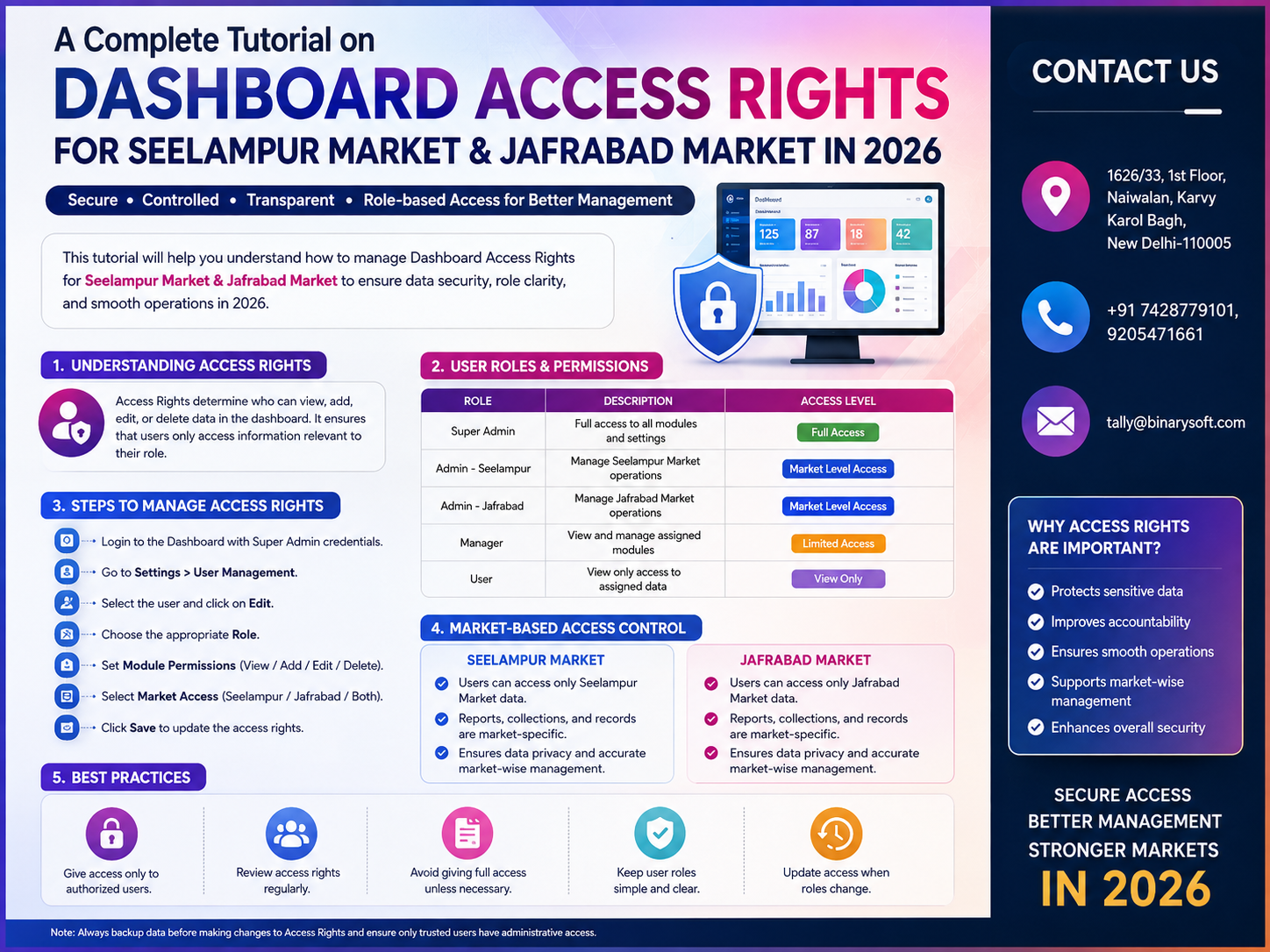
What Changed in 2026: Why Dashboard Access Rights Have Become a Business Priority
In 2026, businesses in Seelampur Market and Jafrabad Market are becoming increasingly dependent on digital dashboards for billing, accounting, inventory, GST information, outstanding receivables, purchases, cash flow and management reporting. But greater visibility creates a new responsibility: not every employee should see or change everything. As businesses add billing operators, accountants, managers, warehouse teams and remote users, unrestricted dashboard access can expose sensitive sales figures, profit information, customer balances and financial reports—or allow important transactions to be changed accidentally. Recent months have therefore made role-based access and user-level controls increasingly important for growing businesses. A carefully configured TallyPrime environment can help owners decide who can access company data and what different users are permitted to do. For Seelampur and Jafrabad businesses, better access control means stronger confidentiality, clearer accountability and a safer way to delegate everyday accounting work without unnecessarily exposing sensitive business information.
Why Access Rights Matter for Businesses in Seelampur and Jafrabad
A small business may begin with one owner managing everything.
The owner creates invoices, records purchases, checks outstanding payments and reviews profit.
As the business expands, responsibilities are distributed.
One employee handles billing.
Another handles purchases.
An accountant maintains vouchers.
A warehouse employee manages stock.
A senior manager reviews performance.
The owner wants access to everything.
This creates an important question:
Should all these users have the same access?
Usually, the answer is no.
A billing operator may need to create sales invoices but may not need access to sensitive profitability information.
A warehouse employee may need inventory information but may not require access to financial reports.
A senior accountant may require broader accounting permissions.
The business owner or administrator may need complete control.
This is the basic principle behind access rights:
Give each user the access required to perform their responsibilities while avoiding unnecessary permissions.
What Are Dashboard Access Rights?
Dashboard access rights refer broadly to controlling which information, reports, functions and actions are available to different users.
In a TallyPrime-based environment, security and user access should be planned according to the software features being used, the edition/configuration, the way data is accessed and the responsibilities of individual users.
The goal is to establish a controlled environment in which users can perform their work without receiving unrestricted access to business information they do not need.
A structured access model can cover areas such as:
- Sales transactions
- Purchase transactions
- Receipts
- Payments
- Inventory
- Outstanding reports
- Accounting reports
- Financial information
- Voucher modification
- Voucher deletion
- Data administration
- Security administration
- User management
The exact permissions available should always be verified against the TallyPrime version, security configuration and deployment being used.
The Difference Between Login Access and Access Rights
These concepts are related but different.
Login access determines whether a person can enter the system or company data.
Access rights determine what that person can do after gaining authorized access.
For example, imagine that an employee named Amit has valid access credentials.
Amit successfully enters the accounting environment.
That does not necessarily mean Amit should be able to:
- Delete vouchers
- Modify old invoices
- Review profit reports
- Change company settings
- Alter security settings
- Create other users
A well-planned security structure controls privileges after authentication.
Why “Everyone Has Full Access” Is a Risky Practice
Giving complete access to every employee may initially seem convenient.
There are fewer permission problems, and employees do not need to ask management whenever they require a function.
But convenience can create risk.
Full access can potentially result in:
Accidental changes
An inexperienced user may alter or delete an important transaction.
Data confidentiality problems
Employees may see business information unrelated to their responsibilities.
Weak accountability
When too many users have unrestricted privileges, investigating changes can become more difficult.
Operational errors
Employees may access settings or functions they do not fully understand.
Management exposure
Sensitive information such as profitability or financial position may be visible unnecessarily.
Good access management therefore balances convenience with control.
A Story from Seelampur: One Click That Changed the Owner's Approach
Consider a fictional electronics wholesaler in Seelampur Market.
The owner, Sameer, had started with a small operation and three employees.
Over several years, the business expanded.
By 2026, eight people were involved in billing, purchases, stock and accounts.
Sameer trusted his team, so everyone effectively worked with broad system access.
He believed restrictions would slow down operations.
Then one evening, his accountant noticed that an older sales transaction did not match the supporting paperwork.
Nobody knew exactly what had happened.
Was the transaction changed accidentally?
Had someone corrected it but forgotten to inform the accountant?
Was the wrong entry edited while trying to fix another invoice?
There was no dramatic fraud.
There was something much more common: confusion.
Sameer spent hours checking records.
What worried him was not merely that an entry had changed. It was the realization that employees who only needed to create routine invoices had far more access than their jobs required.
The following week, he reorganized responsibilities.
Billing staff focused on billing.
Inventory employees focused on stock.
Accounting privileges went to the accounts team.
Administrative control remained restricted.
The biggest change was psychological.
Sameer no longer felt that delegating work meant surrendering control.
That is what good access management should achieve.
Understanding Role-Based Access Control
Role-based access means permissions are designed around job responsibilities instead of giving every user identical authority.
Consider a business with five types of users:
| Role | Typical Requirement |
|---|
| Owner |
Complete management visibility |
| Accounts Manager |
Accounting and financial operations |
| Billing Operator |
Sales invoicing |
| Purchase Executive |
Purchase-related work |
| Inventory User |
Stock-related operations |
This is much more manageable than deciding permissions randomly for every employee.
Step 1: Identify Every Person Who Needs Access
Before configuring anything, prepare a list of users.
For example:
- Business Owner
- Senior Accountant
- Junior Accountant
- Billing Operator
- Purchase Manager
- Store Manager
- Warehouse Operator
- External Consultant, where legitimately required
Then ask:
What does this person actually need to do?
Do not begin with:
“What should we block?”
Begin with:
“What access is necessary for this role?”
This encourages a minimum-required-access approach.
Step 2: Divide Users According to Responsibilities
Users performing similar jobs can be grouped conceptually into roles.
For example:
Owner / Administrator
May require:
- Broad company access
- Financial reports
- Sales information
- Purchase information
- Inventory reports
- Outstanding information
- Management reports
- Administrative functions
- User/security management
Accounts Manager
May require:
- Accounting vouchers
- Receipts
- Payments
- Journal entries
- Sales and purchase information
- Outstanding reports
- Financial reports
Administrative security privileges may still remain restricted depending on company policy.
Billing Operator
May require:
- Sales invoice creation
- Customer selection
- Stock item selection
- Quantity and rate entry
- Tax-related invoice information
- Printing or sharing invoices according to company process
The billing operator may not require access to every management or financial function.
Purchase User
May require:
- Purchase entries
- Supplier information
- Purchase-related reports
- Relevant inventory information
Warehouse User
May require:
- Stock-related information
- Godown/location information
- Stock movement
- Relevant inventory transactions
The exact rights should be configured according to actual responsibilities.
Step 3: Enable Appropriate Security Controls
Businesses using TallyPrime should first review the security and user-access features available in their installation.
Security configuration should be handled by an authorized person.
The administrator should ensure that company data is not left open to every person who can access the computer or network.
Security is most effective when user accounts are assigned individually rather than broadly sharing one common login.
Step 4: Create Individual User Accounts Where Appropriate
A common mistake is using a shared account such as:
Username: Accounts
Password: accounts123
and giving the credentials to five people.
This weakens accountability.
If a questionable change is discovered later, management may struggle to determine who was using the shared credentials.
Individual access is preferable where the software configuration and operational environment support it.
For example:
- Billing-Rahul
- Accounts-Neha
- Purchase-Amit
- Manager-Sunil
The exact naming convention is up to the organization.
The important point is accountability.
Step 5: Decide What Billing Staff Should Access
Billing users typically need fast and convenient access to daily sales operations.
Their workflow should not become unnecessarily complicated.
At the same time, their access should correspond to their duties.
Possible requirements include:
- Create sales vouchers
- Select customers
- Select stock items
- Enter quantities
- Enter rates as permitted by company policy
- Apply relevant tax information
- Print invoices
- Review information needed for customer service
Management should separately decide whether billing users need to modify older vouchers or access sensitive financial reports.
Step 6: Control Voucher Modification
Creating a transaction and modifying an old transaction are different privileges from a business-control perspective.
For example, a billing operator may legitimately need to create today's invoices.
Does that person also need unrestricted ability to modify transactions from several months earlier?
That depends on the business.
Companies should establish policies for:
- Same-day corrections
- Previous-day corrections
- Previous-month changes
- Cancelled invoices
- Deleted vouchers
- Credit notes
- Sales returns
Sensitive corrections can be routed through a supervisor or accounts manager where appropriate.
Step 7: Treat Voucher Deletion Carefully
Deletion deserves special attention.
Accidental deletion can create reconciliation problems.
Instead of allowing deletion simply because an employee can create a voucher, businesses should decide who genuinely needs this privilege.
A possible policy might be:
Billing Operator: Restricted deletion
Senior Accountant: Authorized according to company policy
Administrator: Full administrative authority
This is only an example. Each business should determine controls based on its workflow.
Step 8: Protect Sensitive Financial Information
Business owners often assume that every accounting user needs access to every financial report.
That may not be necessary.
Sensitive reports can include information related to:
- Profitability
- Cash position
- Bank position
- Receivables
- Payables
- Expenses
- Margins
- Business performance
A billing employee may need to know whether a customer has an outstanding balance without necessarily requiring visibility into the company's complete financial position.
Access design should therefore reflect information sensitivity as well as operational needs.
Step 9: Configure Inventory Access According to Responsibilities
For Jafrabad and Seelampur traders maintaining significant inventory, warehouse employees may require access to stock information.
Their responsibilities may include:
- Checking stock quantities
- Reviewing godown/location stock
- Recording permitted stock movements
- Checking batch information
- Supporting physical verification
They may not need access to sensitive financial information.
Separating inventory responsibilities from financial responsibilities can create a cleaner operational structure.
Step 10: Apply Access Controls to Purchase Operations
Purchase transactions directly affect inventory, supplier balances and business costs.
Purchase rights should therefore be assigned carefully.
A purchase user may need to:
- Enter supplier invoices
- Select stock items
- Enter quantities
- Enter purchase rates
- Allocate inventory
- Record relevant tax information
Management should determine whether the same user can:
- Modify old purchases
- Delete purchase vouchers
- Create new supplier masters
- Change important accounting configurations
Separating responsibilities can improve control.
Dashboard Access for Business Owners
The owner typically needs the broadest visibility.
Useful management information can include:
- Sales
- Purchases
- Stock
- Receivables
- Payables
- Cash
- Bank
- Profitability
- Business performance
- Inventory movement
But the owner does not necessarily need to perform every operational task personally.
The purpose of a good dashboard is to give management visibility without forcing the owner to enter every transaction.
Dashboard Access for Managers
A manager may need wider visibility than an operator but less authority than an administrator.
Possible management requirements include:
- Sales review
- Purchase review
- Inventory monitoring
- Outstanding review
- Operational reporting
Security administration can remain with the business owner or designated administrator.
Access Rights for Accountants
Accountants generally require significant access because their work touches many parts of the financial system.
They may need:
- Ledgers
- Accounting vouchers
- Receipts
- Payments
- Journal entries
- Sales
- Purchases
- GST-related information
- Outstanding reports
- Financial reports
However, even an accountant does not automatically require authority to change security settings or create unrestricted administrative users.
Access Rights for External Accountants and Consultants
Some businesses provide data access to external accountants, tax professionals or consultants.
Such access should be deliberate rather than permanent by default.
Businesses should consider:
- What information is required?
- For what purpose?
- For how long?
- Does the person need viewing or transaction authority?
- Should access be reviewed after the assignment ends?
Temporary business requirements should not automatically become permanent access arrangements.
The Principle of Least Privilege
One of the strongest access-control principles is known as least privilege.
It means:
A user should receive only the minimum permissions necessary to perform their legitimate responsibilities.
Suppose an employee's only job is sales billing.
If sales invoicing is sufficient for that job, providing complete administrative access offers no operational benefit.
It only increases risk.
Least privilege is not about distrusting employees.
It is about designing safer systems.
Avoid Shared Passwords
Shared passwords create several problems.
When five employees use the same credentials:
- Accountability becomes weaker
- Password changes become inconvenient
- Former employees may retain knowledge of credentials
- Management cannot easily associate activity with an individual
- Security incidents become harder to investigate
Where possible, individual credentials should be used and managed responsibly.
Use Strong Password Practices
Businesses should avoid passwords that are easy to guess.
Weak examples include:
123456
admin123
companyname123
password
Better password practices include using sufficiently long, unique credentials and avoiding reuse across unrelated systems.
Passwords should not be written openly near the computer or shared casually through group messages.
Review Access When Employees Change Roles
Suppose Rahul worked in billing for two years.
He is then promoted to purchase management.
His old access may no longer match his responsibilities.
Whenever an employee changes role, management should review:
Old permissions
and
New permissions
Otherwise, users can accumulate privileges over time.
This is sometimes called permission creep.
Remove Access When Employees Leave
Employee exit procedures should include digital access.
When someone leaves the organization:
- Review their user account
- Disable or remove unnecessary access
- Change shared credentials if unavoidable shared access existed
- Review remote-access permissions
- Review related business systems
- Secure devices and company data
Do not wait for a problem to discover that a former employee still has access.
Conduct a Monthly Access Review
Businesses should periodically review user access.
A simple monthly access review can ask:
- Who currently has access?
- Is each person still working with the business?
- Does each user still require the assigned permissions?
- Are any shared accounts being used?
- Does anyone have unnecessary administrative authority?
- Have job responsibilities changed?
- Are temporary users still active?
This can take very little time compared with the effort required to investigate a security problem later.
Common Access-Control Mistakes
Giving Everyone Administrator Access
This eliminates meaningful separation between users.
Using One Login for the Entire Office
Shared credentials weaken accountability.
Never Reviewing Old Users
Former employees or temporary users may remain unnecessarily authorized.
Giving Billing Operators Financial Access They Do Not Need
Operational access and management visibility should be distinguished.
Allowing Unrestricted Historical Changes
Older transactions can be sensitive and may require greater control.
Ignoring Warehouse Users
Inventory employees should receive appropriate inventory permissions without automatically receiving complete accounting authority.
Sharing Passwords Through WhatsApp Groups
Credentials can remain in chat histories and be forwarded accidentally.
Never Changing Access After Promotions or Transfers
Permissions should follow responsibilities.
Example Access Matrix for a Seelampur Trading Business
| Function |
Owner |
Accounts Manager |
Billing User |
Warehouse User |
| Sales Entry |
Yes |
As Required |
Yes |
Restricted |
| Purchase Entry |
Yes |
Yes |
Restricted |
Restricted |
| Receipts/Payments |
Yes |
Yes |
Restricted |
Restricted |
| Inventory Information |
Yes |
Yes |
As Required |
Yes |
| Financial Reports |
Yes |
Yes |
Restricted |
Restricted |
| Security Administration |
Yes |
Restricted |
No |
No |
| User Management |
Yes |
Restricted |
No |
No |
| Sensitive Changes |
Yes |
According to Policy |
Restricted |
Restricted |
This is an illustrative framework rather than a universal configuration. Businesses should create their own matrix based on job responsibilities and available TallyPrime security capabilities.
Dashboard Security for Multi-Location Businesses
A business may operate:
- Seelampur shop
- Jafrabad branch
- Central warehouse
- Accounts office
As operations become distributed, access planning becomes more important.
Management should identify:
Who enters transactions?
Who verifies transactions?
Who reviews reports?
Who approves corrections?
Who controls user access?
These responsibilities should be documented.
Create a Simple Access Approval Process
Instead of giving access informally, establish an approval process.
For example:
Employee Name:
Amit Kumar
Department:
Sales
Role:
Billing Operator
Required Access:
Sales billing and relevant customer/stock information
Approved By:
Business Owner
Date Granted:
15 September 2026
Review Date:
15 December 2026
This creates clarity.
Separate Data Entry from Management Review
A useful internal-control model separates:
Transaction Creation
from
Management Review
The employee who creates an invoice does not necessarily need to be the only person responsible for verifying overall sales performance.
Similarly, the employee entering purchase invoices should not necessarily be the only person reviewing purchase trends.
Management reports can provide an independent review layer.
Access Rights and GST Data
GST-related business data can contain sensitive transaction information.
Employees handling GST-related accounting may need access to:
- Sales transactions
- Purchase transactions
- Tax ledgers
- GST details
- Relevant reports
But GST responsibility does not automatically justify unrestricted security administration.
The business should distinguish tax/accounting work from system administration.
Why Access Rights Improve Accountability
Imagine two situations.
Business A
Eight employees use one login.
Business B
Employees have role-appropriate individual access.
When an unexpected transaction appears, Business B has a stronger control framework because responsibilities and permissions are clearer.
This does not mean technology can answer every question automatically.
But it significantly improves organizational discipline.
Access Rights Should Support Productivity, Not Block It
Poorly designed security can create another problem: excessive restrictions.
If employees need management approval for every routine transaction, work becomes slow.
The objective is therefore not maximum restriction.
It is appropriate restriction.
Users should have enough access to perform legitimate work efficiently while sensitive functions remain controlled.
A Practical Access Structure for Jafrabad Market Businesses
A growing trading business could consider the following operational structure:
Level 1: Owner / Administrator
Broad business and security control.
Level 2: Senior Accounts
Accounting operations and required reports.
Level 3: Sales Billing
Sales-related transactions and necessary supporting information.
Level 4: Purchase Team
Purchase-related functions.
Level 5: Inventory / Warehouse
Stock-related functions.
Each organization should customize these levels according to its actual workflow.
Train Employees on Access Responsibilities
Giving a user account is not enough.
Employees should understand:
- Never share credentials unnecessarily
- Lock or secure unattended systems
- Do not use another employee's account
- Report suspicious access
- Request permission changes through management
- Do not attempt to bypass restrictions
- Inform management when responsibilities change
Security is both a technical configuration and an employee process.
Create a User Access Register
Businesses can maintain a simple internal register containing:
- Employee name
- User ID
- Role
- Department
- Access level
- Date created
- Approved by
- Last review date
- Status
This becomes particularly useful when the business grows.
Backup Is Not the Same as Access Control
This distinction is important.
Access control helps manage who can view or modify data.
Backup helps protect against data loss and supports recovery.
A business needs both.
Strong passwords do not replace backups.
Backups do not replace user permissions.
Both should form part of the overall data-management strategy.
Access Rights for Growing Businesses in 2026
As a business grows, the question changes.
At the beginning, the owner asks:
“Who can help me enter the data?”
Later, the owner must ask:
“Who should be allowed to do what?”
That transition is a sign of operational maturity.
Businesses in Seelampur and Jafrabad dealing with increasing transaction volumes should build access management before the organization becomes too complicated.
How Binarysoft Technologies Can Help
Correct TallyPrime security configuration depends on the actual business environment.
Binarysoft Technologies can assist businesses with TallyPrime implementation and related configuration requirements, including areas such as:
- User setup
- Security configuration
- Access-right planning
- Inventory setup
- Accounting configuration
- GST-related setup
- Multi-user environments
- Data management
- TallyPrime training
- Operational workflow planning
- Support and troubleshooting
The objective should be to create an environment where employees can work efficiently while management maintains appropriate control.
Powered by Binarysoft Technologies
Binarysoft Technologies
Authorized Tally Partner
For TallyPrime implementation, user access configuration, accounting, inventory, GST and business-management requirements in Seelampur Market, Jafrabad Market and other commercial areas, businesses can contact Binarysoft Technologies.
Location:
1626/33, 1st Floor, Naiwalan, Karol Bagh, New Delhi – 110005, INDIA
Contact Us:
+91 7428779101, 9205471661
Email Us:
tally@binarysoft.com
Business Hours:
10:00 AM – 6:00 PM, Monday–Friday
Conclusion
Dashboard access rights are not simply an IT setting. They are an important part of business control.
As Seelampur Market and Jafrabad Market businesses expand in 2026, more employees may need access to billing, accounting, inventory and management information. Giving every user complete access may appear convenient, but it can create unnecessary confidentiality, accountability and operational risks.
A better approach is to define responsibilities first and permissions second.
Billing employees should receive the functions required for billing. Warehouse employees should have the inventory access necessary for their work. Accountants should receive appropriate accounting permissions. Sensitive management and administrative privileges should remain with authorized personnel.
Businesses should also review user access periodically, remove obsolete accounts, avoid unnecessary shared credentials, control sensitive voucher changes and train employees in responsible data access.
The goal is not to restrict employees unnecessarily.
The goal is to create a system where the right person has the right access for the right business purpose.
With properly planned TallyPrime security and access controls, businesses can delegate everyday work while maintaining stronger oversight of their valuable financial and operational data.
Frequently Asked Questions
What are dashboard access rights in TallyPrime?
Access rights determine what authorized users can view or perform within the available TallyPrime security environment. The exact controls depend on the configuration and features being used.
Can different employees have different access rights?
TallyPrime provides security and user-management capabilities that can be used to create access structures according to business requirements. Businesses should verify the precise options available in their version and setup.
CA. Atharv Nambiar provides advisory services in accounting, audit, and taxation. He shares practical guidance on financial reporting, business controls, and technology adoption for modern organizations.